TL;DR: Apache Doris connects to Apache Paimon 2.0 through the Paimon Catalog. Doris SQL reads Paimon tables at a consistent snapshot, runs vector search through Paimon's vector index, and writes results back with INSERT, UPDATE, DELETE, and MERGE. In Kwai's tests on 16 million and 128 million 2,048-dimensional vectors, the Paimon path reached 96.0% to 99.6% recall with no copy of the data in a separate vector database.
The Apache Doris and Paimon integration splits the work of feeding AI agents between two open-source projects. Paimon 2.0 stores the data that keeps changing: business records, images, video, embeddings, model outputs, and their indexes, all in open lake tables. Doris queries that data with one SQL engine. It reads Paimon tables at a consistent snapshot, pushes vector search into its distributed query plan, joins and filters the results against live business state, and writes the agent's output back to Paimon as a new atomic snapshot. The agent gets current, consistent, and checkable context.
This is the second post in our Apache Doris 5.0 multimodal lakehouse preview series. VeloDB has a commercial preview of these capabilities available today.
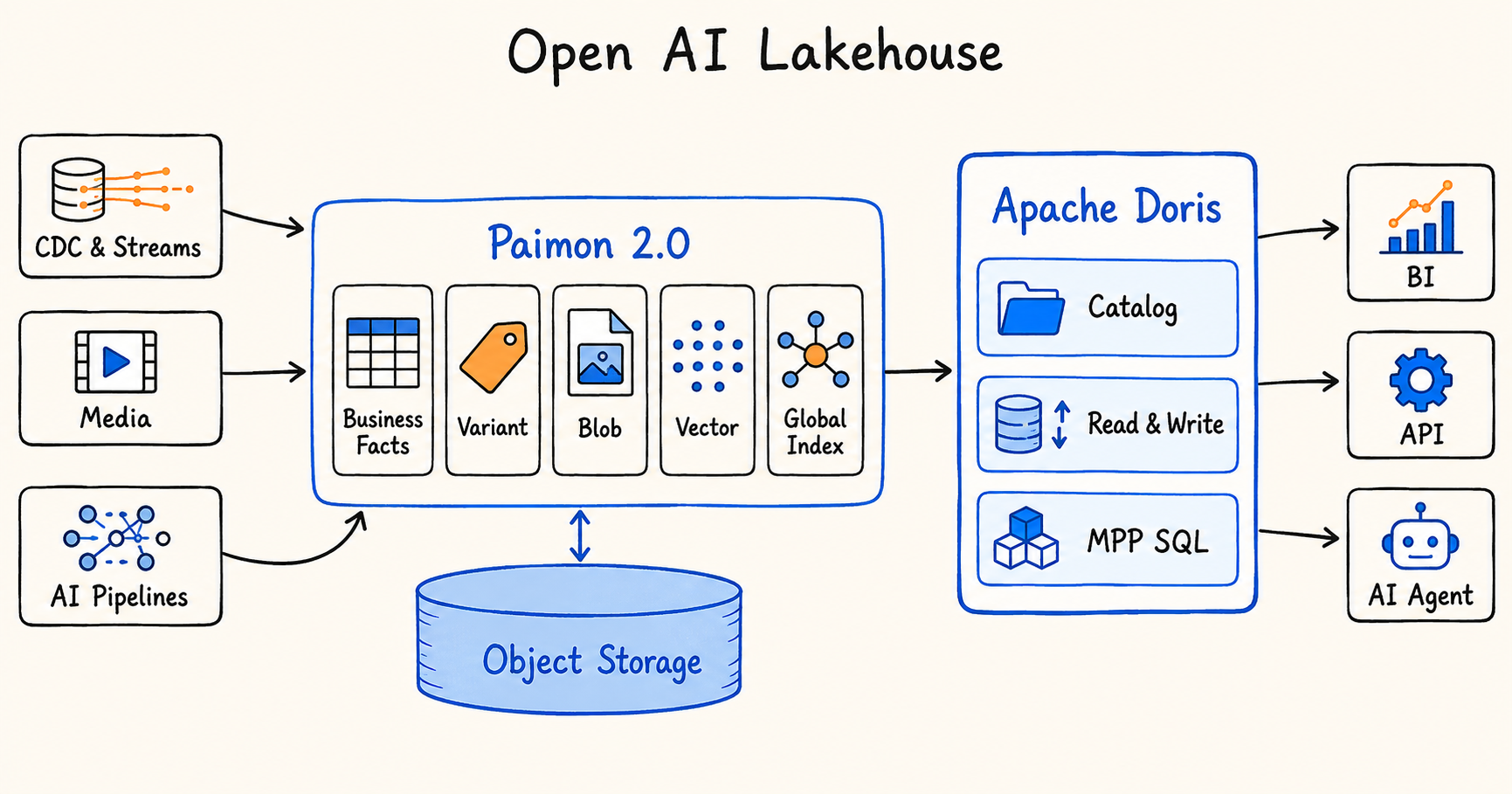
Figure 1. Paimon 2.0 stores business facts, Variant data, BLOBs, vectors, and global indexes on object storage. Apache Doris reads and writes them through the Paimon Catalog and serves BI, APIs, and AI agents with MPP SQL.
What do AI agents need from a data platform?
The model decides what an agent can understand. The data platform decides what the agent knows right now, what it can trust, and what it leaves behind after it acts.
Agentic AI moves enterprise AI from one-off Q&A to a continuous loop: sense, retrieve, analyze, act, and learn from feedback. Traditional BI answers "what happened?" Traditional RAG answers "which documents match this question?" An agent has to go further. It has to check whether the current state allows an action, whether separate pieces of evidence agree, what happened the last time someone took a similar action, and how this action feeds the next round of context.
Take an industrial fault-diagnosis agent that receives a photo of a new defect. Returning a few visually similar defect photos is the easy part. The agent also has to answer harder questions. Did those defects come from the same equipment model and the same process stage? Were the sensor readings abnormal before and after? Is the equipment under maintenance right now? Is the same problem showing up across many lines? Which fix improved yield in later batches?
Requests like this expose four data problems.
Multimodal records keep growing after they land
A business record no longer arrives complete. Orders, equipment state, and user state arrive first. Images, video, and logs follow. Then separate jobs fill in OCR text, captions, embeddings, model scores, and human labels, each on its own schedule. When a model is upgraded, the same record gains a new version of its features.
So the agent needs a data asset that keeps adding columns, content, features, and indexes over time.
Vector search finds candidates; analytics picks the answer
Vector search finds objects that look or read alike. It can't tell you inventory levels, permissions, equipment status, time windows, or business outcomes. Context an agent can act on comes from combining vector or full-text retrieval with structured filters, joins, aggregations, window functions, and business ranking.
Stale indexes hand agents stale facts
When business data and model features live across lake tables, object storage, a vector database, and a search engine, each copy has its own update time, version, and delete state. A discontinued product, a machine under repair, or a retracted document can still come back from an out-of-date index and land in the agent's context.
Agent output has to flow back into the data
Agents produce new classifications, summaries, risk scores, tool-call results, and status changes. Human review adds final labels. If those results stay in the application layer, the next analysis can't use the latest feedback. The data platform has to support both reads and transactional writes.
Put together, an agent needs a complete data path: multimodal data that keeps evolving, indexes that keep up with it, business facts that stay fresh, retrieval results that can be analyzed, and actions that can be written back.
What does Apache Paimon 2.0 add for AI workloads?
Paimon built its reputation as a real-time lake table format. Flink streams database CDC and message queues into Paimon, which maintains tables on object storage with updates, deletes, snapshots, and incremental reads. Paimon 2.0 extends the unit of management from continuously updated structured rows to continuously growing multimodal data. Six features carry that change:
-
BLOB stores images, video, audio, and other large objects in separate files. A query that doesn't select the BLOB column never reads the object.
-
VECTOR<t, n> gives embeddings a fixed-dimension type and a dedicated storage layout.
-
VARIANT holds semi-structured events, model outputs, and tool-call parameters, and can split frequently used fields into typed subcolumns.
-
Data Evolution lets a model add or update only the columns that changed, without rewriting large objects or untouched business fields.
-
Global Row ID ties data files, BLOBs, vectors, indexes, and delete state to one logical record.
-
Global Index brings scalar, full-text, and vector indexes into the table's metadata and snapshot system.
Each modality gets the physical layout that suits it, while the table, the snapshot, and each record keep one consistent meaning. Paimon also tracks which newly written data the indexes already cover, so a query can handle freshness by backfilling the index or by switching query mode.
Paimon 2.0 covers how agent data is stored, updated, evolved, and indexed. Cross-table joins, global Top-K, real-time metrics, permission checks, and high-concurrency serving belong to a query engine. That is the job Doris takes on.
How does Apache Doris integrate with Paimon 2.0?
Doris reads Paimon with full table-format semantics. The integration has three paths: snapshot-consistent reads, vector search driven by Paimon's vector index, and writes to Paimon with standard SQL.
Reading the latest business facts with full Paimon table semantics
Doris discovers Paimon databases and tables through the Paimon Catalog and caches their metadata. Each SQL statement binds to one consistent snapshot and schema. The query planner understands manifests, primary key merges, deletion vectors, incremental ranges, time travel, branches, and tags, so a Paimon primary key table keeps its semantics inside Doris.
An agent can read a consistent business state at a given snapshot, or run incremental queries to keep track of changes in orders, inventory, equipment, and user state.
Running vector search inside the Doris query plan
The Doris frontend (FE) plans the query and sends splits to the backends (BEs). Each BE calls the Paimon Rust reader through a C ABI. The reader searches the vector index shards in parallel and merges the candidates. It then pushes the candidate ranges down to files, row groups, and Parquet pages, and reads vectors, BLOB metadata, or other wide columns only for confirmed hits. Results pass from Rust to C++ through the Arrow C Data Interface and become Doris Blocks.
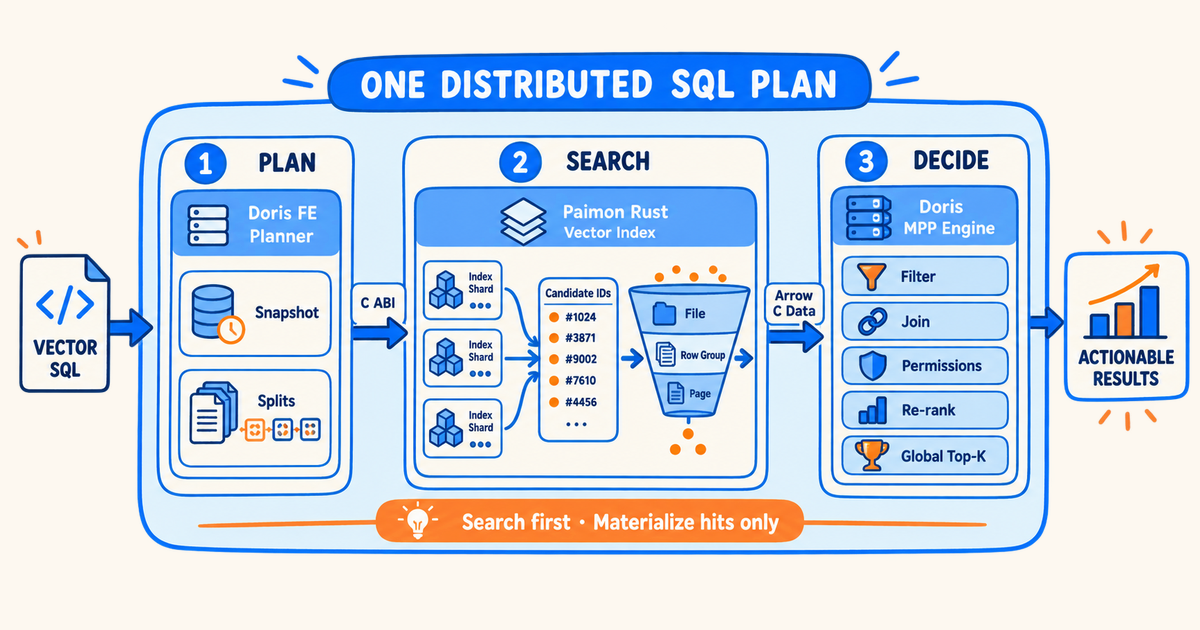
Figure 2. One distributed SQL plan. The Doris FE plans the query, the Paimon Rust reader searches the vector index and prunes candidates, and the Doris MPP engine filters, joins, checks permissions, reranks, and returns global Top-K.
From there the candidates enter the Doris MPP engine for scalar filtering, cross-table joins, aggregation, permission checks, reranking, and global Top-K. Vector search becomes the candidate-generation stage of a distributed SQL plan, inside Doris. The Paimon vector index finds relevant data. Doris decides whether that data is valid, important, and worth acting on in the current business context.
Kwai and the Apache Doris community built and validated this path together. Paimon external tables connect to Doris through the Rust reader, testing has covered tables from millions to billions of rows with Top-K from 100 to 1 million, and candidate pushdown plus on-demand materialization keeps the cost of reading wide vectors down.
Writing back to Paimon with standard SQL
The data path for agents has to include writes. If aggregates, model labels, risk scores, and human-review status from a Doris query still need a separate Spark or Flink job to reach the lake, the system splits its transaction boundary again and adds another pipeline to run.
In Doris 4.2, the Paimon Catalog moves from read-only to read-write:
-
INSERT INTO ... SELECT and INSERT ... VALUES append query results or application data to Paimon.
-
INSERT OVERWRITE replaces data in non-partitioned tables, static partitions, or dynamic partitions.
-
UPDATE, DELETE, and MERGE change business state, model labels, and human feedback in primary key tables.
-
CREATE TABLE and schema evolution add, drop, rename, and retype columns.
-
Variant reads and writes let model results and tool-call parameters with changing structure go straight into open lake tables.
Doris distributes rows across BEs by Paimon's partition and bucket rules and writes files in parallel. The FE collects commit messages from every writer and commits them as one atomically visible Paimon snapshot. On failure or retry, a commit coordinator aborts, cleans up, deduplicates, and recovers idempotently, so no data becomes partially visible or committed twice. What the agent produces lands in the same open data and becomes context for the next query.
How does one agent request run from retrieval to write-back?
A vector query from an agent runs in three stages.
-
Plan the context. The Doris FE parses the vector SQL, binds the Paimon snapshot and schema for this query, and generates parallel splits.
-
Retrieve and read on demand. Each BE calls Paimon Rust through the C ABI. The vector index returns Top-K candidates, and the reader prunes files, row groups, and pages to the candidate ranges, materializing only the columns that hit.
-
Produce the business answer. Arrow data becomes Doris Blocks and flows through the MPP engine for joins, filters, aggregation, reranking, and global Top-K. The result returns to the agent through SQL, an API, or a tool call.
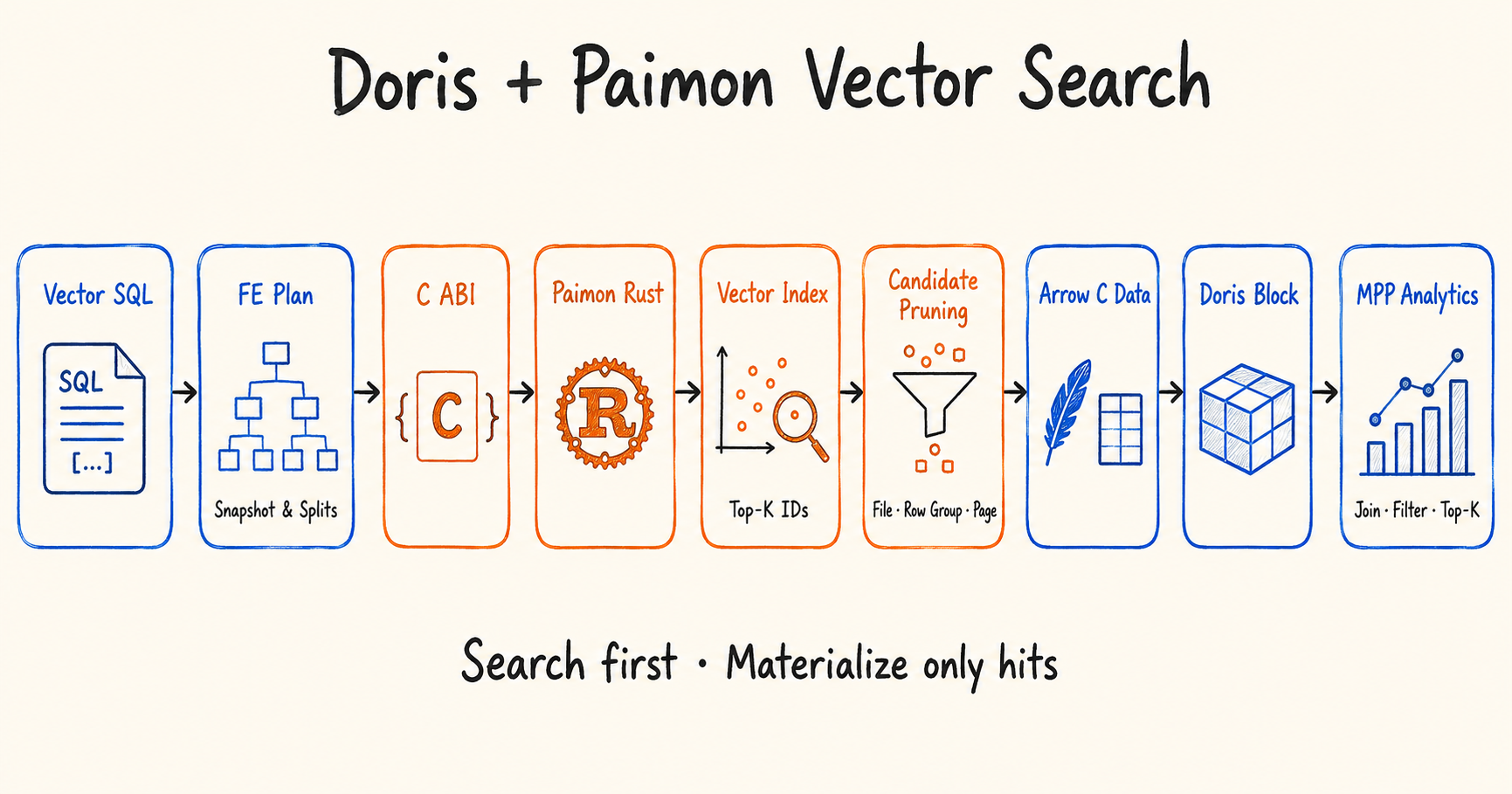
Figure 3. The vector search path from SQL to analytics. Doris searches first and materializes only the rows that hit.
When the agent or a human reviewer produces new labels, status, or outcomes, Doris runs the write path. The Nereids optimizer builds the DML plan, rows route to parallel writers on the BEs, and commit messages return to the FE, which commits them atomically as a new Paimon snapshot. The new results feed the next round of incremental reads, index backfills, and agent analysis.
Next on the roadmap, Doris will consume Paimon Global Index results directly. It will read hit rows by Global Row ID and understand index coverage, the fast, full, and detail freshness modes, and the deletion vectors in the current snapshot. Manifests, index shards, vector pages, and hit data pages will each get their own tier in a local cache.
How did Kwai run vector search on Paimon tables with Doris?
Kwai already ran a real-time lakehouse on Paimon. The team needed large-scale vector search on top of it while keeping business data, vectors, permission fields, and update state consistent.
Copying vectors, filter fields, and return fields into a separate vector database would have meant maintaining a second copy of the business data and a sync pipeline indefinitely. As model versions, business state, and deletes kept changing, that retrieval system would drift and return results that no longer matched the current business state.
Kwai kept vectors and business data together in Paimon primary key tables and connected vector search to Doris external table queries:
-
The Paimon tables store business fields and 2,048-dimensional vectors inline, use an IVF-RQ vector index for candidate retrieval, and read data and indexes through a remote Alluxio cache.
-
Users keep writing Doris SQL. The FE plans and sends splits, and each BE calls the Paimon Rust reader through the C ABI.
-
Paimon Rust runs the vector search in parallel and merges candidates. Candidate ranges push down to files, row groups, and Parquet pages, so the full vector column is never scanned and decoded up front.
-
When a query needs only business IDs, it skips materializing the wide vectors. When it needs vectors, it looks up rows by candidate ID and reads only the hit pages and records.
-
Results convert through the Arrow C Data Interface into Doris Blocks for filtering, joins, aggregation, and Top-K in the MPP engine.
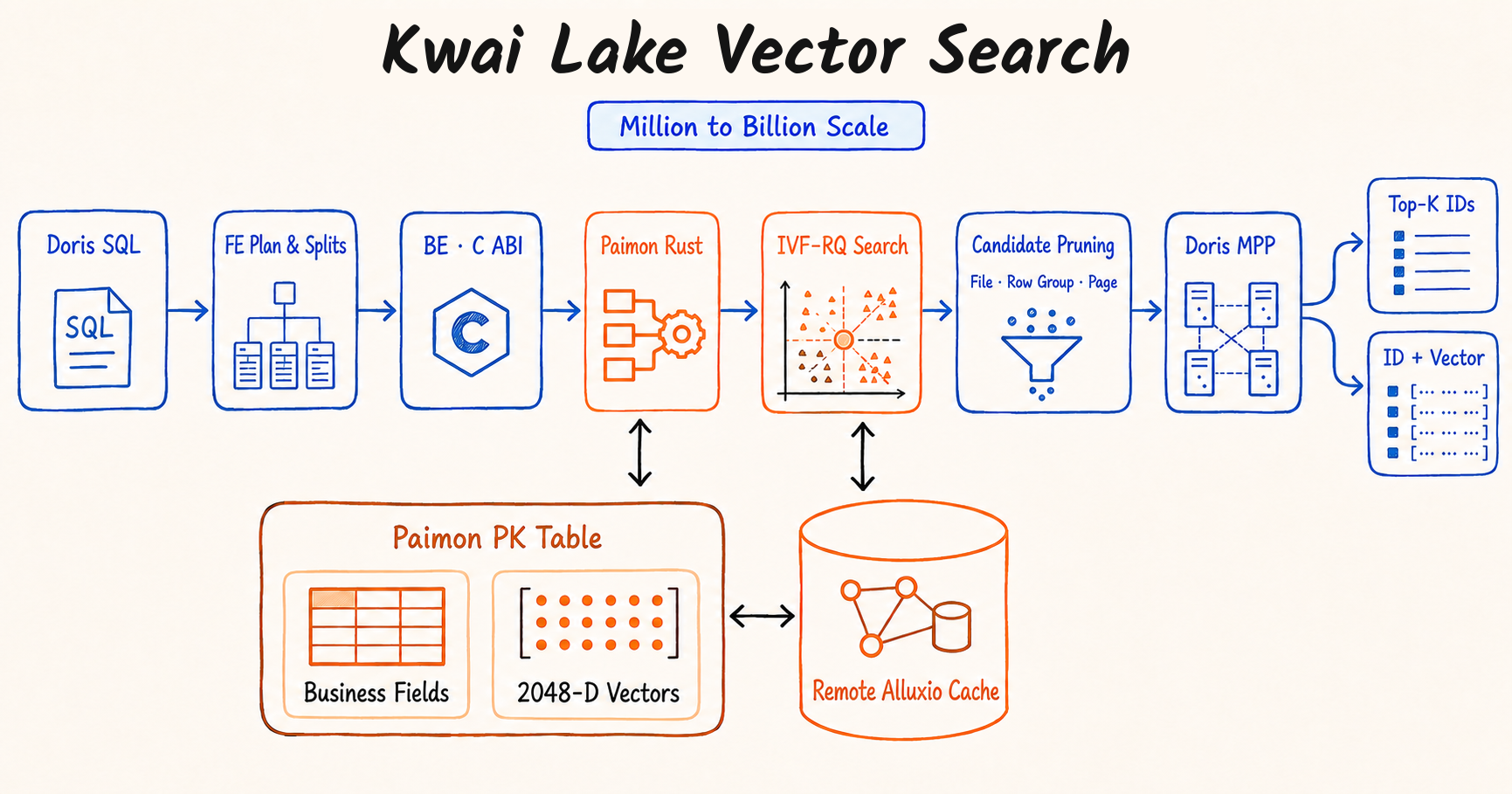
Figure 4. Kwai keeps business fields and 2,048-dimensional vectors in Paimon primary key tables, searches them with an IVF-RQ index through a remote Alluxio cache, and returns Top-K IDs, or IDs with vectors, from Doris.
The published tests used real production vectors:
| Metric | Result |
|---|---|
| Dataset size | 16 million and 128 million vectors |
| Vector dimensions | 2,048 |
| Top-K tested | 100, 10,000, and 1,000,000 |
| Recall, Paimon external table path | 96.0% to 99.6% |
| Query time vs. Doris internal table with local cache | 1.07x to 4.18x |
| Query time vs. Doris internal table at Top-K = 1,000,000 | 1.07x to 1.36x |
Source: Kwai production tests, comparing Paimon external tables behind a remote Alluxio cache with Doris internal tables on local cache. Details in Kwai Vector Search on Paimon with Apache Doris**.
The tests show that even with hundreds of millions of high-dimensional vectors and very large Top-K, teams can keep their open data in Paimon and run vector retrieval and business analysis through Doris SQL, with no need to copy the full dataset into Doris internal tables or a separate vector database.
For agents, retrieval results can join directly to the latest business state in Paimon and pass through Doris permission filters, metric calculations, and relational analysis. The agent gets similar objects plus context that matches current business facts and can be verified and acted on.
How do you get started with Doris and Paimon?
Teams already running Flink and Paimon can keep their pipelines as they are. Step one is creating a Paimon Catalog in Doris:
'type' = 'paimon',
'warehouse' = 's3://example-bucket/warehouse',
's3.endpoint' = 'https://object-storage.example.com',
's3.region' = 'region-id',
's3.access_key' = 'YOUR_ACCESS_KEY',
's3.secret_key' = 'YOUR_SECRET_KEY'
);
Run structured analysis with Doris SQL:
SELECT device_model, defect_type, COUNT(*) AS defect_count
FROM paimon_catalog.quality.inspection_records
WHERE event_time >= NOW() - INTERVAL 30 DAY
GROUP BY device_model, defect_type
ORDER BY defect_count DESC;
On the community-built vector search path, express a Top-K query in Doris SQL:
SELECT id
FROM paimon_catalog.quality.vector_items
ORDER BY l2_distance_approximate(embedding, [...])
LIMIT 100;
Write aggregated results straight back to Paimon:
INSERT INTO paimon_catalog.quality.daily_defect_summary
SELECT DATE(event_time), device_model, defect_type, COUNT(*)
FROM paimon_catalog.quality.inspection_records
GROUP BY DATE(event_time), device_model, defect_type;
For primary key tables whose state changes over time, use MERGE to apply human review or new model results:
MERGE INTO paimon_catalog.quality.inspection_records AS target
USING review_results AS source
ON target.record_id = source.record_id
WHEN MATCHED THEN
UPDATE SET review_status = source.review_status,
defect_type = source.defect_type
WHEN NOT MATCHED THEN
INSERT (record_id, review_status, defect_type)
VALUES (source.record_id, source.review_status, source.defect_type);
When should you keep data in Paimon, and when should you load it into Doris?
Querying Paimon in place trades some latency for one open copy of the data. A few limits are worth knowing before you choose:
-
Doris internal tables are still faster. In Kwai's tests, Paimon external tables took 1.07x to 4.18x as long as Doris internal tables with local cache. The gap was largest at small Top-K. For latency-critical, high-concurrency serving, load the hot data into Doris internal tables.
-
Large Top-K narrows the gap. At Top-K of 1 million, the Paimon path ran within 1.07x to 1.36x of internal tables, which makes it a good fit for batch retrieval and training-data pulls.
-
Native vector index reads are still arriving. The vector search path in this post was built by Kwai with the community. Native consumption of Paimon Global Index results, freshness modes, and tiered local caching are on the Apache Doris 5.0 roadmap.
-
Write support ships with Doris 4.2. INSERT, UPDATE, DELETE, MERGE, and schema evolution on Paimon require Doris 4.2 or later.
FAQ
Can Apache Doris write to Apache Paimon tables?
Yes. Starting with Doris 4.2, the Paimon Catalog supports INSERT INTO ... SELECT, INSERT ... VALUES, INSERT OVERWRITE, UPDATE, DELETE, MERGE, CREATE TABLE, and schema evolution. Doris writes files in parallel across backends and commits them as one atomic Paimon snapshot, with idempotent recovery on failure or retry.
Does Apache Doris support vector search on Paimon tables?
Yes, through a vector search path that Kwai built with the Apache Doris community. Doris calls the Paimon Rust reader, uses Paimon's vector index to generate candidates, and runs filters, joins, and global Top-K in its MPP engine. Native reads of Paimon Global Index results are planned for Apache Doris 5.0.
Do AI agents need a separate vector database if the data is already in Paimon?
Not necessarily. Kwai kept 2,048-dimensional vectors and business fields together in Paimon primary key tables and ran vector retrieval through Doris SQL, reaching 96.0% to 99.6% recall on 16 million and 128 million vectors. Keeping one copy avoids a sync pipeline and the stale results that come from it.
How fast is querying Paimon from Doris compared with Doris internal tables?
In Kwai's tests, Paimon external tables behind a remote Alluxio cache took 1.07x to 4.18x as long as Doris internal tables with local cache. At Top-K of 1 million, the gap narrowed to 1.07x to 1.36x.
What is new in Apache Paimon 2.0 for AI workloads?
Paimon 2.0 adds BLOB columns for large objects, a VECTOR<t, n> type for embeddings, VARIANT for semi-structured data, Data Evolution for column-level updates, a Global Row ID that ties every modality to one record, and a Global Index for scalar, full-text, and vector indexes inside the table's snapshot system.
Let agents work from business facts as they happen
Agentic AI depends on business facts, multimodal content, model features, retrieval indexes, and agent actions that all change constantly. They have to stay consistent and turn into verifiable context on demand.
Paimon 2.0 gives that data an open foundation for storage, updates, evolution, and indexing. Apache Doris connects Paimon snapshot reads, the vector index, MPP OLAP, and standard SQL writes, so an agent can run the full loop: sense the change, retrieve evidence, analyze, act, and write the feedback back.
For Doris users, AI no longer requires a closed copy of the data. Data stays in Paimon, Doris runs retrieval and analysis, and query results and agent feedback go back into open lake tables through Doris.
Iceberg, Paimon, and Lance multimodal lakehouse capabilities have been merged into the Doris 4.2 release branch and are scheduled to ship with Doris 4.2. Upcoming posts in this series cover Iceberg, Paimon, and other open formats in Apache Doris 5.0, with technical design, benchmarks, and production use cases.
To try these capabilities on a managed service, contact VeloDB about the commercial preview.
Related reading