If you’re building semantic search, RAG, or embedding-powered recommendations, you’ll eventually face a practical question: where do your vectors live, and how do you query them fast in production? Pinecone is one of the most popular answers—a fully managed vector database that lets you store and search embeddings through a simple API without running your own infrastructure. But “managed and easy” doesn’t automatically mean “right for everyone.” This guide explains what Pinecone vector database does well, where the trade-offs show up at scale, and how it compares to other vector databases—so you can choose based on your real requirements.
Introduction: Why Pinecone Vector Database Matters in the Vector Search Landscape
The vector database market has exploded alongside the rise of large language models (LLMs) and AI-powered applications. Among the growing list of options, Pinecone vector database stands out as one of the most widely adopted managed solutions—used by companies like Notion, Gong, and Vanguard to power semantic search, retrieval-augmented generation (RAG), and recommendation systems at scale.
Pinecone's appeal is simple: it removes the infrastructure burden entirely. You don't provision servers, manage Kubernetes clusters, or tune index parameters. You get an API key, push vectors, and start querying. For teams building AI applications who would rather spend their engineering time on product features than database operations, that's a compelling value proposition.
But "managed and simple" doesn't mean "right for everyone." Pinecone is a proprietary, closed-source platform with a pay-as-you-go pricing model that scales with your usage—and your bill. Teams running at large scale, those requiring full control over indexing strategies, or organizations with strict open-source policies may find that alternatives like Milvus, Weaviate, or even pgvector are better fits.
This guide covers how Pinecone vector database works, what it does well, where it falls short, and how it compares to other vector databases—so you can make an informed decision based on your actual requirements.
What Is a Vector Database?
Before diving into Pinecone specifically, it's worth understanding what vector databases do and why they've become essential infrastructure for AI applications.
Why Vector Databases Are Needed
Traditional databases are designed for structured data: rows, columns, exact-match lookups. When you run SELECT * FROM products WHERE id = 123, you get a precise result because the query matches a discrete value. But modern AI applications don't work this way. They deal in semantic similarity—finding content that means something similar, not content that matches exactly.
This shift is driven by embedding models. Tools like OpenAI's text-embedding-3, Cohere Embed, and open-source models like BGE and E5 convert text, images, and other unstructured data into high-dimensional vectors—arrays of hundreds or thousands of floating-point numbers that capture semantic meaning. Similar concepts produce numerically close vectors; dissimilar ones are far apart.
The challenge is retrieving the closest vectors efficiently. A brute-force comparison of a query vector against millions of stored vectors is computationally expensive and far too slow for real-time applications. Vector databases solve this by building specialized index structures—like HNSW (Hierarchical Navigable Small World) graphs or IVF (Inverted File) indexes—that enable approximate nearest neighbor (ANN) search in milliseconds rather than seconds.
How Vector Databases Differ from Traditional Databases
The core architectural difference is the query model. Traditional databases optimize for exact matches, range scans, and joins across structured fields. Vector databases optimize for similarity search across high-dimensional space.
A relational database answers "give me the row where email = 'user@example.com'." A vector database answers "give me the 10 items whose embeddings are closest to this query embedding." These are fundamentally different operations that require different storage formats, indexing strategies, and query execution paths.
In practice, most production applications need both. You might query a vector database for semantically similar documents, then join the results with metadata from a relational database to filter by date, category, or user permissions. This is why vector databases like Pinecone support metadata filtering—and why some teams prefer unified platforms that can handle vector and structured queries together without managing separate systems.
What Is Pinecone Vector Database?
Now that we've covered the fundamentals of vector databases, let's look at what makes Pinecone a specific and popular choice in this space—and where its boundaries lie.
Pinecone Vector Database Definition
Pinecone is a fully managed, cloud-native vector database designed to store, index, and query high-dimensional vector embeddings. It provides similarity search as a service: you send vectors in, define a distance metric, and Pinecone handles the indexing, replication, scaling, and query optimization behind the scenes.
Founded in 2019 by Edo Liberty (previously head of Amazon AI Labs), Pinecone launched commercially in 2021—timing that aligned perfectly with the generative AI wave. Today it's one of the most popular vector databases in the market, particularly among teams building RAG pipelines, semantic search engines, and AI-powered recommendation systems.
Pinecone is closed-source and available only as a cloud service. There is no self-hosted option, no downloadable binary, and no way to inspect or modify the underlying code. You interact with Pinecone exclusively through its REST API and SDKs (Python, Node.js, Java, Go).
What Pinecone Vector Database Is Designed to Do
Pinecone is purpose-built for one thing: fast, reliable similarity search over vector embeddings with minimal operational overhead. Specifically, it excels at:
- Storing and indexing high-dimensional vectors (1 to 20,000 dimensions) with associated metadata
- Low-latency similarity search using cosine similarity, Euclidean distance, or dot product
- Metadata filtering that combines vector similarity with attribute-based constraints (e.g., find similar documents but only from the last 30 days)
- Hybrid search that blends dense vector search with sparse keyword matching
- Real-time data ingestion through upsert operations that make new vectors queryable within seconds
- Zero-ops infrastructure where scaling, replication, failover, and backups are fully automated
For teams building standard semantic search or RAG applications at moderate scale—millions to low hundreds of millions of vectors—Pinecone is genuinely fast to get running and reliable in production.
What Pinecone Vector Database Is Not Designed For
Pinecone is a vector search engine, not a general-purpose database. Understanding its boundaries helps you avoid architectural mistakes:
It doesn't replace your relational database. Pinecone has no SQL support, no joins, no aggregation functions, and no transactional semantics. If your application requires combining vector search with complex relational queries, you'll run Pinecone alongside PostgreSQL or a similar database—adding operational complexity.
It offers limited analytical capabilities. You can't run GROUP BY, compute averages, or build dashboards from Pinecone data. It returns ranked results by similarity; any post-processing happens in your application layer.
It doesn't support custom indexing strategies. Unlike Milvus (which offers 11+ index types including HNSW, IVF_FLAT, DiskANN, and SCANN), Pinecone abstracts the indexing layer entirely. You don't choose an index type or tune parameters. This is convenient for most use cases but restrictive if your workload has specific recall-latency trade-off requirements.
It's not designed for on-premises deployment. If your security or compliance policies require self-hosted infrastructure, Pinecone isn't an option. You'll need an open-source alternative.
How Does Pinecone Vector Database Work?
Pinecone's architecture is built around four core pillars: automated vector indexing, managed infrastructure, storage-compute separation, and latency-optimized query execution. Here's how each piece works together.
Vector Indexing and Similarity Search
When you upsert vectors into Pinecone, the system automatically indexes them using proprietary algorithms optimized for high-dimensional nearest neighbor search. Unlike self-hosted databases like Milvus, where you explicitly choose between HNSW, IVF, SCANN, or other index types and tune their parameters, Pinecone handles these decisions internally. You specify the similarity metric during index creation—cosine, Euclidean, or dot product—and Pinecone optimizes the rest.
Under the hood, Pinecone partitions vectors across multiple nodes using sharding. Each shard holds a subset of your data and its own index structure, allowing the system to parallelize search queries across shards. When a query arrives, Pinecone broadcasts it to relevant partitions, retrieves nearest neighbor candidates in parallel, and merges results globally to return the top-k most similar vectors.
For embeddings from popular models like OpenAI's text-embedding-3 (which produces normalized vectors), cosine similarity is the standard choice. For unnormalized embeddings or specialized use cases like maximum inner product search, dot product is more appropriate. The metric choice is specified once at index creation and affects the entire index—you cannot mix metrics within a single index.
Managed Infrastructure and Serverless Architecture
The defining characteristic of Pinecone vector database is that it abstracts away infrastructure entirely. You don't provision compute, configure replicas, or manage node health. You create an index, specify a cloud provider and region (e.g., AWS us-east-1), and Pinecone provisions everything behind the scenes.
Pinecone offers two deployment models:
Serverless indexes scale automatically based on request volume. You pay per read unit, write unit, and storage consumed—no upfront capacity reservation. This model suits variable workloads and teams that can't predict capacity needs. The trade-off is slightly higher latency due to potential cold starts and resource sharing across tenants.
Pod-based indexes reserve dedicated capacity. You choose a pod type (p1, p2, s1), pod size, and replica count, paying a fixed hourly rate for reserved compute. This suits stable, predictable workloads where consistent low latency matters. Adding replicas duplicates your index across pods, improving query throughput.
For most new projects, Pinecone recommends serverless indexes. They're simpler, cheaper for variable workloads, and remove the burden of capacity planning. Pod-based indexes are better suited for production systems with proven, stable traffic patterns.
Storage and Compute Abstraction
Pinecone separates storage from compute—a design pattern borrowed from modern data warehouses. Vector data persists in distributed object storage (similar to S3), while compute nodes handle indexing and query execution. This separation means you can scale query throughput independently of data size.
Metadata is stored alongside vectors and is queryable. When you upsert a vector, you attach a JSON metadata payload—document IDs, categories, timestamps, or any structured attributes. During queries, metadata filters narrow results before or during the nearest neighbor search. For example, you might search for semantically similar support tickets but only from the last 7 days and only in the "billing" category.
Replication is automatic. Pinecone maintains copies of your data across availability zones for durability and high availability. If a node fails, the control plane detects the failure and rebalances shards to healthy nodes—no manual intervention required.
Query Execution and Latency Optimization
Pinecone executes queries in milliseconds by combining index traversal with early termination. The system doesn't examine every vector; it navigates the indexed structure to locate likely candidates, examines a subset, and returns top-k results.
On pod-based indexes, Pinecone publishes latency around 30ms at the 99th percentile on p2 pods under typical load, with throughput around 150 QPS per pod. Serverless indexes have slightly higher baseline latency—50 to 100ms under normal conditions—but scale automatically without capacity planning.
These numbers are competitive for most production use cases. However, they're not the fastest available. Self-hosted Milvus with careful HNSW tuning can achieve sub-10ms latency, and Qdrant has demonstrated higher throughput in certain benchmark scenarios. If ultra-low latency is critical to your application (real-time streaming, sub-10ms sensitivity), it's worth benchmarking alternatives. For most semantic search and RAG workloads, Pinecone's latency is more than adequate.
Key Features of Pinecone Vector Database
 Pinecone's feature set is deliberately focused—it doesn't try to be everything, but what it does, it aims to do with minimal friction. The following features define the day-to-day experience of working with Pinecone.
Fully Managed Vector Database
Ease of Deployment and Operations
Getting started with Pinecone vector database takes minutes, not days. You sign up, create an API key, install the Python SDK, and start upserting vectors. There are no Kubernetes clusters to provision, no Docker containers to configure, and no storage backends to set up.
Compare this to deploying Milvus, which requires Kubernetes expertise, etcd for metadata management, MinIO or S3 for object storage, and multiple Milvus service components. Or compare it to self-hosted Weaviate, which needs Docker or Kubernetes setup even for simple projects. Pinecone eliminates this entire operational layer.
The Python SDK provides a clean interface for the core workflow:
from pinecone import Pinecone, ServerlessSpec

# Initialize client
pc = Pinecone(api_key="your-api-key")

# Create a serverless index
pc.create_index(
    name="my-embeddings",
    dimension=768,
    metric="cosine",
    spec=ServerlessSpec(cloud="aws", region="us-east-1")
)

# Get index reference and upsert vectors
index = pc.Index("my-embeddings")
index.upsert(vectors=[
    {"id": "doc-1", "values": [0.123, 0.456, ...], "metadata": {"category": "tech"}},
    {"id": "doc-2", "values": [0.789, 0.012, ...], "metadata": {"category": "science"}}
])

# Query by similarity
results = index.query(vector=[0.100, 0.200, ...], top_k=5, include_metadata=True)
This simplicity accelerates time-to-market significantly. For teams without dedicated DevOps expertise, it means shipping features instead of managing infrastructure.
Infrastructure Abstraction
Pinecone owns availability, durability, and scaling. You don't receive alerts at 3 AM because a node failed or storage is running low. The Pinecone team manages hardware provisioning, software updates, security patches, and disaster recovery.
This abstraction comes with enterprise compliance certifications: SOC 2 Type II, ISO 27001, GDPR compliance, and HIPAA attestation. For teams in regulated industries—healthcare, finance—these certifications provide assurance without requiring security audits of open-source database code.
The trade-off is reduced visibility. You're trusting Pinecone's defaults for how data is stored, replicated, and encrypted. If you have specific requirements around data residency, encryption key management, or infrastructure auditing, Pinecone's options may be more limited than what you'd get from running your own deployment.
Scalability and Performance
Horizontal Scaling for Large Vector Sets
Pinecone's architecture scales horizontally as your dataset grows. Data is automatically sharded across nodes, and queries parallelize across shards. You go from thousands of vectors to millions to billions without changing application code—Pinecone handles partitioning transparently.
For pod-based indexes, you control scaling by choosing pod count and replica count. For serverless indexes, scaling is entirely automatic and metered. This is a meaningful advantage over self-hosted solutions where you must manually add replicas, rebalance shards, and monitor resource utilization.
Low-Latency Similarity Search
Pinecone targets sub-50ms latency for most queries. Pod-based indexes on p2 pods deliver approximately 30ms at the 99th percentile. Serverless indexes typically hit 50–100ms under normal conditions.
This latency is competitive with other managed vector database options. It's not the fastest possible—Milvus with careful tuning can go lower, and Weaviate Cloud achieves similar ranges—but it's consistent and reliable. The predictability matters: you don't experience the variance that comes with managing your own Kubernetes cluster during traffic spikes.
Real-Time Data Ingestion
Upserts and Streaming Workloads
Pinecone supports real-time data ingestion through upsert operations. New vectors become queryable within seconds of being written, which is essential for applications where data freshness matters—think live customer interactions, breaking news, or streaming event data.
The upsert API handles both inserts and updates atomically. If you upsert a vector with an existing ID, the old vector is replaced. This simplifies data pipeline logic since you don't need separate insert and update paths.
For large-scale bulk loads, Pinecone provides an import API that can ingest data from cloud storage (e.g., S3) more efficiently than individual upsert calls. This is useful during initial data migration or periodic reindexing workflows.
Seamless Integration with AI and Data Stacks
LLM, Embedding Models, and Tooling Ecosystem
Pinecone vector database integrates with the major AI development ecosystem. It has official integrations with LangChain, LlamaIndex, Haystack, and other popular LLM orchestration frameworks—making it straightforward to add vector search to RAG pipelines.
On the embedding side, Pinecone now offers hosted inference through Pinecone Inference, supporting models like Cohere Embed and its own sparse embedding model. This means you can generate embeddings and store them in the same platform, reducing architectural complexity.
Pinecone also integrates with data platforms like Airbyte, Databricks, and Snowflake for data ingestion, and with monitoring tools for observability. The ecosystem support makes it easy to slot Pinecone into existing AI stacks without building custom connectors.
Key Concepts in Pinecone Vector Database
To use Pinecone effectively, you'll need to understand a few core concepts that shape how data is organized, how capacity is provisioned, and how similarity is measured.
Pinecone Index
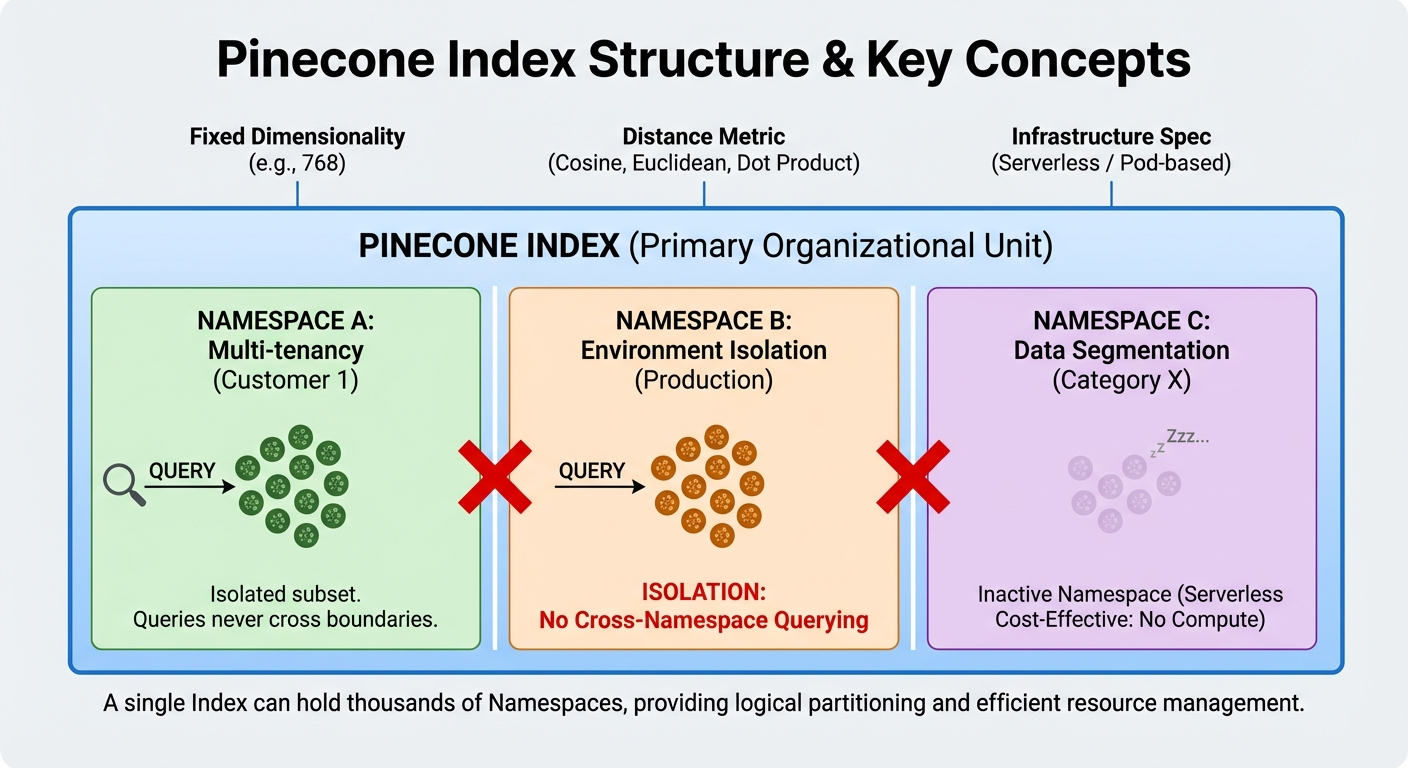
An index is the primary organizational unit in Pinecone. It holds a collection of vectors with the same dimensionality and distance metric. You create an index specifying the vector dimension (e.g., 768 for text-embedding-3-small), the metric (cosine, Euclidean, or dot product), and the infrastructure spec (serverless or pod-based).
Within an index, namespaces provide logical partitioning. Each namespace is an isolated subset of vectors—queries in one namespace never return results from another. This is useful for multi-tenancy (separate namespaces per customer), environment isolation (dev vs. production), or data segmentation (different document categories).
A single index can hold thousands of namespaces. For serverless indexes, inactive namespaces don't consume compute resources, making multi-tenancy cost-effective.
Pods and Capacity Units
For pod-based indexes, capacity is measured in pods. Each pod is a unit of dedicated compute and storage:
- p1 pods: Optimized for low-latency queries on smaller datasets. Lower storage capacity per pod.
- p2 pods: Higher query throughput and performance, suitable for production workloads with demanding latency requirements.
- s1 pods: Storage-optimized for larger datasets where query latency requirements are more relaxed.
Pod sizes (x1, x2, x4, x8) multiply the base pod's storage and compute capacity. Replicas duplicate pods for increased query throughput and availability.
For serverless indexes, the concept of pods doesn't apply. Resources are allocated dynamically based on usage, and billing is based on read units (RUs), write units (WUs), and storage consumed.
Distance Metrics and Similarity Functions
Pinecone supports three distance metrics, each suited to different embedding types:
Cosine similarity measures the angle between two vectors, ignoring magnitude. It's the default choice for most text embeddings because embedding models typically produce normalized vectors. Two documents about "machine learning" will have high cosine similarity regardless of document length.
Dot product measures both direction and magnitude. It's appropriate when vector magnitude carries meaning—for example, when relevance scores are encoded in vector norms.
Euclidean distance measures the straight-line distance between vectors in high-dimensional space. It's less common for text embeddings but relevant for certain scientific or spatial applications.
You specify the metric once during index creation. It cannot be changed after the index is created—switching metrics requires creating a new index and re-ingesting your data.
Common Use Cases of Pinecone Vector Database
Pinecone's managed simplicity and low-latency search make it a natural fit for several AI-driven application patterns. Here are the most common ones we see in production today.
Semantic Search
Semantic search is the most straightforward Pinecone use case. Instead of matching keywords, you embed the user's query and search for vectors with the closest semantic meaning. This powers search experiences where users describe what they want in natural language—"lightweight laptop for travel"—and get relevant results even when product descriptions don't contain those exact words.
Pinecone's metadata filtering enhances semantic search by adding structured constraints. You can search for semantically similar products but filter to a specific price range, brand, or availability status—combining the precision of traditional search with the intelligence of vector similarity.
Retrieval-Augmented Generation (RAG)
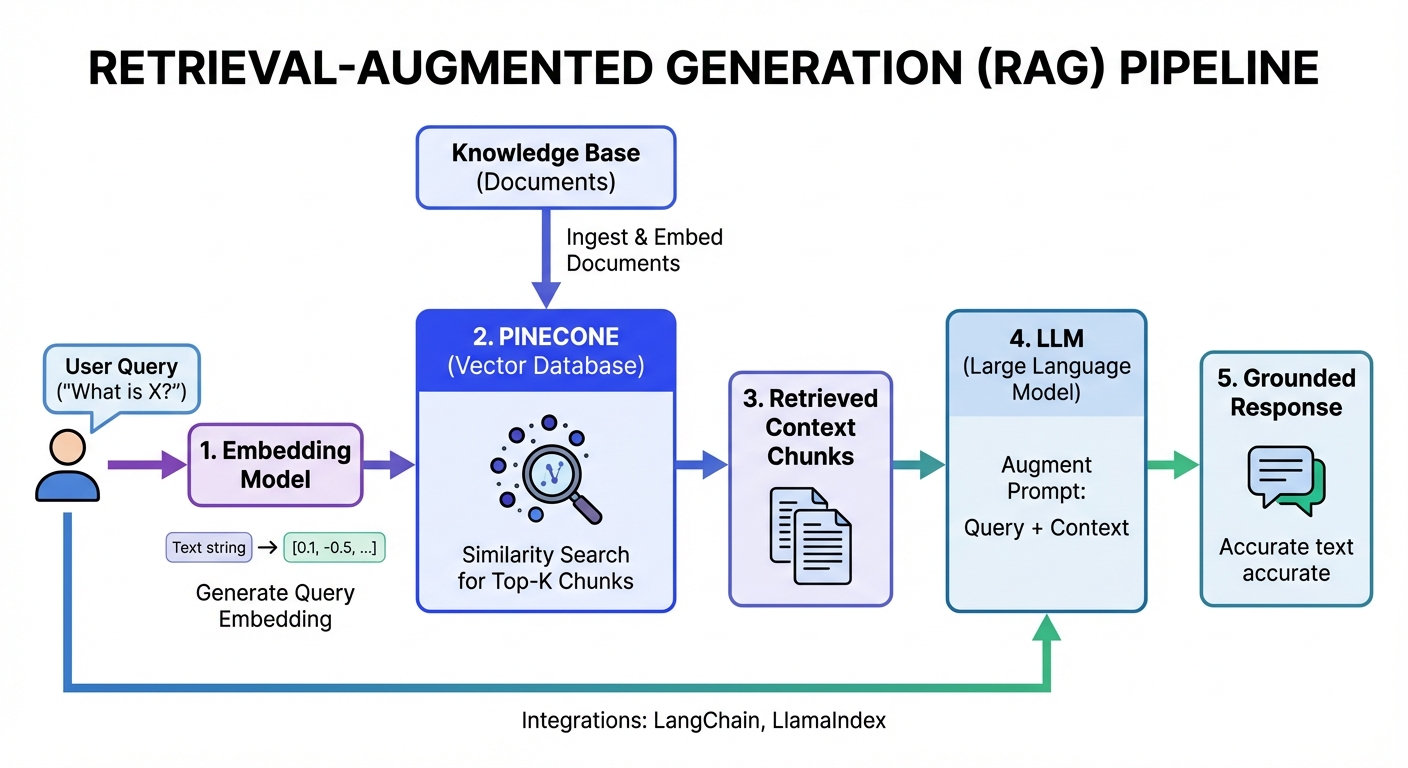 RAG is the dominant use case driving Pinecone adoption today. In a RAG pipeline, you store your knowledge base as vector embeddings in Pinecone, then retrieve relevant context at query time to ground the LLM's response in your actual data. This reduces hallucination and keeps responses current without retraining the model.
A typical RAG flow: embed the user's question, query Pinecone for the most relevant document chunks, pass those chunks as context to the LLM, and generate a grounded response. Pinecone's integration with LangChain and LlamaIndex makes this pattern straightforward to implement.
Recommendation Systems
Recommendations rely on the same similarity principle: find items whose embeddings are close to items the user has engaged with. Pinecone handles this by storing item embeddings and querying with user preference vectors or recently viewed item vectors.
Metadata filtering is particularly valuable here—you can recommend similar products while filtering out items the user has already purchased, items that are out of stock, or items outside a price range.
Multimodal and Image Search
Modern embedding models like CLIP produce vectors from both images and text in the same embedding space. This enables cross-modal search: query with text ("red dress with floral pattern") and retrieve matching images, or query with an image and find visually similar products.
Pinecone stores these multimodal embeddings the same way it stores text embeddings. The dimensionality and metric are set at index creation, and the rest of the workflow is identical.
Getting Started with Pinecone Vector Database
This section walks through the complete workflow—from creating your first index to querying and managing data. All examples use the Python SDK, which is the most common integration path.
Creating and Managing an Index
Setting up a Pinecone vector database index requires a Pinecone account and API key. The free Starter plan provides enough capacity for learning and small projects.
Step 1: Install the SDK and initialize the client.
pip install pinecone
from pinecone import Pinecone, ServerlessSpec

pc = Pinecone(api_key="your-api-key")
Step 2: Create a serverless index.
The key decisions are vector dimension (must match your embedding model), distance metric, and cloud region:
pc.create_index(
    name="product-search",
    dimension=1536,            # Matches OpenAI text-embedding-3-large
    metric="cosine",           # Standard for normalized embeddings
    spec=ServerlessSpec(
        cloud="aws",
        region="us-east-1"
    )
)
Dimension is immutable—if your embedding model changes output dimensions, you'll need a new index. Choose your metric based on your embedding model: cosine for normalized embeddings (most text models), dot product for unnormalized embeddings where magnitude matters.
Step 3: Verify the index.
# List all indexes
print(pc.list_indexes())

# Get index details
index = pc.Index("product-search")
print(index.describe_index_stats())
The describe_index_stats() call returns the total vector count, dimension, and namespace breakdown—useful for verifying that data ingestion is working correctly.
Inserting and Updating Vectors
Pinecone uses a single upsert operation for both inserts and updates. If a vector ID already exists, it's replaced; if it doesn't, it's created.
Basic upsert with metadata:
index.upsert(vectors=[
    {
        "id": "product-001",
        "values": embedding_model.encode("Lightweight 14-inch ultrabook"),
        "metadata": {
            "name": "TravelPro Ultrabook",
            "category": "laptops",
            "price": 999.99,
            "in_stock": True
        }
    },
    {
        "id": "product-002",
        "values": embedding_model.encode("Noise-canceling wireless headphones"),
        "metadata": {
            "name": "QuietMax Pro",
            "category": "audio",
            "price": 349.99,
            "in_stock": True
        }
    }
])
Batch upserts for large datasets:
For production data loads, batch your upserts in groups of 100–200 vectors to balance throughput with API rate limits:
import itertools

def chunks(iterable, batch_size=100):
    it = iter(iterable)
    chunk = list(itertools.islice(it, batch_size))
    while chunk:
        yield chunk
        chunk = list(itertools.islice(it, batch_size))

for batch in chunks(all_vectors, batch_size=100):
    index.upsert(vectors=batch)
Using namespaces:
Namespaces let you partition data within a single index. This is useful for multi-tenancy or data segmentation:
index.upsert(
    vectors=[{"id": "doc-1", "values": [...], "metadata": {...}}],
    namespace="customer-abc"
)
Querying for Similar Vectors
Queries in Pinecone vector database return the top-k most similar vectors to your query vector. You can combine similarity search with metadata filtering for precise results.
Basic similarity query:
results = index.query(
    vector=embedding_model.encode("lightweight laptop for traveling"),
    top_k=5,
    include_metadata=True
)

for match in results.matches:
    print(f"Score: {match.score:.4f} | {match.metadata['name']} - ${match.metadata['price']}")
Query with metadata filtering:
results = index.query(
    vector=query_embedding,
    top_k=10,
    include_metadata=True,
    filter={
        "category": {"$eq": "laptops"},
        "price": {"$lte": 1500},
        "in_stock": {"$eq": True}
    }
)
Metadata filters support operators including $eq, $ne, $gt, $gte, $lt, $lte, $in, and $nin. You can combine them with $and and $or for complex filter logic.
Query within a namespace:
results = index.query(
    vector=query_embedding,
    top_k=5,
    namespace="customer-abc"
)
Managing and Deleting Indexes
Delete specific vectors by ID:
index.delete(ids=["product-001", "product-002"])
Delete all vectors in a namespace:
index.delete(delete_all=True, namespace="old-data")
Delete an entire index:
pc.delete_index("product-search")
Deleting an index is permanent—all data is removed and cannot be recovered. For serverless indexes, Pinecone supports backups (called collections for pod-based indexes) that let you snapshot an index before making destructive changes.
Fetching vectors by ID (useful for debugging):
result = index.fetch(ids=["product-001", "product-002"])
for id, vector in result.vectors.items():
    print(f"ID: {id}, Metadata: {vector.metadata}")
Pinecone Vector Database vs Other Vector Databases
Choosing the right vector database depends on your operational maturity, budget, scale requirements, and flexibility needs. Here's how Pinecone stacks up against the main alternatives.
| Feature / Dimension | Pinecone (Managed Service) | pgvector (PostgreSQL Extension) | Weaviate (Hybrid Platform) | Milvus (Purpose-Built OSS) |
|---|---|---|---|---|
| Deployment & Operation | Fully managed, simple SDK/API (zero ops) | Extension to existing DB (low ops if PostgreSQL exists) | Managed cloud & self-hosted options | Self-hosted (Kubernetes required, high ops) & managed |
| Index Flexibility | Abstracted (no direct control, automatic optimization) | Limited (vector similarity within PostgreSQL) | Built-in vectorization, knowledge graph support | High (11+ index types: HNSW, DiskANN, etc., fine-tuning) |
| Open-Source Status | Proprietary (cloud-only) | Yes | Yes | Yes |
| Performance at Scale (>10M vectors) | Consistent low latency, automatic sharding | Degrades significantly, slower indexing | Good, requires tuning for high scale | High (massive scale, billions of vectors) |
| Cost at Scale | Higher (per-unit pricing model) | Lower (part of existing infrastructure) | Moderate (lower if self-hosted) | Lower (self-hosted, significant savings at scale) |
| Primary Use Case | Rapid deployment, simplicity-first applications | Modest workloads (<10M), existing PostgreSQL users | Flexibility, GraphQL, hybrid search patterns | Massive scale, deep customization, cost control |
Pinecone Vector Database vs pgvector
pgvector is a PostgreSQL extension that adds vector similarity search to an existing PostgreSQL database. The key difference is architectural: pgvector extends a general-purpose database you probably already run, while Pinecone is a dedicated, managed vector service.
When pgvector wins: If you're already running PostgreSQL and your vector workload is modest—under 10 million vectors—pgvector avoids introducing a new system entirely. You can combine vector search with relational queries, joins, and transactions in a single SQL statement. That's something Pinecone simply can't do.
When Pinecone wins: pgvector performance degrades significantly at scale. Beyond 10 million vectors, query latency increases and indexing becomes slower. pgvector also lacks features like automatic sharding, metadata-optimized filtering at scale, and multi-tenancy through namespaces. If your application is vector-search-first and needs to handle hundreds of millions of vectors with consistent latency, Pinecone is the stronger choice.
The practical tradeoff: pgvector is excellent for teams that want vector search without adding operational complexity. Pinecone is better when vector search is a core part of your product and requires dedicated infrastructure. Many teams start with pgvector and graduate to Pinecone or Milvus as their vector workload grows.
Pinecone Vector Database vs Weaviate
Both Pinecone and Weaviate are modern vector databases, but they represent different philosophies. Weaviate is open-source with both self-hosted and managed cloud options. Pinecone is proprietary and cloud-only.
API approach: Weaviate uses GraphQL, which is more expressive but has a steeper learning curve. Pinecone uses RESTful endpoints and SDK methods that are simpler for most developers.
Flexibility: Weaviate supports knowledge graph patterns and complex query structures beyond pure vector search. It also offers built-in vectorization modules that generate embeddings on the fly, eliminating the need for a separate embedding pipeline. Pinecone focuses narrowly on vector search with metadata filtering.
Open-source advantage: Weaviate's source code is available for audit, self-hosting, and modification. You can fork it, deploy it on your own infrastructure, and maintain full control. Pinecone offers no such flexibility—you depend entirely on Pinecone's service availability and roadmap.
Cost considerations: Weaviate's managed cloud starts with a lower base cost. Pinecone's free tier is limited to 2 GB storage with restricted read/write units. At scale, both become significant expenses, but Weaviate's self-hosted option gives you a path to lower costs by running on your own infrastructure.
Choose Pinecone if deployment speed and operational simplicity are your top priorities. Choose Weaviate if you want open-source flexibility, GraphQL querying, or the option to self-host.
Pinecone Vector Database vs Milvus
Milvus is a powerful open-source vector database with deep customization capabilities—and the most direct alternative to Pinecone for teams that need production-grade vector search.
Index flexibility: This is the biggest differentiator. Milvus supports 11+ index types including HNSW, IVF_FLAT, IVF_PQ, SCANN, and DiskANN. Each has different trade-offs in speed, memory usage, and recall accuracy. Pinecone abstracts indexing entirely—you get what Pinecone decides is optimal. If your workload benefits from a specific index strategy (e.g., DiskANN for datasets that don't fit in memory), Milvus gives you control that Pinecone doesn't.
Operational burden: Milvus requires Kubernetes, etcd for metadata coordination, MinIO or S3 for object storage, and monitoring infrastructure. You own availability, disaster recovery, and upgrades. Pinecone removes this burden entirely. For teams without dedicated infrastructure engineers, this difference is significant.
Cost at scale: Milvus is open-source and free to run on your infrastructure. At large scale—hundreds of millions to billions of vectors with high query volumes—self-hosted Milvus on cloud infrastructure often costs 50–80% less than Pinecone. The savings come from avoiding Pinecone's per-unit pricing, which compounds as usage grows.
Performance tuning: Milvus lets you adjust index parameters, search parameters (like nprobe and ef), and resource allocation. This fine-grained control means you can optimize for your specific recall-latency requirements. Pinecone's abstraction means you accept its defaults.
Choose Pinecone if managed simplicity and rapid deployment matter most. Choose Milvus if you need index type flexibility, operate at massive scale, or require open-source code transparency.
Managed vs Self-Hosted Vector Databases
The managed vs. self-hosted decision is the fundamental choice behind all the comparisons above.
Managed databases (Pinecone, Weaviate Cloud, Zilliz Cloud) trade control for speed. You get faster deployment, automatic scaling, built-in compliance certifications, and zero infrastructure maintenance. The costs are vendor lock-in, higher per-unit pricing at scale, and limited customization.
Self-hosted databases (Milvus, Qdrant, open-source Weaviate) trade convenience for control. You get full configuration flexibility, lower per-unit costs at scale, code transparency, and deployment independence. The costs are operational complexity, the need for DevOps expertise, and responsibility for availability and disaster recovery.
For startups and teams with limited infrastructure expertise, managed solutions are often the right starting point. For enterprises with dedicated platform teams and predictable, large-scale workloads, self-hosted solutions typically deliver better long-term economics. Many organizations use both—Pinecone for rapid prototyping and smaller workloads, self-hosted databases for production at scale.
Limitations and Trade-offs of Pinecone Vector Database
No database is without trade-offs. Pinecone's managed simplicity comes at specific costs—financial, architectural, and operational. Understanding these limitations upfront prevents surprises down the road.
Cost Structure and Pricing Considerations
Pinecone offers four plans: Starter (free), Standard ($50/month minimum), Enterprise ($500/month minimum), and Dedicated (custom pricing). The Starter plan is useful for learning—it provides up to 2 GB storage, 2 million write units, and 1 million read units per month—but it's limited to a single region (AWS us-east-1) and unsuitable for production.
On the Standard plan, beyond the included $15/month in usage credits, you pay per read unit, write unit, and GB of storage. A production workload with tens of millions of vectors and thousands of daily queries can easily exceed $500/month. At hundreds of millions of vectors with high query volumes, monthly costs can reach several thousand dollars.
Compare this to self-hosted Milvus, which is free—your only costs are the cloud infrastructure you run it on. For the same scale, cloud compute and storage might cost $500–800/month versus $2,000+ on Pinecone. The managed convenience has real value, but cost-conscious teams should model total cost of ownership carefully before committing.
Pinecone's pricing is transparent and predictable, which is an advantage for budgeting. But the per-unit model means costs scale linearly with usage—there are no natural cost optimizations as you grow, unlike self-hosted solutions where amortized infrastructure costs decrease per unit at scale.
Vendor Lock-in and Flexibility
Pinecone is proprietary and cloud-only. There's no self-hosted fallback, no source code to review, and no standard API that other databases also implement. If Pinecone changes pricing, deprecates features, or experiences an extended outage, your options are limited to waiting or migrating.
Migration from Pinecone to another vector database means exporting your vectors (which Pinecone supports), choosing a new platform, reindexing, and rewriting all API integration code. The vector data itself is portable—it's just arrays of floats—but the query syntax, metadata filtering format, and SDK interfaces are all Pinecone-specific.
For organizations with vendor diversification policies or those building mission-critical infrastructure, this lock-in is a meaningful business risk. Open-source alternatives mitigate this by giving you deployment independence and code auditability.
Query and Data Model Constraints
Pinecone's query model is focused: vector similarity search with metadata filtering. It doesn't support complex boolean logic across metadata fields as naturally as a full query language. You can use $and and $or operators, but expressing complex cross-field relationships or nested conditions is less intuitive than SQL or GraphQL.
The data model is flat—vectors with JSON metadata. There's no concept of relationships between vectors, no graph traversal, and no referential integrity. If your use case requires understanding connections between entities (e.g., knowledge graphs), Weaviate's graph-based approach or a hybrid SQL+vector architecture may be more appropriate.
Pinecone supports vectors up to 20,000 dimensions, which covers all common embedding models. However, there's a metadata size limit per vector (currently 40 KB), which constrains how much structured data you can attach to each vector.
Operational Trade-offs at Scale
At extreme scale—billions of vectors with millions of daily queries—Pinecone's fully managed model becomes less advantageous. The per-unit pricing makes it expensive, and you lose the ability to optimize infrastructure costs by tuning hardware specifications, index parameters, or replica strategies.
Organizations running Milvus or Qdrant at scale benefit from fine-grained control: choosing optimal instance types, tuning memory allocation between indexing and caching, selecting index types that match their recall requirements, and scaling read and write capacity independently. Pinecone doesn't offer this level of control.
Additionally, Pinecone serverless indexes have cold-start behavior for infrequently accessed namespaces. If your application has a long-tail access pattern—many namespaces that are queried infrequently—the first query to a cold namespace will have higher latency. This isn't an issue for most applications but can be noticeable for multi-tenant systems with thousands of tenants and sporadic access.
When Pinecone Vector Database Is the Right Choice — And When It's Not
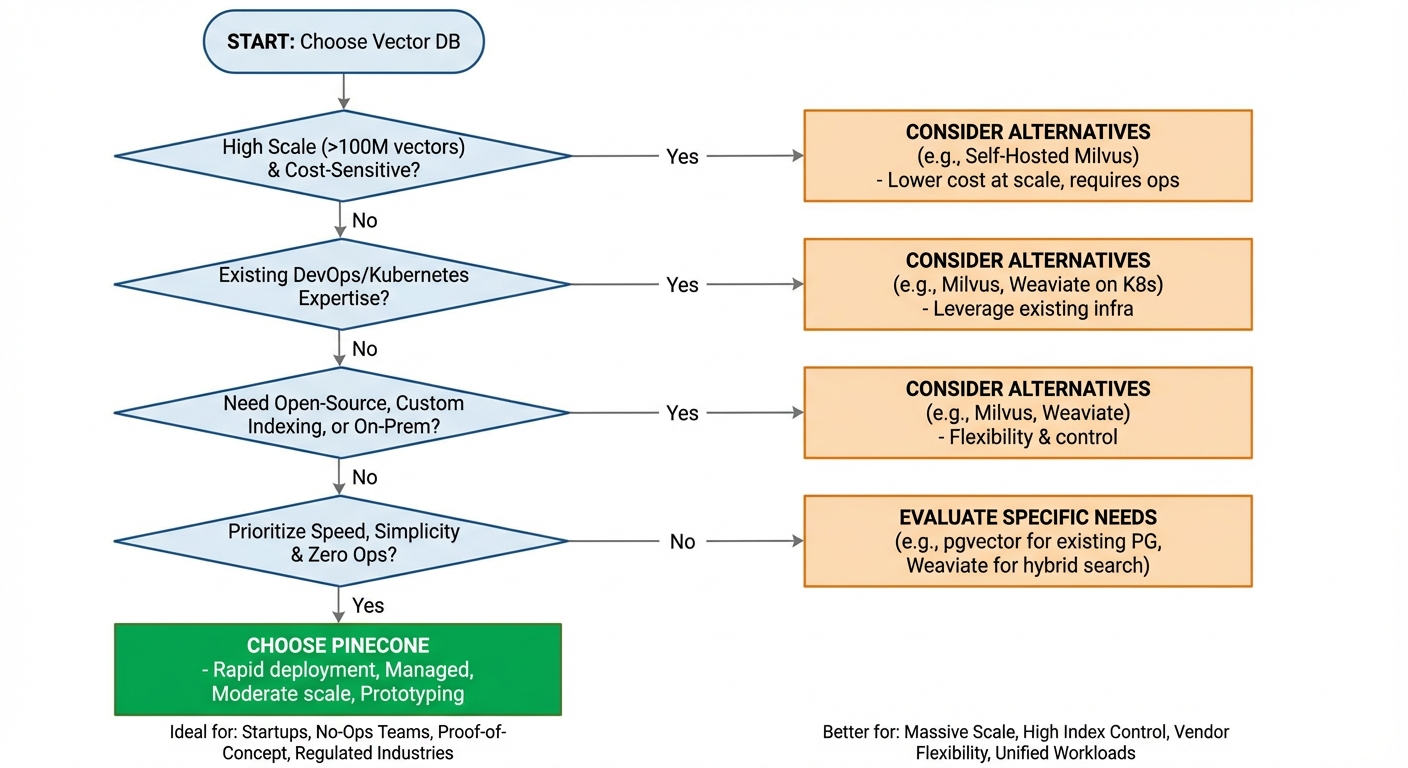 Given the features and limitations above, the decision comes down to matching Pinecone's strengths with your team's situation. Here's a practical breakdown.
Teams That Benefit Most from Pinecone Vector Database
Early-stage startups building AI-powered products should seriously consider Pinecone. You avoid infrastructure distractions, launch faster, and pay only for what you use. When you're trying to validate a product idea, time-to-market matters more than per-unit cost optimization.
Teams without DevOps expertise benefit enormously from managed infrastructure. If your engineering team consists of product developers and ML engineers without database operations experience, Pinecone eliminates a significant skill gap.
Rapid prototyping and proof-of-concept projects are ideal Pinecone use cases. You can spin up an index, load embeddings, and validate your semantic search concept in hours rather than days.
Regulated industries needing compliance certifications (SOC 2, ISO 27001, HIPAA) can leverage Pinecone's existing certifications instead of running compliance audits on self-hosted open-source infrastructure.
Moderate-scale applications—millions to low hundreds of millions of vectors with thousands of daily queries—sit squarely in Pinecone's sweet spot. You get managed convenience without the cost of hyperscale workloads becoming prohibitive.
Scenarios Where Alternatives May Be a Better Fit
Cost-sensitive projects at scale. If you're building search over hundreds of millions of vectors with high query volumes, self-hosted Milvus on cloud infrastructure is significantly cheaper. The operational investment pays for itself in reduced monthly costs.
Teams requiring vendor flexibility. If your compliance or architecture policies require open-source code, self-hosted deployment options, or the ability to switch providers without rewriting integration code, Pinecone's proprietary model doesn't fit.
Applications needing custom indexing. If you need to experiment with different index types—DiskANN for disk-based indexes, IVF_PQ for memory-constrained environments, or SCANN for specific recall targets—Milvus provides control that Pinecone doesn't.
Unified search and analytics workloads. If your application requires combining vector search with full-text search, SQL analytics, and structured data queries in a single system, a unified platform eliminates the need to manage separate databases for different query types. Maintaining Pinecone alongside a relational database and potentially a search engine adds operational complexity that a unified approach avoids.
Enterprises with existing Kubernetes infrastructure. If your organization already runs Kubernetes with mature DevOps practices, deploying Milvus or Weaviate leverages existing expertise rather than introducing a new managed service.
Frequently Asked Questions About Pinecone Vector Database
Is Pinecone Vector Database Free?
Pinecone offers a free Starter plan with 2 GB storage, 2 million monthly write units, and 1 million monthly read units. This is suitable for learning, experimentation, and small projects. The Starter plan is restricted to a single region (AWS us-east-1), allows up to 5 indexes, and pauses indexes after 3 weeks of inactivity.
For production use, you'll need the Standard plan ($50/month minimum) or Enterprise plan ($500/month minimum). Both use pay-as-you-go pricing beyond included credits. Compared to Milvus (fully open-source, no licensing costs) or Weaviate's self-hosted option, Pinecone's free tier is more limited and the path to production carries ongoing costs.
Is Pinecone Vector Database Open Source?
No. Pinecone is proprietary and closed-source. There's no community edition, no source code repository, and no self-hosted option. You can only use Pinecone through its managed cloud service.
If open-source is a requirement—whether for code auditability, self-hosted deployment, or avoiding vendor lock-in—consider Milvus, Qdrant, Weaviate, or Chroma. These databases offer full source code availability and can be deployed on your own infrastructure.
What Is Pinecone Vector Database in LLM Applications?
In LLM applications, Pinecone vector database serves as the external knowledge store that grounds model responses in your actual data. The most common pattern is retrieval-augmented generation (RAG): you embed your documents and store them in Pinecone, then at query time, retrieve the most relevant chunks to provide as context to the LLM.
This architecture solves two key problems. First, it keeps LLM responses current without retraining—you update documents in Pinecone and the model's responses reflect the changes. Second, it reduces hallucination by giving the model factual context to reference rather than relying solely on its parametric knowledge.
Pinecone's integrations with LangChain, LlamaIndex, and similar frameworks make it particularly accessible for RAG implementations. The Pinecone Assistant product takes this further by providing a managed RAG experience where Pinecone handles chunking, embedding, retrieval, and LLM orchestration.
How Does Pinecone Vector Database Handle Large-Scale Vector Data?
Pinecone handles scale through automatic sharding, distributed query execution, and separated storage-compute architecture. As you add vectors, data is partitioned across nodes. Queries execute in parallel across partitions, and results are merged before being returned.
For serverless indexes, scaling is fully automatic—resources adjust based on demand. For pod-based indexes, you control scale by selecting pod types, sizes, and replica counts. Pinecone claims support for billions of vectors, and companies like Notion use it at that scale for production workloads.
The practical constraint isn't technical capability—it's cost. At billions of vectors, Pinecone's per-unit pricing becomes substantial. Teams operating at this scale should carefully evaluate whether the managed convenience justifies the premium over self-hosted alternatives where infrastructure costs can be optimized more aggressively.
Conclusion
Pinecone vector database is a strong choice for teams that prioritize rapid deployment, operational simplicity, and managed reliability. If you're building an AI application—particularly a RAG pipeline or semantic search experience—and you want to focus on product features rather than database infrastructure, Pinecone gets you to production quickly.
The trade-offs are real and worth considering honestly. Vendor lock-in, higher cost at scale, limited customization, and a closed-source codebase mean Pinecone isn't the right fit for every team. Cost-sensitive projects, large-scale deployments, and organizations requiring deployment flexibility should evaluate open-source alternatives like Milvus, Weaviate, or Qdrant.
The right choice depends on where your team is today and where you're headed. For many teams, starting with Pinecone and migrating if needed is a pragmatic approach—you ship faster now and optimize later. For others, investing in self-hosted infrastructure from the start delivers better long-term economics and flexibility.
It's also worth noting that the landscape is shifting: analytical databases like VeloDB now support vector indexing natively, letting teams run similarity search and SQL analytics in a single system without managing a separate vector database at all. Evaluate all paths based on your actual requirements, not on marketing promises.