If you're building an AI application and already running PostgreSQL, pgvector is probably the first thing you'll consider for storing embeddings. And for good reason, it lets you add vector search without spinning up another database.
pgvector is an open-source PostgreSQL extension that stores vector embeddings and finds similar vectors using distance calculations. You write SQL, your vectors live next to your regular data, and you don't need to learn a new query language or manage separate infrastructure.
That simplicity is pgvector's biggest strength. It's also what limits it when your needs grow.
How pgvector Works in PostgreSQL
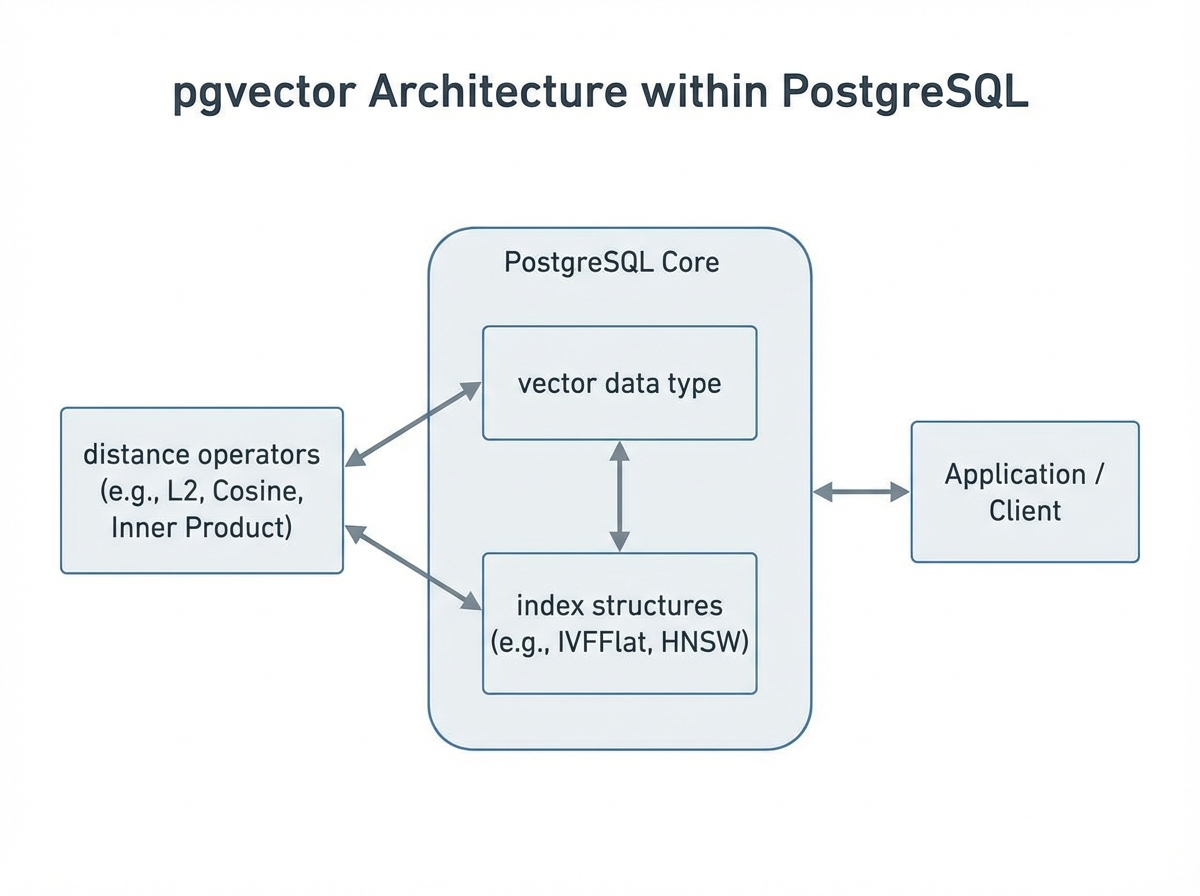 pgvector integrates vector operations directly into PostgreSQL by introducing a new
 vector data type and specialized operators for similarity calculations. This design lets you combine vector search with traditional SQL queries in a single database system.
Storing Vector Embeddings in Postgres
pgvector adds a vector data type that stores fixed-dimensional arrays of floating-point numbers. You define the dimensionality when creating a column:
CREATE TABLE documents (
    id SERIAL PRIMARY KEY,
    content TEXT,
    embedding vector(768)  -- 768-dimensional vector
);
Vectors are inserted as bracket-enclosed arrays and stored alongside your regular relational data:
INSERT INTO documents (content, embedding)
VALUES ('Sample text', '[0.1, 0.2, 0.3, ...]');
This unified storage model eliminates the need to synchronize data between separate systems—your embeddings live in the same database as your application data.
Similarity Search and Distance Functions
pgvector introduces operators that calculate distances between vectors, enabling "nearest neighbor" queries that find semantically similar items:
| Operator | Distance Metric | Use Case |
|---|---|---|
<-> | Euclidean (L2) | General similarity when magnitude matters |
<=> | Cosine | Text embeddings where direction matters more than magnitude |
<#> | Inner Product | Maximum inner product search (requires normalized vectors) |
A basic similarity search looks like standard SQL:
SELECT content, embedding <=> '[0.1, 0.2, ...]' AS distance
FROM documents
ORDER BY distance
LIMIT 10;
The query converts the input into a vector, calculates distances against all stored embeddings, and returns the closest matches.
Indexing Options in pgvector (IVFFlat, HNSW)
Without an index, pgvector performs exact nearest neighbor search by scanning every row—accurate but slow at scale. Two index types enable faster approximate searches:
IVFFlat (Inverted File Flat)
Divides the vector space into clusters (lists) and searches only the most relevant clusters. Good for moderate-scale datasets where you need a balance between speed and accuracy.
CREATE INDEX ON documents
USING ivfflat (embedding vector_cosine_ops)
WITH (lists = 100);
The lists parameter controls the number of clusters. More lists mean faster searches but require more memory and longer index build times.
HNSW (Hierarchical Navigable Small World)
Creates a multi-layer graph structure for extremely fast approximate searches. Generally provides better recall than IVFFlat at equivalent query speeds, but consumes more memory.
CREATE INDEX ON documents
USING hnsw (embedding vector_l2_ops)
WITH (m = 16, ef_construction = 64);
Parameters m (connections per node) and ef_construction (search depth during index building) let you tune the speed-accuracy trade-off.
Query Patterns and Performance Characteristics
pgvector queries integrate naturally with SQL, enabling powerful hybrid searches:
SELECT d.content, d.embedding <=> query_embedding AS similarity
FROM documents d
JOIN categories c ON d.category_id = c.id
WHERE c.name = 'technology'
  AND d.created_at > '2024-01-01'
ORDER BY similarity
LIMIT 20;
This combines vector similarity with relational filters and joins—something that requires complex orchestration with standalone vector databases.
Performance scales with dataset size, vector dimensions, and index configuration. For datasets under 1 million vectors with proper indexing, pgvector typically delivers sub-second query latency.
Why Developers Use pgvector
pgvector has gained significant adoption for several practical reasons:
Unified Infrastructure No need to deploy, manage, or pay for a separate vector database. Your vectors live alongside application data in the same PostgreSQL instance you already operate.
Familiar SQL Interface Teams with PostgreSQL experience can start immediately. Vector operations use standard SQL syntax, reducing the learning curve compared to proprietary vector database APIs.
Hybrid Queries Combine semantic similarity with relational filters, joins, and aggregations in a single query. This integration is difficult to achieve when vectors and structured data live in separate systems.
Transactional Consistency Vector updates participate in PostgreSQL's ACID transactions. When you update a document and its embedding together, both changes commit atomically.
Ecosystem Compatibility Works with existing PostgreSQL tooling—backup systems, monitoring, ORMs, and migration frameworks. Integrates with LangChain, LlamaIndex, and other AI application frameworks through established PostgreSQL connectors.
Cost Efficiency For many workloads, pgvector eliminates the need for dedicated vector database licensing or SaaS fees. The extension is open-source under the PostgreSQL license.
Limitations of pgvector
While pgvector provides accessible vector search, understanding its constraints is essential for making informed architecture decisions. These limitations are often underemphasized in introductory content but matter significantly in production scenarios.
Scalability Ceiling
pgvector inherits PostgreSQL's single-node architecture. This creates practical limits:
- Dataset Size: Performance degrades noticeably beyond 10-20 million vectors, depending on dimensionality and hardware. Dedicated vector databases like Milvus or Qdrant handle billions of vectors through distributed architectures.
- Query Throughput: High-concurrency workloads (thousands of QPS) strain PostgreSQL's connection and query processing model. Purpose-built vector databases optimize specifically for parallel similarity search.
- Horizontal Scaling: PostgreSQL's scaling options (read replicas, Citus extension) weren't designed for vector workloads. Adding capacity requires careful planning rather than elastic scaling.
Index Build Times and Memory Pressure
Building HNSW indexes on large datasets can take hours and consume substantial memory—potentially multiple times the dataset size. During index construction, the database may become unresponsive to other queries.
IVFFlat indexes require pre-clustering, which means you should have representative data before building the index. Adding data after index creation doesn't automatically update the cluster structure.
Approximate Search Trade-offs
Both index types perform approximate nearest neighbor (ANN) search, not exact search. This means:
- Some relevant results may be missed (recall < 100%)
- Tuning parameters significantly impact recall-vs-speed trade-offs
- Different queries may have inconsistent recall rates
For applications requiring guaranteed exact results, you must perform full table scans, which don't scale.
Limited Vector Operations
pgvector focuses on similarity search. It lacks advanced features found in dedicated vector databases:
- No built-in support for hybrid sparse-dense vector search
- Limited filtering optimization (filters applied after vector search can be slow)
- No native support for vector clustering or partitioning strategies
- Missing features like dynamic index updates, vector versioning, or multi-tenancy primitives
Embedding Model Dependency
Search quality depends entirely on your upstream embedding model. pgvector stores and retrieves vectors—it doesn't understand or improve the semantic quality of your embeddings. Poor embeddings produce poor results regardless of database performance.
Operational Complexity at Scale
Managing pgvector in production requires PostgreSQL expertise:
- Vacuum operations become more complex with large vector tables
- Index maintenance requires downtime or careful online rebuilding
- Monitoring vector-specific performance requires custom instrumentation
- Backup and restore times increase significantly with vector data
When Should You Choose pgvector?
pgvector fits specific scenarios well. Consider it when:
You already run PostgreSQL: The extension adds vector capabilities without new infrastructure, operational complexity, or vendor relationships.
Vector search is a feature, not the core product: If similarity search supplements your application rather than defining it, pgvector's simplicity outweighs its limitations.
Dataset size is moderate: For collections under 5-10 million vectors, pgvector performs adequately with proper indexing.
Hybrid queries are essential: When you need to combine vector similarity with complex SQL predicates, joins, or aggregations, pgvector's integration is unmatched.
Budget constraints exist: Open-source and running on existing infrastructure, pgvector has near-zero additional cost.
You need transactional guarantees: ACID compliance for vector operations matters in certain applications.
pgvector vs Dedicated Vector Databases
The choice between pgvector and purpose-built vector databases depends on workload characteristics, scale requirements, and operational preferences.
pgvector vs Pinecone
| Aspect | pgvector | Pinecone |
|---|---|---|
| Deployment | Self-hosted (extension) | Fully managed SaaS |
| Scalability | Single-node PostgreSQL limits | Designed for billion-scale vectors |
| Operations | You manage PostgreSQL | Zero infrastructure management |
| Cost Model | PostgreSQL hosting costs | Pay-per-query/storage pricing |
| Integration | Unified with relational data | Separate system, requires sync |
| Latency | Varies with load/indexing | Optimized for consistent low latency |
In short, the choice largely depends on your operational model and scale requirements.
- Choose pgvector when you want unified data management, have moderate scale, and prefer self-hosted infrastructure.
- Choose pinecone vector database when you need managed operations, extreme scale, or guaranteed performance SLAs.
pgvector vs Weaviate
| Aspect | pgvector | Weaviate |
|---|---|---|
| Data Model | Vectors only (with SQL metadata) | Objects with vectors and properties |
| Query Language | SQL | GraphQL + custom filters |
| Built-in ML | None | Integrated vectorization modules |
| Hybrid Search | Via SQL joins/filters | Native dense + sparse search |
| Deployment | PostgreSQL extension | Standalone or cloud |
The decision comes down to how much ML integration you need and your preferred query interface.
- Choose pgvector when SQL integration matters and you generate embeddings externally.
- Choose Weaviate when you want integrated ML pipelines, GraphQL interfaces, or native hybrid search.
pgvector vs Milvus
| Aspect | pgvector | Milvus |
|---|---|---|
| Architecture | Single-node extension | Distributed, cloud-native |
| Scale | Millions of vectors | Billions of vectors |
| Index Types | IVFFlat, HNSW | GPU indexes, DiskANN, multiple ANN algorithms |
| Performance | Good for moderate workloads | Optimized for high-throughput similarity search |
| Consistency | ACID transactions | Eventual consistency (tunable) |
| Ecosystem | PostgreSQL tooling | Purpose-built management tools |
The trade-off is essentially simplicity versus scale.
- Choose pgvector for PostgreSQL-centric architectures with moderate vector workloads.
- Choose Milvus for large-scale vector search as a primary workload, especially when you need distributed architecture, GPU acceleration, or advanced indexing algorithms.
pgvector in AI and Search Applications
pgvector powers several common AI application patterns:
Retrieval-Augmented Generation (RAG)
Store document chunk embeddings in pgvector and retrieve relevant context for LLM prompts. The SQL integration lets you filter by document metadata (date, source, permissions) during retrieval.
Semantic Search
Replace keyword matching with meaning-based search. Product catalogs, documentation sites, and knowledge bases use pgvector to surface relevant results even when query terms don't match content exactly.
Recommendation Systems
Store item embeddings and find similar products, content, or users. Combine with user behavior data in the same database for personalized recommendations.
Image and Multimodal Search
Store CLIP or similar model embeddings to enable image-to-image or text-to-image search within PostgreSQL.
Common Performance and Operational Considerations
Index Selection Strategy
- Use HNSW for most production workloads—it offers better recall at equivalent speeds
- Use IVFFlat when memory is constrained or you need faster index builds
- Start without indexes for small datasets (<100K vectors) and add as needed
Tuning Recommendations
- Set
maintenance_work_memhigh during index builds (several GB for large datasets) - Adjust
ef_search(HNSW) orprobes(IVFFlat) at query time to balance speed vs. recall - Use
EXPLAIN ANALYZEto understand query plans involving vector operations
Monitoring
Track these metrics for vector workloads:
- Index size and build time
- Query latency percentiles (p50, p95, p99)
- Recall rate (requires ground truth comparison)
- Connection pool utilization during vector queries
Backup Considerations
Vector columns increase backup sizes significantly. Consider:
- Incremental backup strategies
- Separate tablespaces for vector data
- Testing restore times with realistic data volumes
Frequently Asked Questions About pgvector
Do I need a separate database to use pgvector?
No. pgvector is an extension that installs into your existing PostgreSQL database. Enable it with CREATE EXTENSION vector; and you can immediately create vector columns in any table. Your vectors and relational data share the same database instance, transactions, and backup procedures.
Is pgvector a vector database?
Technically, pgvector transforms PostgreSQL into a database with vector capabilities, but it differs from purpose-built vector databases. It's an extension adding vector functionality to a relational database, not a system designed from the ground up for vector workloads. This distinction matters for scalability and performance at large scale.
How does pgvector compare to dedicated vector databases?
pgvector excels at integrating vector search with relational data using familiar SQL. However, dedicated vector databases offer better scalability (billions vs. millions of vectors), more indexing options, optimized query processing, and features like distributed architecture. Choose pgvector for unified data management at moderate scale; choose dedicated solutions for vector-centric, high-scale workloads.
Can pgvector handle production workloads?
Yes, with appropriate expectations. pgvector successfully powers production applications with millions of vectors and moderate query volumes. Performance depends heavily on proper indexing, hardware resources, and workload characteristics. Monitor latency percentiles and have a scaling plan if you approach pgvector's practical limits (typically 10-20M vectors depending on configuration).
What embedding dimensions does pgvector support?
pgvector supports vectors up to 16,000 dimensions by default, configurable at compile time. Common embedding models produce 384 to 3,072 dimensions. Higher dimensions increase storage, memory usage, and query time. Some cloud providers impose lower limits (e.g., 2,000 dimensions for certain index types on Google Cloud SQL).
How do I migrate from pgvector to a dedicated vector database?
Export vectors using standard PostgreSQL tools (COPY command or pg_dump), transform to the target format, and import into the new system. The main challenge is often application code changes—replacing SQL queries with the new database's API. Consider maintaining pgvector for hybrid queries while offloading pure vector search to the dedicated system.
Conclusion
pgvector brings vector similarity search to PostgreSQL without requiring new infrastructure or specialized skills. For teams already invested in PostgreSQL, it offers a practical path to building semantic search, RAG applications, and recommendation systems.
The extension works well for moderate-scale workloads where vector search complements rather than dominates your data architecture. Its ability to combine similarity search with SQL's full expressive power—joins, filters, aggregations, transactions—remains its strongest differentiator.
However, pgvector isn't a universal solution. Applications requiring billion-scale vectors, extreme query throughput, or advanced vector operations will benefit from purpose-built alternatives.
For teams that value unified infrastructure but have outgrown pgvector's limits, VeloDB offers native vector search alongside inverted indexes and MPP-based analytics—enabling hybrid retrieval (keyword + semantic) and SQL aggregations in one engine, without the synchronization overhead of managing separate systems.