Apache Iceberg has become the default open table format for data lakehouses. It brings ACID transactions, schema evolution, hidden partitioning, and time travel to cheap object storage, in a vendor-neutral format that any engine can read. In short, warehouse-grade reliability without the warehouse price tag.
However, setting up a lakehouse with Iceberg is harder than it sounds. It can take days (sometimes months) before teams run their first SELECT *. There's the catalog to choose (REST, Hive, Glue, JDBC), the ingestion layer to build, and the CDC strategy to figure out: Debezium, Kafka, Spark Streaming, or Flink. Then there's schema evolution, object storage configuration, file optimization, and finally, the query engine. Each piece introduces its own dependencies and failure points.
OLake helps to simplify the CDC process. It is an open-source data replication engine that moves data from transactional databases such as PostgreSQL, MySQL, and MongoDB into open lakehouse formats using CDC and parallel ingestion, without requiring a Kafka or Debezium stack.
In this blog, we will examine how to get real-time operational data into your analytical environment using Postgres + Iceberg + Apache Doris: a working pipeline from Postgres to Iceberg to Apache Doris that runs in minutes on a small EC2 instance. This post walks through the architecture, why each component is there, and how to set it up.
The Architecture: PostgreSQL to Iceberg to Apache Doris
Pipeline:
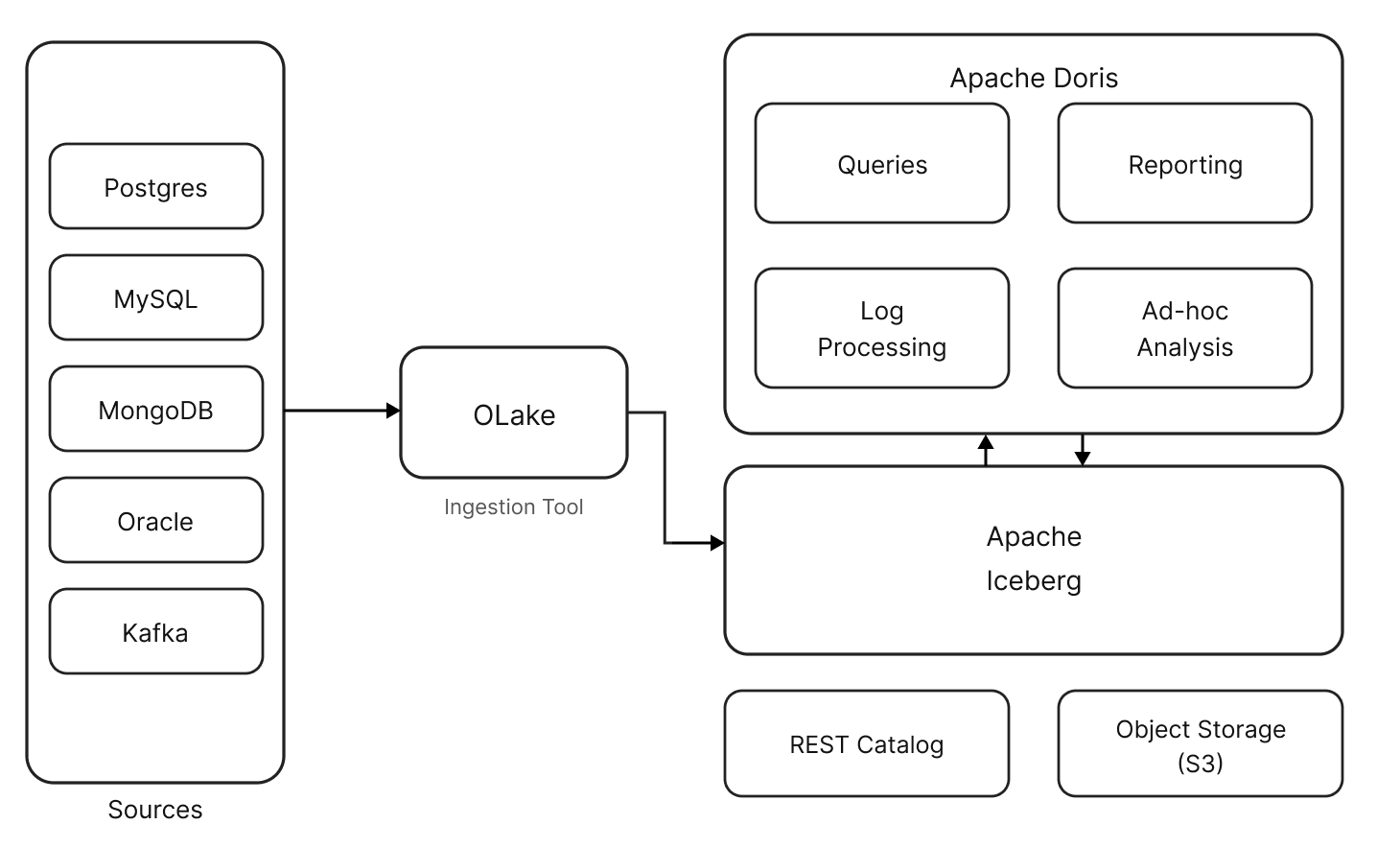
PostgreSQL (Source) → CDC Engine (Ingestion) → Apache Iceberg on Object Storage (Storage) → Apache Doris (Query Engine)
The demo uses four open-source components:
-
PostgreSQL as an operational database. It stays untouched. The CDC engine reads from its WAL (Write-Ahead Log) without impacting production performance.
-
Olake as CDC Engine captures inserts, updates, and deletes from Postgres and writes them as Iceberg tables. Olake is a lightweight CDC engine designed specifically for replicating databases and Kafka sources into Apache Iceberg. It supports Postgres, MySQL, MongoDB, Oracle, and Kafka as sources, and works with all major Iceberg catalogs.
-
Apache Iceberg stores the data as Parquet files on object store, organized by a metadata layer that enables features like hidden partitioning, column pruning, and predicate pushdown. A catalog (REST, Hive Metastore, AWS Glue) keeps track of table metadata.
-
Apache Doris queries the Iceberg tables directly, thanks to its native support for Iceberg format. Apache Doris supports reading Iceberg data, writing to Iceberg tables, and executing queries with its vectorized engine.
Apache Doris as a Query Engine for Iceberg
So why Apache Doris as the query engine here? A few reasons:
-
Fully Vectorized Execution Engine: Apache Doris processes data in columnar batches using SIMD instructions, reducing virtual function calls and increasing cache hit rates. This aligns naturally with columnar formats such as Parquet and ORC used in Iceberg tables, delivering leading performance: on a 1TB TPC-DS benchmark on Iceberg data, Doris completes all 99 queries in roughly one-third the time of Trino.
-
Works with every Iceberg catalog. REST, AWS Glue, Hive Metastore, Hadoop, and Alibaba DLF. Point Doris at your existing catalog without migration.
-
Full CDC support with delete files. When a CDC engine captures an UPDATE or DELETE from Postgres, Iceberg records it as a delete file. Doris natively reads Iceberg Position Delete and Equality Delete files, merging them at query time to return consistent, fresh results, essential for lakehouse architectures built on CDC pipelines.
-
Time travel and snapshot queries. Need to see what the data looked like last Tuesday? Doris can query any Iceberg snapshot: useful for debugging, auditing, or comparing metrics across time periods.
-
Predicate pushdown and partition pruning. Doris automatically prunes Iceberg partitions, including dynamic partition pruning during multi-table joins, so only relevant data is read. In high-selectivity scenarios, this delivers up to 30–40% faster queries on large Iceberg tables.
Getting Started: Setup in 15 Minutes
Here's how to get a working pipeline running locally or on a cloud instance.
Prerequisites
- A Linux instance (even a small one: 4GB RAM, 20GB disk is enough for a demo)
- Docker installed
- SSH access (if running on a remote instance)
Step 1: Configure System Parameters
Apache Doris needs a higher memory map count. Set it before starting the stack:
sudo sysctl -w vm.max_map_count=2000000
Step 2: Deploy Apache Doris with Iceberg Support
The Doris repository includes a ready-made sample environment for lakehouse demos:
git clone https://github.com/apache/doris.git
cd doris/samples/datalake/iceberg_and_paimon
bash ./start_all.sh
This starts Apache Doris, an Iceberg REST catalog, and the S3-compatible object store.
Step 3: Set Up Olake CDC Ingestion
OLake deploys with a single Docker Compose command:
curl -sSL https://raw.githubusercontent.com/datazip-inc/olake-ui/master/docker-compose.yml | docker compose -f - up -d
From OLake's UI, configure the PostgreSQL source, the Iceberg destination (catalog type, object store credentials), and create a sync job. OLake handles table discovery, schema mapping, initial backfill, and ongoing CDC.
Step 4: Query from Apache Doris
Once data is synced, connect to Apache Doris and start querying:
-- Access the Doris client
bash start_doris_client.sh

-- Explore available catalogs
SHOW CATALOGS;

-- Switch to the Iceberg catalog
SWITCH iceberg;

-- Refresh to pick up new tables
REFRESH CATALOG iceberg;

-- Browse and query
SHOW DATABASES;
USE <database_name>;
SHOW TABLES;
SELECT * FROM iceberg.<database_name>.<table_name> LIMIT 10;
Apache Doris can now query PostgreSQL data directly from Iceberg tables in object storage. The whole setup took Rohan about two minutes in his live demo.
Performance Considerations
A few things to keep in mind when moving from demo to production:
-
File sizing. Iceberg tables perform best when data files are in the 128MB to 512MB range. Too many small files degrade query performance because the engine spends more time opening files than reading data. The CDC engine should handle file compaction, or teams can run Iceberg's built-in compaction jobs periodically.
-
Partition strategy. Iceberg's hidden partitioning is a big upgrade over Hive-style partitioning. Define the partition spec at the table level (e.g., partition by day on a timestamp column), and Iceberg handles the rest. No need to include partition columns in queries. Doris leverages this for automatic partition pruning.
-
Table maintenance. Iceberg tables accumulate snapshots, data files, and metadata files over time. Run periodic maintenance (snapshot expiration, orphan file cleanup, compaction) to keep query performance consistent.
-
Catalog choice. For production, consider AWS Glue (on AWS), Hive Metastore (if one is already running), or a managed REST catalog. The demo uses tabulario/iceberg-rest, which is lightweight but probably not the right choice for production at scale.
Use Cases
Once the pipeline is running, what does it unlock?
Real-time dashboards on operational data
The PostgreSQL database powers the application. The product team wants dashboards: user activity, revenue metrics, and feature adoption. Querying production Postgres directly doesn't scale. Nightly batch ETL is too slow. CDC replication into Iceberg provides near-real-time data, and Doris serves the dashboards with sub-second latency, even with dozens of concurrent users.
Ad-hoc analytics
Data analysts run exploratory queries all the time: joining user activity with billing data, filtering by custom date ranges, aggregating across millions of rows. Doris's optimizer handles these without pre-aggregation or materialized views. And because the data lives in Iceberg, analysts can also access it via Spark for deeper work.
Data warehousing without the warehouse
Many teams pay for Snowflake or BigQuery just to run SQL analytics on structured data. This stack delivers the same thing at a fraction of the cost. Object storage is affordable, Apache Doris is open source. No per-query pricing, no credit system.
Historical analysis with time travel
Every write to Iceberg creates an immutable snapshot. Apache Doris can query any of them: compare this week's metrics against last month, audit when a specific record changed, or debug a pipeline issue by querying the exact state of data at a given timestamp.
Summary
This demo shows a fast way to set up a lakehouse architecture with Iceberg. In the stack, PostgreSQL stays as the operational database, Iceberg provides open, ACID-compliant storage on affordable object storage, and Apache Doris delivers fast analytical queries without data duplication.
For teams currently running batch ETL into a warehouse or querying production databases directly, this is a cleaner path: real-time data freshness, open formats, no vendor lock-in, and a quick setup to get running and start analyzing.
Join the Apache Doris community on Slack to connect with Doris experts and other users. For a fully-managed, cloud version of Apache Doris, contact the VeloDB team.