TL;DR
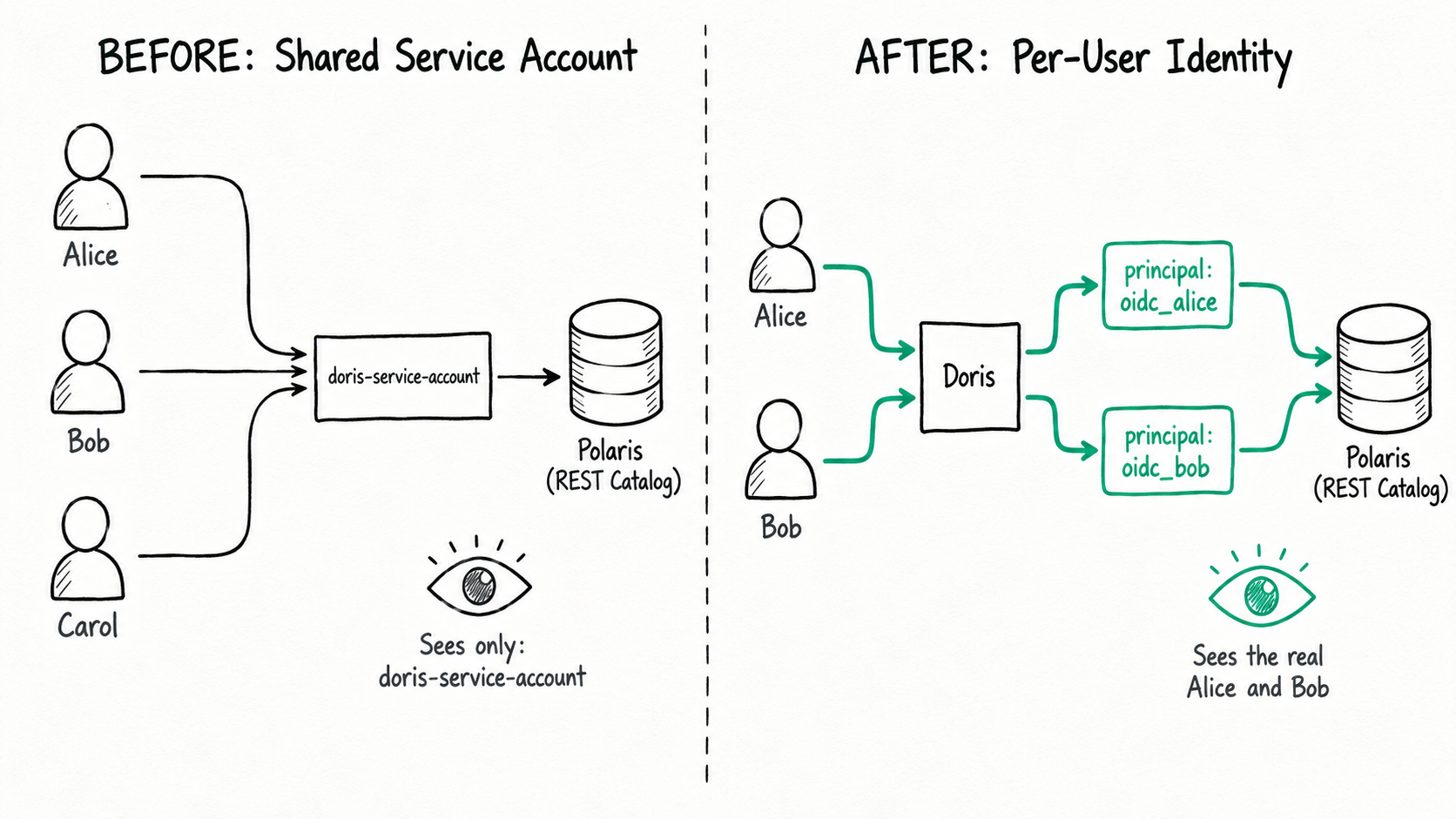
- Previously, when Doris accessed an Iceberg REST Catalog, it used a shared service account hard-coded into the catalog configuration. The catalog only ever saw doris-service-account, never the real user behind the query.
- With per-user identity mode enabled, Doris propagates each user's OIDC identity (established at login) to the REST Catalog, such as Apache Polaris. Polaris now sees the real Alice or Bob, and uses that identity to decide which namespaces and tables are visible and to vend temporary credentials for object storage.
- The payoff: clean permission boundaries (Doris owns the entry point, the catalog owns lakehouse objects), audit trails that trace back to real people, organizational changes (such as a role transfer) handled by editing one role in Polaris, and no long-lived high-privilege account sitting in the business access path.
This article first explains how it works, then walks through a complete, hands-on demo on a local environment built with Keycloak, Polaris, and MinIO.
The governance model of data platforms is undergoing a fundamental shift. Traditionally, a database engine bundled identity authentication, authorization, and query execution into a single monolith, so the engine enforced every security policy within it. The rise of the Lakehouse architecture broke that model. Data now lives in open formats on shared object storage, and several engines (Spark, Trino, Doris, and others) all access the same data. Once the compute entry points multiply, letting each engine build its own user and permission system only pushes governance toward fragmentation and inconsistent enforcement. Permission policies scatter, audit trails break, and the security team can no longer answer a basic question: who accessed which data, when, and through which entry point.
Against this backdrop, open shared catalogs have emerged, including Databricks Unity Catalog, Apache Gravitino, Apache Polaris/Snowflake Open Catalog, and more. Each reflects the same trend where authorization and governance are moving out of individual execution engines and into a unified control plane.
This shift directly changes the role of the compute engine. Doris should no longer assume it is the final arbiter of all permissions. A more sensible boundary looks like this:
Doris:
  Owns the SQL entry point, identity propagation, query planning, and execution.

Catalog:
  Owns unified authorization for external lakehouse objects, temporary credential vending, and cross-engine auditing.
Upgrading Doris's authentication capabilities
Under a REST-based unified catalog control plane, authentication and authorization split into two stages:
Authentication:
  Doris verifies the external identity, establishes a session, and keeps an identity context it can propagate.

Authorization:
  The catalog makes the final ruling on external lakehouse objects, based on unified metadata and a policy model.
This places new demands on Doris's authentication system. Logging in is no longer just about mapping a user to a local account. It must also securely convert the external identity credential into a delegated credential that catalog access can later use.
For cloud-native environments, OIDC / OAuth2 is already the de facto choice. It has several traits that fit lakehouse governance naturally:
- It uses short-lived tokens instead of long-lived passwords.
- It supports identity propagation across systems.
- It can carry authorization context such as group, scope, tenant, and department.
- It can establish trust with cloud IAM, SaaS control planes, and enterprise IdPs.
- It suits an access model where people, service accounts, scheduled jobs, and agents all coexist.
So Doris supporting OIDC is not merely "one more way to log in." It is the foundational capability that lets Doris plug into a unified governance control plane. Everything that follows depends on Doris carrying and propagating external identity correctly: per-user access to the REST Catalog, dynamic authorization in the catalog, credential vending, and unified cross-engine auditing.
This solves an identity problem, not a connectivity problem
In the traditional approach, a catalog configuration usually looks like this:
CREATE CATALOG lakehouse PROPERTIES (
    'type' = 'iceberg',
    'iceberg.catalog.type' = 'rest',
    'iceberg.rest.uri' = 'https://polaris.example.com/api/catalog',
    'iceberg.rest.security.type' = 'oauth2',
    'iceberg.rest.oauth2.credential' = 'doris-service-account:******',
    'warehouse' = 'enterprise_lakehouse'
);
In this mode, Doris can reach the REST Catalog, but what the catalog sees is doris-service-account. Whether Alice queries finance_orders or Bob queries campaign_spend, it all looks like the same account doing the work.
In per-user identity mode, the catalog no longer stores the credentials of a powerful account for business access. Instead, it declares that it will use the identity of the current Doris session:
CREATE CATALOG lakehouse PROPERTIES (
    'type' = 'iceberg',
    'iceberg.catalog.type' = 'rest',
    'iceberg.rest.uri' = 'https://polaris.example.com/api/catalog',
    'iceberg.rest.security.type' = 'oauth2',
    'iceberg.rest.session' = 'user',
    'iceberg.rest.session-timeout' = '0',
    'iceberg.rest.oauth2.delegated-token-mode' = 'access_token',
    'iceberg.rest.vended-credentials-enabled' = 'true',
    'warehouse' = 'enterprise_lakehouse'
);
What these parameters actually do
A handful of key parameters together determine how identity flows from Doris to the catalog:
- iceberg.rest.session = 'user': when Doris accesses the REST Catalog, it uses the identity of the user logged into the current session, rather than a fixed business account hard-coded in the catalog properties.
- iceberg.rest.oauth2.delegated-token-mode = 'access_token': Doris forwards the OIDC access_token the user carried at login to the REST Catalog as a delegated token, and Polaris uses it to identify the real principal (Alice or Bob).
- iceberg.rest.vended-credentials-enabled = 'true': reading data files goes through credential vending. Based on the current user's permissions, Polaris vends short-lived, least-privilege temporary object-storage credentials to the Doris BE, so Doris itself no longer holds long-lived S3 keys.
- iceberg.rest.session-timeout = '0': the timeout setting for the per-user identity session. For the exact meaning of 0, check the documentation for your version.
There are two layers of authorization here, and both rest on the same user identity:
Layer 1, Metadata (REST Catalog): listing namespaces and loading table definitions, decided by Polaris based on user identity.
Layer 2, Data (object storage): reading the actual Iceberg data files, authorized by the temporary credentials Polaris vends.
Because both layers use the same identity, what a user "can see" and what a user "can read" always stay consistent.
You can picture the new access path like this:
Alice OIDC token -> Doris session -> Iceberg REST Catalog -> Polaris principal Alice
Bob OIDC token   -> Doris session -> Iceberg REST Catalog -> Polaris principal Bob
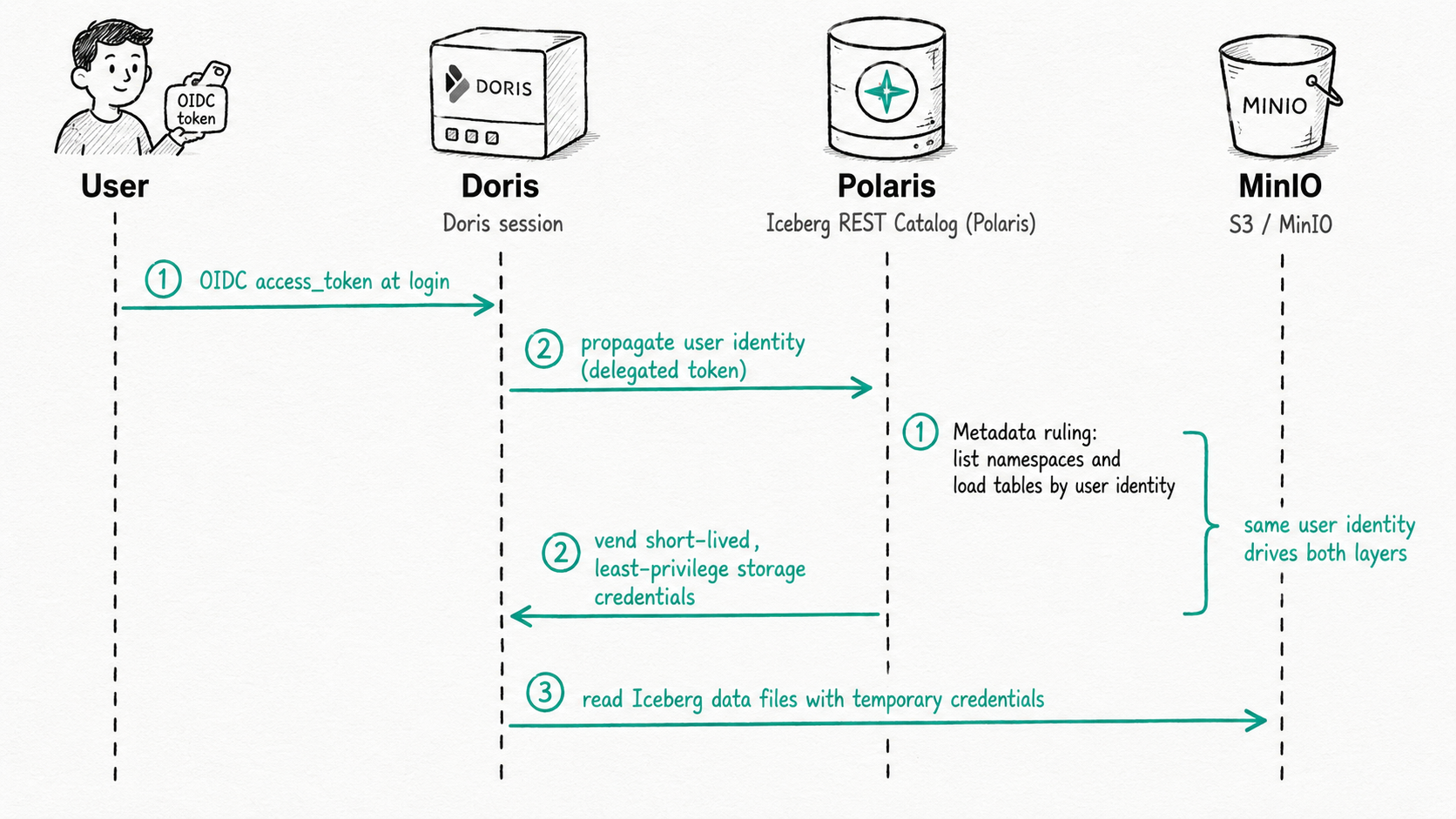
Now Doris owns the SQL entry point, session management, and query execution, while the REST Catalog owns object-level permission rulings over the lakehouse. If either side denies, the access fails.
A more enterprise-like example
Suppose a retail company's data lake has two business domains:
finance
  finance_orders
  finance_budget

marketing
  campaign_spend
  lead_score
Alice is a Finance analyst. She should see only Finance data.
Bob was originally in Marketing. He should see only Marketing data.
Later, Bob transfers to Finance. The platform administrator adjusts Bob in Polaris from marketing_reader to finance_reader. This change should not require Doris to modify its catalog configuration or to manage permissions on every individual Iceberg table.
The ideal looks like this:
Before the change:
  In Doris, Alice can see only finance tables
  In Doris, Bob can see only marketing tables

Adjust Bob's role in Polaris:
  Bob goes from marketing_reader to finance_reader

After the change:
  Alice can still see only finance tables
  In Doris, Bob now sees only finance tables
This is the value of per-user identity mode. Doris does not need to hold a powerful account that can reach every table, nor to replicate a full set of lakehouse object permissions locally. Doris securely passes "who is here right now" to the catalog, and the catalog decides based on the company's latest organizational and authorization relationships.
Hands-on demo
The demo below uses Keycloak, Polaris, and MinIO as a local environment. You can swap in your enterprise's internal IdP, a production Polaris, and real object storage.
Every "expected result" or "sample output" in this section is illustrative. After you get the flow working in a real environment, replace them with actual output and error text.
Demo prerequisites
The demo assumes a few things:
- The capabilities in this article are based on Doris 4.1 and its OIDC authentication plugin. If using the enterprise-edition, pay attention to the specific edition
- Doris has the OIDC authentication plugin loaded.
- The Doris FE and BE come from the same build.
- Polaris can identify the real user from the OIDC token. For example, preferred_username = oidc_alice maps to the Polaris principal oidc_alice.
- Both Alice and Bob can log into Doris via OIDC.
- On the Doris side, users get only the general permission to enter the lakehouse catalog.
- On the Polaris side, Polaris decides exactly which namespaces and tables Alice and Bob can see.
This article does not cover the configuration details of the IdP and the Polaris OIDC mapper. In a real environment, as long as Polaris can map Alice's token to the oidc_alice principal and Bob's token to the oidc_bob principal, the rest of the flow holds.
Services and ports
The local fixture brings up three services. Here are the ports and addresses to know before you copy any commands:
| Service | Role | Host port | Address used in this article |
|---|---|---|---|
| Keycloak | OIDC identity provider (IdP); issues user tokens | 18112 | http://${DEMO_HOST}:18112 |
| Polaris | Iceberg REST Catalog and management API | 20281 | http://127.0.0.1:20281 for admin scripts; http://${DEMO_HOST}:20281 for the Doris catalog |
| MinIO | S3-compatible object storage | 20201 | http://${DEMO_HOST}:20201 |
About 127.0.0.1 versus ${DEMO_HOST}: to call the Polaris management API with curl directly on the host 127.0.0.1 is fine. But the addresses you write into the Doris catalog (iceberg.rest.uri, s3.endpoint) must use the host's externally reachable IP ${DEMO_HOST}, because the Doris BE may run in a container or on another machine and cannot reach the 127.0.0.1 of the machine where you run these commands.
One more thing: the --port in the first step's run-oidc-fixture.sh up-polaris --port 18112 is Keycloak's external port (matching the 18112 in oidc.issuer below). Polaris and MinIO use the fixed ports from the table above.
Step 1: Start the local IdP, Polaris, and MinIO
If you use the local fixture under enterprise-plugins, start the services and generate tokens first:
cd enterprise-plugins

export DEMO_HOST=$(hostname -I | awk '{print $1}')

bash tools/run-oidc-fixture.sh up-polaris \
  --port 18112 \
  --external-host "${DEMO_HOST}"

bash tools/run-oidc-fixture.sh gen-tokens \
  --port 18112 \
  --external-host "${DEMO_HOST}"
Check the container status:
docker inspect -f '{{.Name}} {{.State.Status}} {{if .State.Health}}{{.State.Health.Status}}{{else}}no-healthcheck{{end}}' \
  doris-local-oidc-keycloak \
  doris-local-oidc-polaris \
  doris-local-oidc-polaris-minio
You should see:
/doris-local-oidc-keycloak running healthy
/doris-local-oidc-polaris running healthy
/doris-local-oidc-polaris-minio running healthy
The generated tokens are usually here:
docker/oidc/tokens/oidc_alice_polaris_rest.access_token
docker/oidc/tokens/oidc_bob_grafana_query.access_token
To keep the examples readable, the rest of the article maps Alice to oidc_alice and Bob to oidc_bob. Store both users' token paths in variables so the later commands stay clean:
# The fixture issues the two users' tokens from different OIDC clients:
#   Alice's token comes from the polaris-rest client, Bob's from the grafana-doris-plugin client.
# Both client_ids are allowed in oidc.allowed_client_ids in Step 3.
export ALICE_TOKEN=./docker/oidc/tokens/oidc_alice_polaris_rest.access_token
export BOB_TOKEN=./docker/oidc/tokens/oidc_bob_grafana_query.access_token
${DEMO_HOST} in the SQL that follows is a placeholder. When you actually run it, replace it with the value of DEMO_HOST above, for example 172.20.32.136.
Step 2: Create user identities and roles in Polaris
The commands below use the Polaris management API to create two principals and two sets of permissions. They use the port exposed by local Docker. When running inside the container network, you can replace http://127.0.0.1:20281 with http://polaris:8181.
First, set up the environment variables and a generic helper function:
export POLARIS_REALM=realm-mixed
export POLARIS_CATALOG=doris_oidc_test
export POLARIS_BASE=http://127.0.0.1:20281
export POLARIS_CATALOG_API=${POLARIS_BASE}/api/catalog/v1
export POLARIS_MGMT_API=${POLARIS_BASE}/api/management/v1

export POLARIS_ADMIN_TOKEN=$(
  curl -sS -X POST "${POLARIS_CATALOG_API}/oauth/tokens" \
    -H "Polaris-Realm: ${POLARIS_REALM}" \
    -H "Content-Type: application/x-www-form-urlencoded" \
    -d "grant_type=client_credentials&client_id=root&client_secret=secret123&scope=PRINCIPAL_ROLE:ALL" \
  | python3 -c 'import json,sys; print(json.load(sys.stdin)["access_token"])'
)

polaris_api() {
  method="$1"
  path="$2"
  body="${3:-}"

  if [ -n "${body}" ]; then
    curl -sS -X "<equation>{method}" "</equation>{POLARIS_MGMT_API}${path}" \
      -H "Authorization: Bearer ${POLARIS_ADMIN_TOKEN}" \
      -H "Polaris-Realm: ${POLARIS_REALM}" \
      -H "Content-Type: application/json" \
      -d "${body}"
  else
    curl -sS -X "<equation>{method}" "</equation>{POLARIS_MGMT_API}${path}" \
      -H "Authorization: Bearer ${POLARIS_ADMIN_TOKEN}" \
      -H "Polaris-Realm: ${POLARIS_REALM}"
  fi
}
Create the Polaris principals for Alice and Bob:
polaris_api POST "/principals" \
  '{"principal":{"name":"oidc_alice"}}'

polaris_api POST "/principals" \
  '{"principal":{"name":"oidc_bob"}}'
If a principal already exists, the conflict response is safe to ignore. The point of the demo isn't to create accounts. It's to make sure Polaris holds real user identities that line up with the OIDC tokens.
Create two principal roles:
polaris_api POST "/principal-roles" \
  '{"principalRole":{"name":"finance_member"}}'

polaris_api POST "/principal-roles" \
  '{"principalRole":{"name":"marketing_member"}}'
Create two catalog roles:
polaris_api POST "/catalogs/${POLARIS_CATALOG}/catalog-roles" \
  '{"catalogRole":{"name":"finance_reader"}}'

polaris_api POST "/catalogs/${POLARIS_CATALOG}/catalog-roles" \
  '{"catalogRole":{"name":"marketing_reader"}}'
Bind the catalog roles to the principal roles:
polaris_api PUT "/principal-roles/finance_member/catalog-roles/${POLARIS_CATALOG}" \
  '{"catalogRole":{"name":"finance_reader"}}'

polaris_api PUT "/principal-roles/marketing_member/catalog-roles/${POLARIS_CATALOG}" \
  '{"catalogRole":{"name":"marketing_reader"}}'
The initial organization: Alice belongs to Finance, Bob belongs to Marketing.
polaris_api PUT "/principals/oidc_alice/principal-roles" \
  '{"principalRole":{"name":"finance_member"}}'

polaris_api PUT "/principals/oidc_bob/principal-roles" \
  '{"principalRole":{"name":"marketing_member"}}'
Step 3: Set up the OIDC login entry in Doris
On the Doris side, first create an OIDC integration. It validates user tokens and brings external identities like Alice and Bob into Doris sessions.
CREATE AUTHENTICATION INTEGRATION corp_oidc
PROPERTIES (
    'type' = 'oidc',
    'enable_jit_user' = 'true',
    'oidc.issuer' = 'http://${DEMO_HOST}:18112/realms/doris',
    'oidc.jwks_uri' = 'http://${DEMO_HOST}:18112/realms/doris/protocol/openid-connect/certs',
    'oidc.allowed_audiences' = 'doris',
    'oidc.username_claim' = 'preferred_username',
    'oidc.subject_claim' = 'sub',
    'oidc.allowed_algorithms' = 'RS256',
    'oidc.required_scopes' = 'doris.query',
    'oidc.allowed_client_ids' = 'grafana-doris-plugin,polaris-rest'
);
Here, oidc.allowed_client_ids allows both client_ids that the two users' tokens actually carry (grafana-doris-plugin and polaris-rest). This limits login to tokens issued by trusted clients only. In production, you would typically register a dedicated client for Doris access and allow only that one. Make sure the value here matches the token's azp / client_id, or the corresponding user gets rejected at login.
Create a general-purpose role on the Doris side. This role says only that the user may enter the lakehouse entry point. It says nothing about whether the user belongs to Finance or Marketing.
CREATE ROLE lakehouse_user;
GRANT SELECT_PRIV ON lakehouse.*.* TO ROLE lakehouse_user;
Map users who can query Doris via OIDC to this general-purpose role:
CREATE ROLE MAPPING corp_oidc_lakehouse_mapping
ON AUTHENTICATION INTEGRATION corp_oidc
RULE (
    USING CEL 'has_scope("doris.query")'
    GRANT ROLE lakehouse_user
);
The table-creation phase of the demo needs to create a catalog and external tables temporarily. So readers can follow along directly, grant lakehouse_user create privileges for now. You revoke them once the tables exist.
GRANT CREATE_PRIV ON lakehouse.*.* TO ROLE lakehouse_user;
If authentication_chain does not yet include corp_oidc, add it to the FE configuration. A test environment can use dynamic configuration; for production, write it into the FE config and confirm with a restart.
ADMIN SET FRONTEND CONFIG ('authentication_chain' = 'corp_oidc');
Step 4: Prepare the demo tables
In a real company, demo tables like these usually come from data-engineering pipelines, Spark jobs, or a platform administrator. Business users' later access does not need a powerful catalog account.
To make the demo complete, create a temporary content-management role with write privileges for Alice to use when she creates tables and writes data through Doris. Once that's done, revoke this temporary privilege and keep only the Finance reader permission.
Step 2 created only reader roles (read-only); here we need a role that can write. First create a data_engineer principal role and a matching catalog role, and grant it the privilege to manage this catalog's content (create, drop, read, and write namespaces and tables):
polaris_api POST "/principal-roles" \
  '{"principalRole":{"name":"data_engineer"}}'

polaris_api POST "/catalogs/${POLARIS_CATALOG}/catalog-roles" \
  '{"catalogRole":{"name":"data_engineer_role"}}'

# CATALOG_MANAGE_CONTENT covers create / drop / read / write on namespaces and tables.
polaris_api PUT "/catalogs/${POLARIS_CATALOG}/catalog-roles/data_engineer_role/grants" \
  '{"grant":{"type":"catalog","privilege":"CATALOG_MANAGE_CONTENT"}}'

polaris_api PUT "/principal-roles/data_engineer/catalog-roles/${POLARIS_CATALOG}" \
  '{"catalogRole":{"name":"data_engineer_role"}}'
Then grant this temporary role to Alice:
polaris_api PUT "/principals/oidc_alice/principal-roles" \
  '{"principalRole":{"name":"data_engineer"}}'
Log into Doris using Alice's OIDC token:
mysqlsh --sql --sqlc --ssl-mode=REQUIRED \
  -h 127.0.0.1 -P 9030 -u oidc_alice \
  --authentication-openid-connect-client-id-token-file=${ALICE_TOKEN}
Create the REST Catalog that uses per-user identity access:
DROP CATALOG IF EXISTS lakehouse;

CREATE CATALOG lakehouse PROPERTIES (
    'type' = 'iceberg',
    'iceberg.catalog.type' = 'rest',
    'iceberg.rest.uri' = 'http://${DEMO_HOST}:20281/api/catalog',
    'iceberg.rest.security.type' = 'oauth2',
    'iceberg.rest.session' = 'user',
    'iceberg.rest.session-timeout' = '0',
    'iceberg.rest.oauth2.delegated-token-mode' = 'access_token',
    'iceberg.rest.vended-credentials-enabled' = 'true',
    'warehouse' = 'doris_oidc_test',
    's3.endpoint' = 'http://${DEMO_HOST}:20201',
    's3.region' = 'us-east-1'
);

SWITCH lakehouse;

CREATE DATABASE IF NOT EXISTS finance;
CREATE DATABASE IF NOT EXISTS marketing;

USE finance;

CREATE TABLE IF NOT EXISTS finance_orders (
    order_id INT,
    amount DECIMAL(12, 2)
);

CREATE TABLE IF NOT EXISTS finance_budget (
    dept STRING,
    budget DECIMAL(12, 2)
);

USE marketing;

CREATE TABLE IF NOT EXISTS campaign_spend (
    campaign_id INT,
    cost DECIMAL(12, 2)
);

CREATE TABLE IF NOT EXISTS lead_score (
    lead_id INT,
    score INT
);
To make the later SELECT checks more concrete, insert a few rows of demo data while you're here:
INSERT INTO finance.finance_orders VALUES (1001, 199.00), (1002, 89.50);
INSERT INTO finance.finance_budget VALUES ('finance', 1000000.00);
INSERT INTO marketing.campaign_spend VALUES (5001, 1200.00);
INSERT INTO marketing.lead_score VALUES (7001, 88);
Once the tables are created and the data is written, revoke Alice's temporary management role and clean up this temporary write role:
polaris_api DELETE "/principals/oidc_alice/principal-roles/data_engineer"

# Optional: delete the temporary roles entirely so no writable identity is left behind
polaris_api DELETE "/principal-roles/data_engineer"
polaris_api DELETE "/catalogs/${POLARIS_CATALOG}/catalog-roles/data_engineer_role"
At the same time, revoke the temporary create privilege on the Doris side, keeping only the query entry permission:
REVOKE CREATE_PRIV ON lakehouse.*.* FROM ROLE lakehouse_user;
After this step, business access depends only on the general entry permission on the Doris side, plus finance_reader and marketing_reader in Polaris.
Step 5: Grant permissions on the Finance and Marketing tables
The Finance reader can list the Finance namespace and read Finance tables:
polaris_api PUT "/catalogs/${POLARIS_CATALOG}/catalog-roles/finance_reader/grants" \
  '{"grant":{"type":"namespace","namespace":["finance"],"privilege":"NAMESPACE_LIST"}}'

for table in finance_orders finance_budget; do
  polaris_api PUT "/catalogs/${POLARIS_CATALOG}/catalog-roles/finance_reader/grants" \
    "{\"grant\":{\"type\":\"table\",\"namespace\":[\"finance\"],\"tableName\":\"${table}\",\"privilege\":\"TABLE_LIST\"}}"
  polaris_api PUT "/catalogs/${POLARIS_CATALOG}/catalog-roles/finance_reader/grants" \
    "{\"grant\":{\"type\":\"table\",\"namespace\":[\"finance\"],\"tableName\":\"${table}\",\"privilege\":\"TABLE_READ_PROPERTIES\"}}"
  polaris_api PUT "/catalogs/${POLARIS_CATALOG}/catalog-roles/finance_reader/grants" \
    "{\"grant\":{\"type\":\"table\",\"namespace\":[\"finance\"],\"tableName\":\"${table}\",\"privilege\":\"TABLE_READ_DATA\"}}"
done
The Marketing reader can list the Marketing namespace and read Marketing tables:
polaris_api PUT "/catalogs/${POLARIS_CATALOG}/catalog-roles/marketing_reader/grants" \
  '{"grant":{"type":"namespace","namespace":["marketing"],"privilege":"NAMESPACE_LIST"}}'

for table in campaign_spend lead_score; do
  polaris_api PUT "/catalogs/${POLARIS_CATALOG}/catalog-roles/marketing_reader/grants" \
    "{\"grant\":{\"type\":\"table\",\"namespace\":[\"marketing\"],\"tableName\":\"${table}\",\"privilege\":\"TABLE_LIST\"}}"
  polaris_api PUT "/catalogs/${POLARIS_CATALOG}/catalog-roles/marketing_reader/grants" \
    "{\"grant\":{\"type\":\"table\",\"namespace\":[\"marketing\"],\"tableName\":\"${table}\",\"privilege\":\"TABLE_READ_PROPERTIES\"}}"
  polaris_api PUT "/catalogs/${POLARIS_CATALOG}/catalog-roles/marketing_reader/grants" \
    "{\"grant\":{\"type\":\"table\",\"namespace\":[\"marketing\"],\"tableName\":\"${table}\",\"privilege\":\"TABLE_READ_DATA\"}}"
done
You can check the role grants:
polaris_api GET "/catalogs/${POLARIS_CATALOG}/catalog-roles/finance_reader/grants"
polaris_api GET "/catalogs/${POLARIS_CATALOG}/catalog-roles/marketing_reader/grants"
Step 6: Doris keeps only the general lakehouse entry permission
Doris does not need to configure external-table permissions separately for Alice and Bob. It only needs to confirm that these OIDC users may enter this lakehouse catalog.
We already created lakehouse_user earlier and revoked the temporary CREATE_PRIV after the tables were created. What remains on the Doris side is:
GRANT SELECT_PRIV ON lakehouse.*.* TO ROLE lakehouse_user;
This step matters. Doris does not decide locally whether Alice belongs to Finance or Marketing. It only confirms that she is a legitimately logged-in user and lets her enter lakehouse. Which namespaces and tables she can see once inside is up to Polaris, based on the current user token.
Step 7: Alice can see only the Finance tables
Alice logs into Doris with her own token:
mysqlsh --sql --sqlc --ssl-mode=REQUIRED \
  -h 127.0.0.1 -P 9030 -u oidc_alice \
  --authentication-openid-connect-client-id-token-file=${ALICE_TOKEN}
Run:
SWITCH lakehouse;
SHOW DATABASES;
She should see only Finance:
Database
finance
Then look at the Finance tables:
USE finance;
SHOW TABLES;
Expected result:
Tables_in_finance
finance_budget
finance_orders
Go one step further and actually read the data from a Finance table. This step triggers credential vending: Polaris vends temporary object-storage credentials to the Doris BE for Alice's identity, and only then can Doris read the data files from MinIO.
SELECT * FROM finance.finance_orders;
Expected result (example):
+----------+--------+
| order_id | amount |
+----------+--------+
|     1001 | 199.00 |
|     1002 |  89.50 |
+----------+--------+
If Alice tries to access Marketing, whether by listing tables or reading data directly, she is denied:
USE marketing;
SHOW TABLES;

SELECT * FROM marketing.campaign_spend;
Polaris denies or filters the access. The exact error text varies between clients, but the meaning should be the same: no permission.
ERROR: Access denied by REST Catalog
From Alice's point of view, it's as if Doris connects only to the Finance data domain. But that's not because Doris keeps table permissions specifically for Alice. It's because Doris passed Alice's identity to Polaris.
Step 8: Bob can initially see only the Marketing tables
Bob logs into the same Doris with his own token:
mysqlsh --sql --sqlc --ssl-mode=REQUIRED \
  -h 127.0.0.1 -P 9030 -u oidc_bob \
  --authentication-openid-connect-client-id-token-file=${BOB_TOKEN}
Bob accesses the same catalog:
SWITCH lakehouse;
SHOW DATABASES;
He should see only Marketing:
Database
marketing
Look at the Marketing tables and read the data:
USE marketing;
SHOW TABLES;

SELECT * FROM marketing.campaign_spend;
Expected result (example):
Tables_in_marketing
campaign_spend
lead_score

+-------------+---------+
| campaign_id | cost    |
+-------------+---------+
|        5001 | 1200.00 |
+-------------+---------+
If Bob tries to access Finance:
USE finance;
SELECT * FROM finance.finance_orders;
The expected result is no permission:
ERROR: Access denied by REST Catalog
At this point, a few facts stand out:
- Alice and Bob access the same Doris.
- Alice and Bob access the same
lakehousecatalog. - The Doris catalog is not configured with two static accounts.
- Polaris returns different lakehouse visibility for different user identities.
Step 9: Bob transfers teams, permissions change in Polaris, and Doris results follow
Now comes a change that happens all the time in real companies: Bob moves from Marketing to Finance.
The platform administrator adjusts Bob's role in Polaris and nowhere else. First revoke Bob's Marketing membership:
polaris_api DELETE "/principals/oidc_bob/principal-roles/marketing_member"
Then grant Bob Finance membership:
polaris_api PUT "/principals/oidc_bob/principal-roles" \
  '{"principalRole":{"name":"finance_member"}}'
Note that nothing here touches the Doris catalog:
-- Not needed
ALTER CATALOG lakehouse ...

-- Not needed
DROP CATALOG lakehouse;
CREATE CATALOG lakehouse ...

-- Not needed
GRANT SELECT_PRIV ON lakehouse.finance.* TO oidc_bob;
REVOKE SELECT_PRIV ON lakehouse.marketing.* FROM oidc_bob;
Bob logs in again, or keeps accessing Doris after his token and session refresh:
mysqlsh --sql --sqlc --ssl-mode=REQUIRED \
  -h 127.0.0.1 -P 9030 -u oidc_bob \
  --authentication-openid-connect-client-id-token-file=${BOB_TOKEN}
Run again:
SWITCH lakehouse;
SHOW DATABASES;
Now Bob sees Finance:
Database
finance
Look at the Finance tables and read the data:
USE finance;
SELECT * FROM finance.finance_orders;
Expected result (example):
+----------+--------+
| order_id | amount |
+----------+--------+
|     1001 | 199.00 |
|     1002 |  89.50 |
+----------+--------+
Then access Marketing:
SELECT * FROM marketing.campaign_spend;
The expected result becomes no permission:
ERROR: Access denied by REST Catalog
This is the security upgrade the feature is really about. Bob's organizational relationship changed in Polaris, and the permissions he sees when querying the lake through Doris changed right along with it. Doris keeps no shared, powerful account that could bypass Polaris, and it copies no lakehouse object permissions into its own local store.
When does a permission change take effect? Because Doris carries the user's OIDC token, a permission change becomes visible only after identity and session refresh. After Polaris adjusts a role, an in-flight session won't necessarily notice right away. It usually takes a token or session refresh, and if needed a fresh login, before the latest permissions show up. In production, evaluate the propagation delay together with the token lifetime and iceberg.rest.session-timeout*.*
Why this flow fits enterprises better
First, cleaner permission boundaries.
Doris confirms whether a user can log in, can enter the lakehouse entry point, and can run SQL. Polaris decides whether that user can list a given namespace, read a given Iceberg table, or access a given view.
Second, a more accurate audit subject.
With a shared, powerful account, the Polaris-side audit logs can easily show nothing but doris-service-account. With per-user identity, Polaris sees real principals like Alice and Bob. When something goes wrong, you don't have to correlate the Doris audit logs against the catalog audit logs by hand.
Third, organizational changes take effect in one authorization center.
When Bob transfers teams, the platform administrator adjusts a single role in Polaris. The Doris catalog configuration stays the same, and so does the connection setup in BI tools. Users still reach the lake through the same Doris entry point, but what they can see has already updated to match the latest organizational relationships.
Fourth, fewer long-lived, over-privileged accounts.
The business access path no longer needs a high-privilege catalog account sitting in the Doris catalog properties indefinitely. When a platform administrator does need to initialize data or run maintenance, you can confine that account to the setup or admin flow instead of sharing it across every business query.
How this relates to Doris's local permissions
This feature doesn't ask Doris to give up local permissions. It separates the two layers of permission boundaries cleanly.
A more sensible enterprise model looks like this:
Doris permissions:
  Who can log into Doris
  Who can use the lakehouse catalog entry point
  Who can run queries, create sessions, and use resource groups

Polaris permissions:
  Who can see the finance namespace
  Who can read the finance_orders table
  Who can see the marketing namespace
  Who can access a given Iceberg view
The end result is the intersection of the two sides:
Doris allow + Polaris allow -> success
Doris deny  + Polaris allow -> failure
Doris allow + Polaris deny  -> failure
Doris deny  + Polaris deny  -> failure
So on the Doris side, you can grant only the general lakehouse entry permission:
GRANT SELECT_PRIV ON lakehouse.*.* TO ROLE lakehouse_user;
You don't copy the permissions for every external namespace, every Iceberg table, and every external view into Doris.
One clarification. In this article's demo, the Doris side grants all lakehouse users only the single coarse-grained entry permission
SELECT_PRIV ON lakehouse.*.*. In other words, Doris always allows, and Polaris makes the real distinction between Alice and Bob. Doris's local permission answers "can you come through the door," while "what you see once inside" is left to Polaris. If you prefer, you can layer finer-grained local permissions on the Doris side too, forming the intersection above together with Polaris.
In a nutshell
In the past, Doris accessing an Iceberg REST Catalog was more like everyone sharing a single access badge. The badge opens the door, but the access system has no idea who actually walked in.
Now, Doris can carry the user identity established at OIDC login all the way to the REST Catalog. When Alice accesses, Polaris sees Alice; when Bob accesses, Polaris sees Bob. After Bob transfers teams, the moment his role changes in Polaris, the scope he sees when reaching the lake through Doris changes with it.
This is not simply a few extra catalog parameters. It is what lets Doris truly join the enterprise's unified identity, unified authorization, and unified audit system in lakehouse scenarios.