Picture an analytics team running its end-of-quarter close. The ETL job joins three years of transaction history against a customer dimension and a product hierarchy, then aggregates by region for the executive deck. Three hours in, the database server runs out of memory, and the query dies with an OOM error. The team retries with a smaller date range, splits the job in half, and ships the deck the next morning instead of that evening. If the spill-to-disk feature had been enabled, that job would have finished, and there would be no morning panic.
Apache Doris 4.1 release matured this feature for the Doris community.
TL'DR of what changed in 4.1:
- Full operator coverage: Hash Join, Aggregation, and Sort all spill. These three operators account for almost all memory pressure in analytical queries.
- Recursive repartitioning: When a recovered partition is still too large for memory, the engine repartitions it again. This handles heavy data skew, not just average-case workloads.
- Proactive triggering: Doris detects memory pressure early and starts spilling before hitting a hard limit, rather than waiting for a query to fail and then trying to recover.
The rest of this post covers what Spill to Disk is, which workloads benefit most from it, how Apache Doris implements it end-to-end, the configuration and observability surface, and the full TPC-DS benchmark.
1. Memory-Intensive Operators and Why They Need Spill to Disk
In Apache Doris, three operators sit at the top of the OOM-risk list. They share one trait: each must accumulate state over the entire input before producing results. Memory usage scales with input size, cardinality, or skew, so the worst case sits far above the average. Spill to Disk targets exactly these three. The following operators most likely to hit memory limits are those that need to accumulate state:
| Operator | Memory Bottleneck |
|---|---|
| Hash Join | Build side requires loading the full dataset into a hash table |
| Aggregation | Maintains a hash table of group keys and intermediate aggregation state |
| Sort | Must buffer all data before sorting and outputting |
These three share two characteristics that make them candidates for spilling:
-
Memory usage scales with data size: Input volume, cardinality, and data skew all affect how much memory they consume.
-
State is serializable: The state these operators maintain doesn't need to stay in memory permanently. It can be written to disk and read back on demand.
The core concept behind spill to disk is to convert revocable memory into disk state, then read it back in smaller streaming batches during the recovery phase.
2. How Apache Doris Implemented Spill to Disk
Doris does not implement spill inside each operator in isolation. A control layer and an operator layer coordinate the work, and share a common infrastructure layer beneath them.
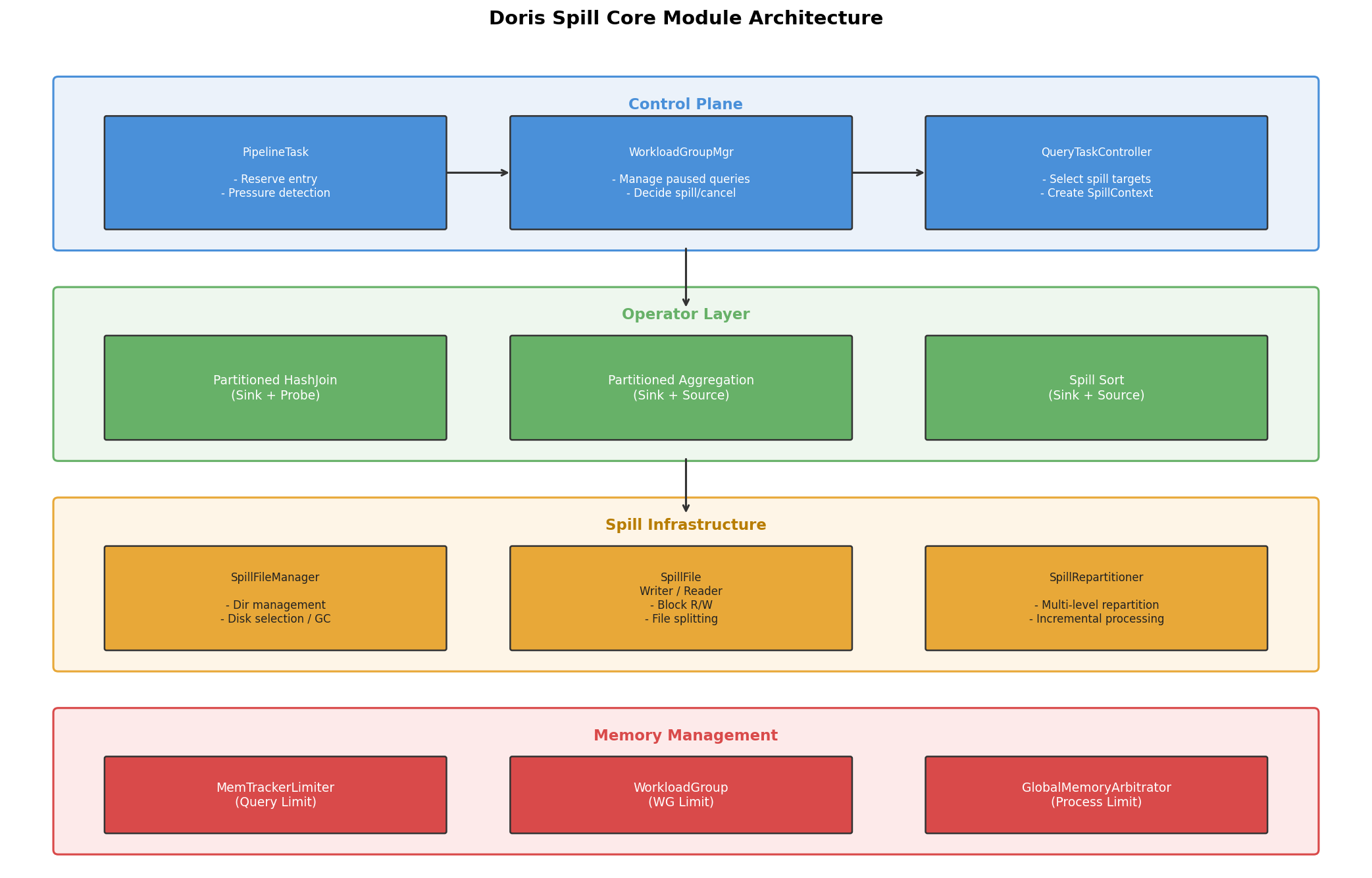
The four layers:
-
Control layer:
PipelineTaskhandles the reserve entry point and memory pressure detection.WorkloadGroupMgrmanages paused queries and decides whether to spill or cancel.QueryTaskControllerselects specific spill targets and createsSpillContext. -
Operator layer: Three core operators: Partitioned HashJoin, Partitioned Aggregation, and Spill Sort, each implement
revoke_memory()to handle their own data persistence and recovery. -
Infrastructure layer:
SpillFileManagermanages disk directories and garbage collection.SpillFile,SpillFileWriter, andSpillFileReaderprovide block-level read/write abstractions.SpillRepartitionerhandles multi-level repartitioning. -
Memory management layer: Three-level memory checks (Query Limit → Workload Group Limit → Process Limit) form a layered memory defense.
3. The Trigger Flow: Reserve, Pause, Spill, Resume
The entire Spill to Disk process follows a pause → persist → resume cycle.
Overview
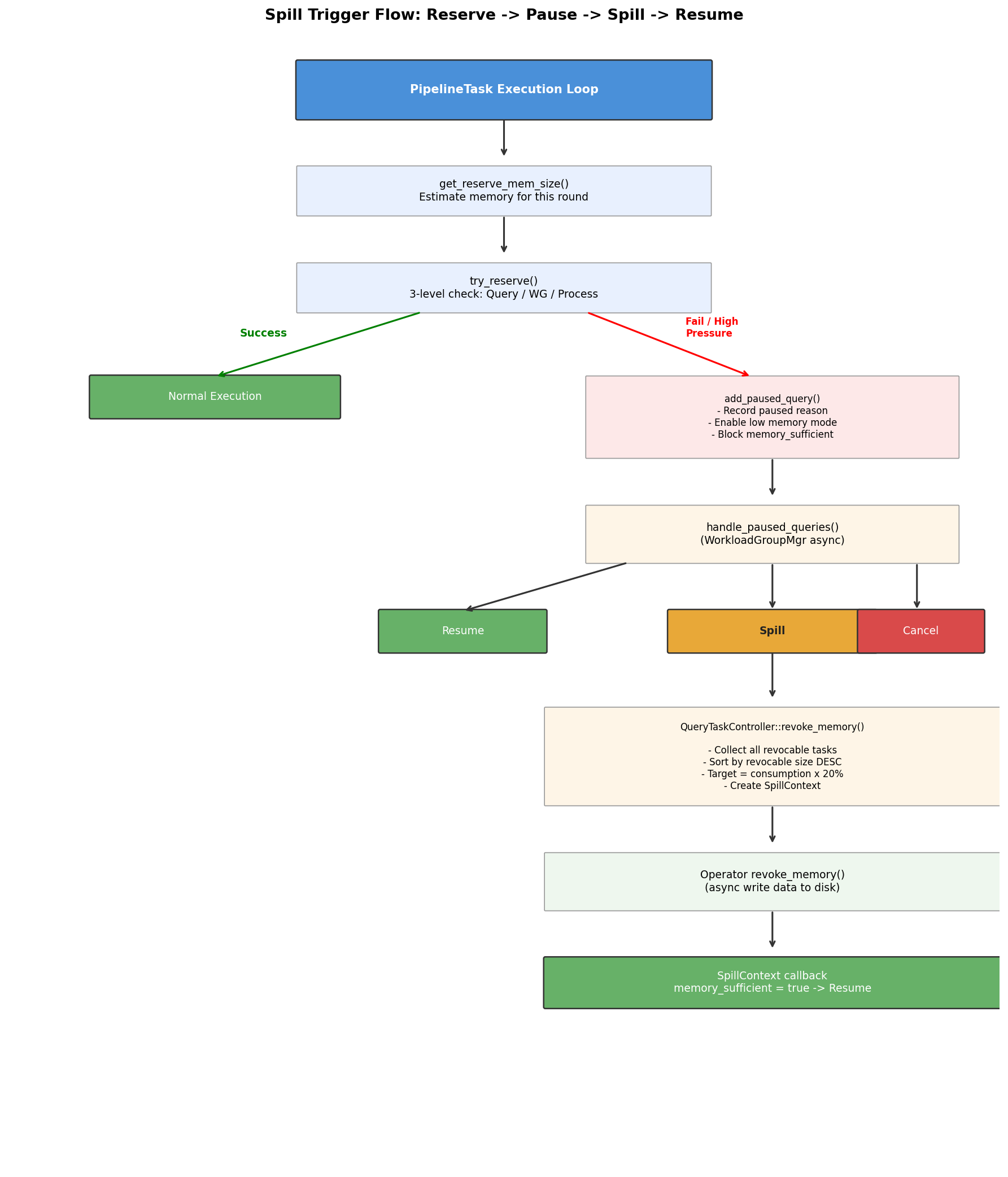
Overall trigger flow: reserve, pause, spill, resume
Reserve Memory: Three-Level Validation
Before each execution round, PipelineTask estimates how much memory the operator will need for the next step, then calls try_reserve() to reserve that amount. This isn't a real malloc, it's a pre-check to determine whether execution should continue before entering operator logic.
try_reserve() validates three constraints simultaneously:
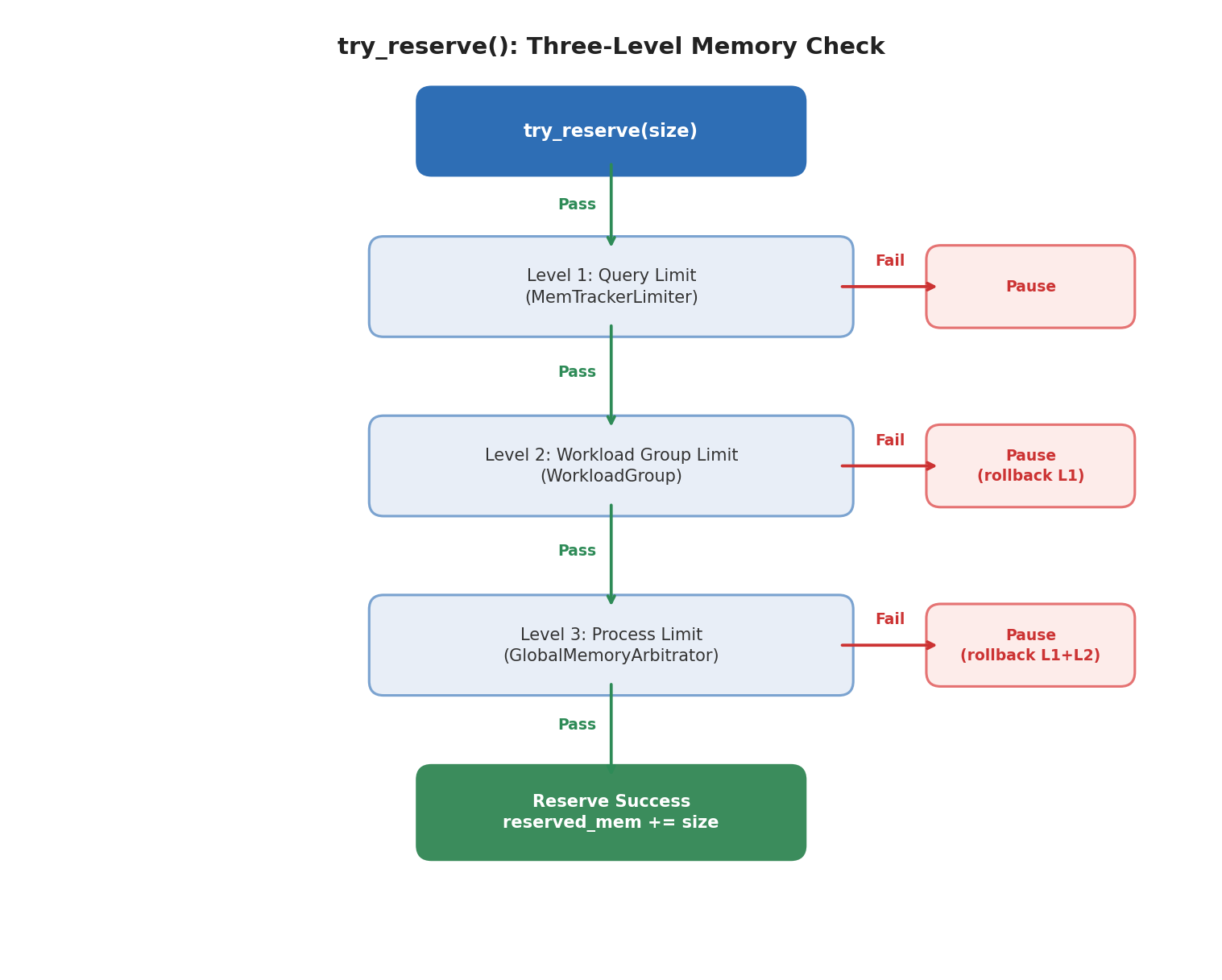
Three-level reserve validation
Key design note: When enable_reserve_memory is on, QueryContext will disable the query tracker's immediate hard check. Apache Doris prefers that queries enter a "pausable and spillable" path rather than failing immediately when a limit is hit.
Proactive Spill Trigger
Beyond the passive trigger (reserve failure), PipelineTask also checks proactively whether spill should be initiated early. Spill triggers when all three conditions are met simultaneously:
| Condition | Description |
|---|---|
| reserve_size × parallelism > query_limit / 5 | The estimated reserve for this round is large relative to the query limit (exceeds 20% across concurrency dimensions) |
| System under high memory pressure | Query memory usage ≥ 90%, or Workload Group touches low/high watermark |
| revocable_mem × parallelism ≥ query_limit × 20% | Current revocable memory in the pipeline is large enough to be worth spilling |
The goal of the proactive spill trigger is to avoid waiting until memory allocation fails. It proactively converts revocable memory to disk state when it detects memory under high pressure.
Paused Query State
When a reserve fails or proactive revoking triggers, the query enters a Paused state:
- Records the pause reason (
QUERY_MEMORY_EXCEEDED/WG_MEMORY_EXCEEDED/PROCESS_MEMORY_EXCEEDED) - Enables low memory mode
- Blocks on
memory_sufficient_dependency
The query stops executing and waits for WorkloadGroupMgr to handle it.
WorkloadGroupMgr Decision Logic
WorkloadGroupMgr follows different branches depending on the pause reason.
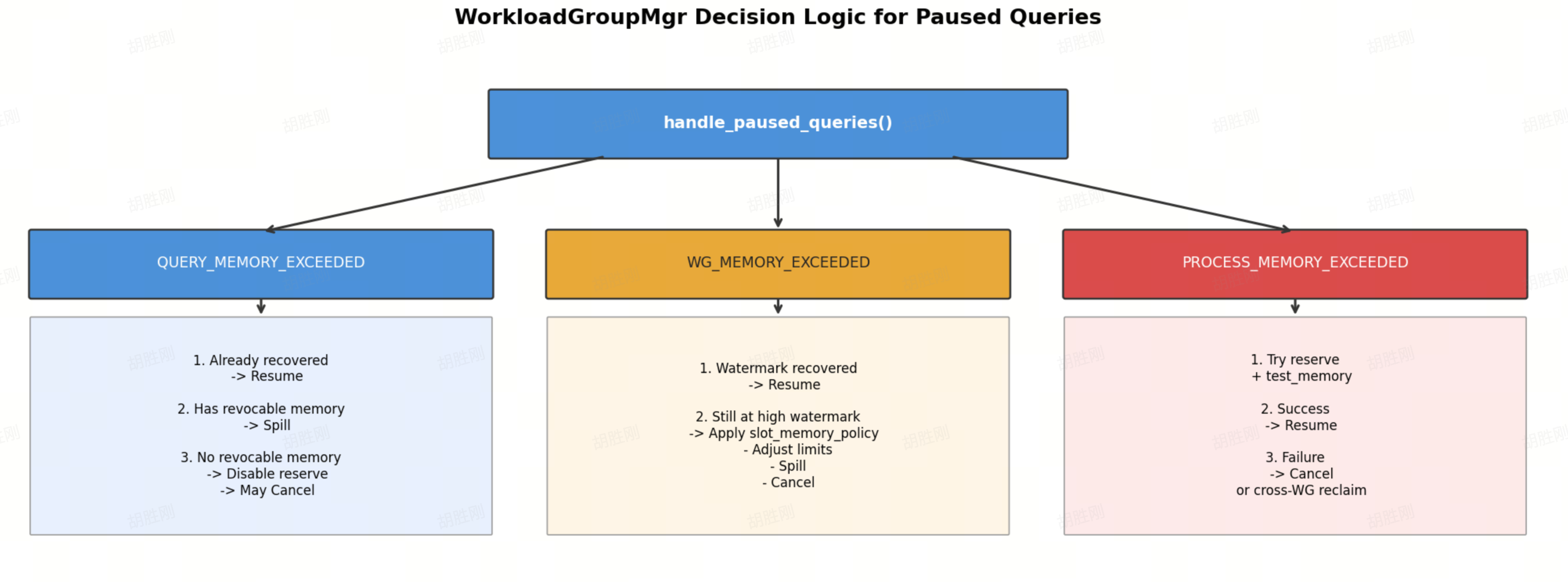
WorkloadGroupMgr decision flow
Two key constraints to keep in mind:
- Only Paused Queries are eligible for spill triggering by
WorkloadGroupMgr. QueryTaskControllerrequires that there are no running tasks in a fragment before starting revocation. Apache Doris doesn't allow uncoordinated memory reclamation of a query's state while it's actively executing.
QueryTaskController: Selecting Spill Targets
QueryTaskController::revoke_memory() executes the following logic:
- Collect all revocable tasks across all fragments
- Sort by revocable size in descending order
- Select a batch of tasks: target recovery amount = current actual memory consumption × 20% (uses actual consumption, not the limit. For example, if the limit is 1.6 GB but only 1 GB is in use, the target recovery amound is 200 MB, not 300 MB)
- Create a
SpillContextfor the selected tasks (with a completion callback) - Call each task's
revoke_memory(), conditional onrevocable_mem_size >= MIN_SPILL_WRITE_BATCH_MEM(512 KB) - When all tasks complete, the
SpillContextcallback fires →memory_sufficient = true→ query resumes scheduling
4. Shared Infrastructure
Although each operator implements spill differently, they share a common infrastructure layer.
SpillFileManager
Role: Global management of spill storage directories and disk resources.
                     SpillFileManager
                          │
          ┌───────────────┼───────────────┐
          │               │               │
    ┌─────▼─────┐  ┌─────▼─────┐  ┌─────▼─────┐
    │ SpillData │  │ SpillData │  │ SpillData │
    │ Dir (SSD) │  │ Dir (SSD) │  │ Dir (HDD) │
    └───────────┘  └───────────┘  └───────────┘
Key behaviors:
- Disk selection: Prefers SSD. Selects among available disks in ascending order of usage rate.
- Background GC: Periodically scans and cleans expired spill directories.
- Capacity management: Checks remaining disk space via
reach_capacity_limit(). - Read/write metrics: Maintains global counters for spill read and write byte totals.
SpillFile, SpillFileWriter, and SpillFileReader
SpillFile is a logical file abstraction that can automatically split into multiple parts under the hood:
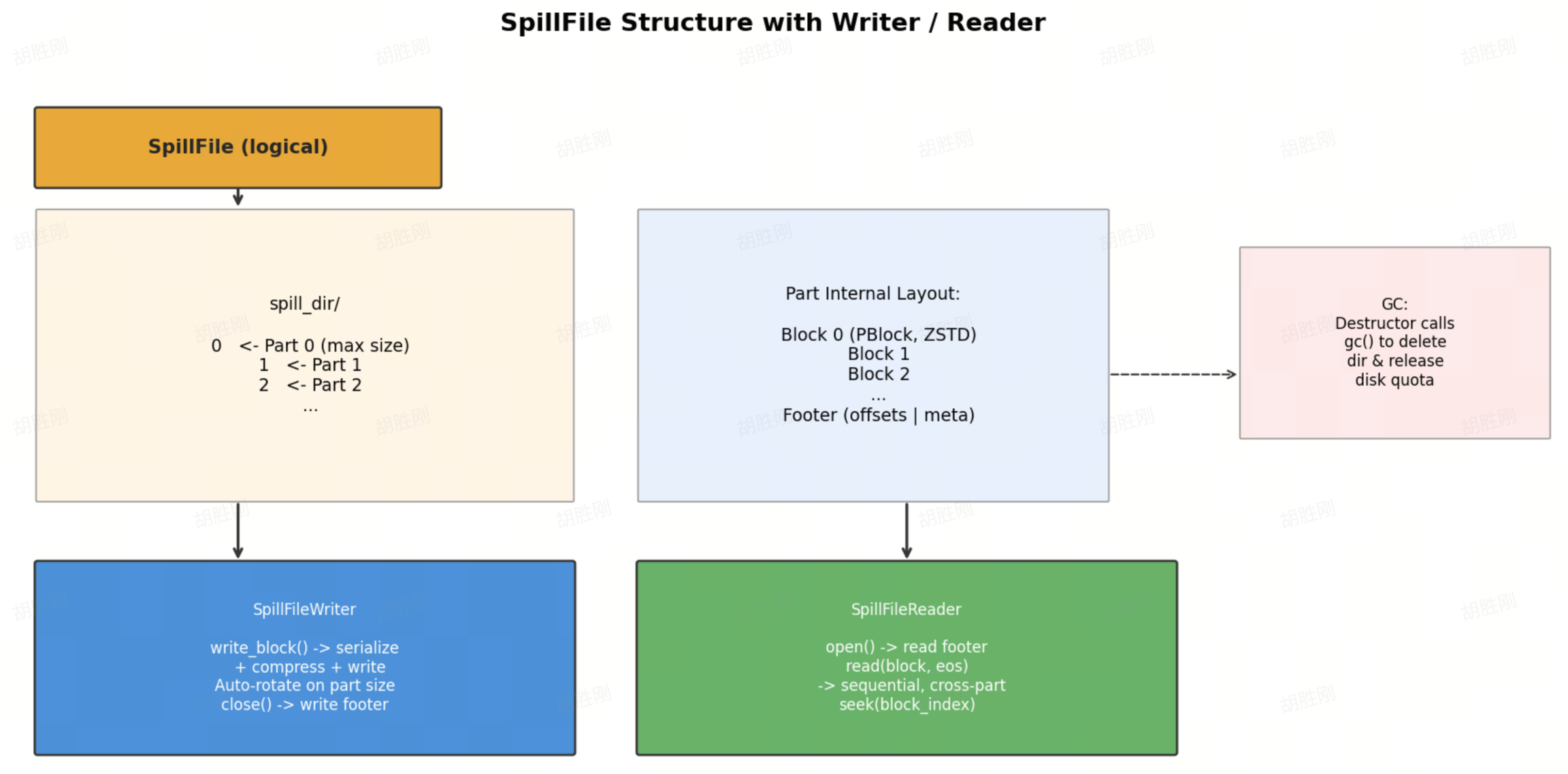
SpillFile internals
This design lets upper-level operators focus on "write block / read block" without managing file splitting or metadata.
Fault tolerance: SpillFile's destructor automatically calls gc() to delete the spill directory and release the disk quota. Even if the writer doesn't close normally, byte counts continue to be tracked, ensuring GC has accurate disk usage statistics.
SpillRepartitioner
SpillRepartitioner is the core building block for multi-level spill in Apache Doris, primarily used by Hash Join and Aggregation:
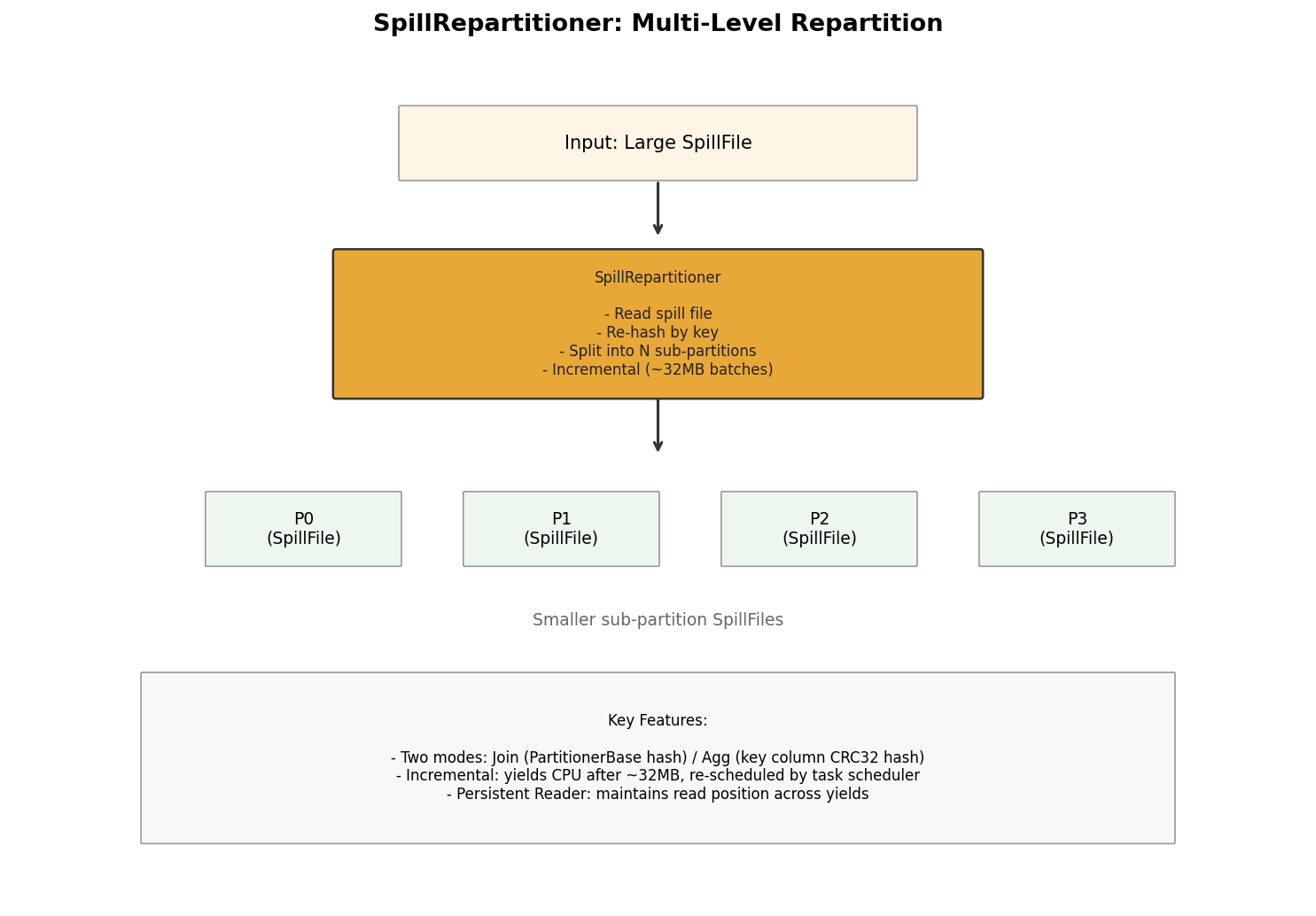
SpillRepartitioner
Key characteristics:
- Two modes: Join mode (uses
PartitionerBasefor hashing) and Aggregation mode (uses key column index for CRC32 hashing). - Incremental processing: Processes approximately 32 MB at a time, then yields CPU back to the scheduler to avoid long blocking.
- Persistent Reader: Maintains read position across yields, avoiding redundant re-reads.
5. How Spill to Disk Works with Each Operator
Hash Join:
Hash Join is the most complex part of Apache Doris's spill implementation because it requires coordination between the build and probe sides, and recovery may require recursive repartitioning.
Normal Path vs. Spill Path
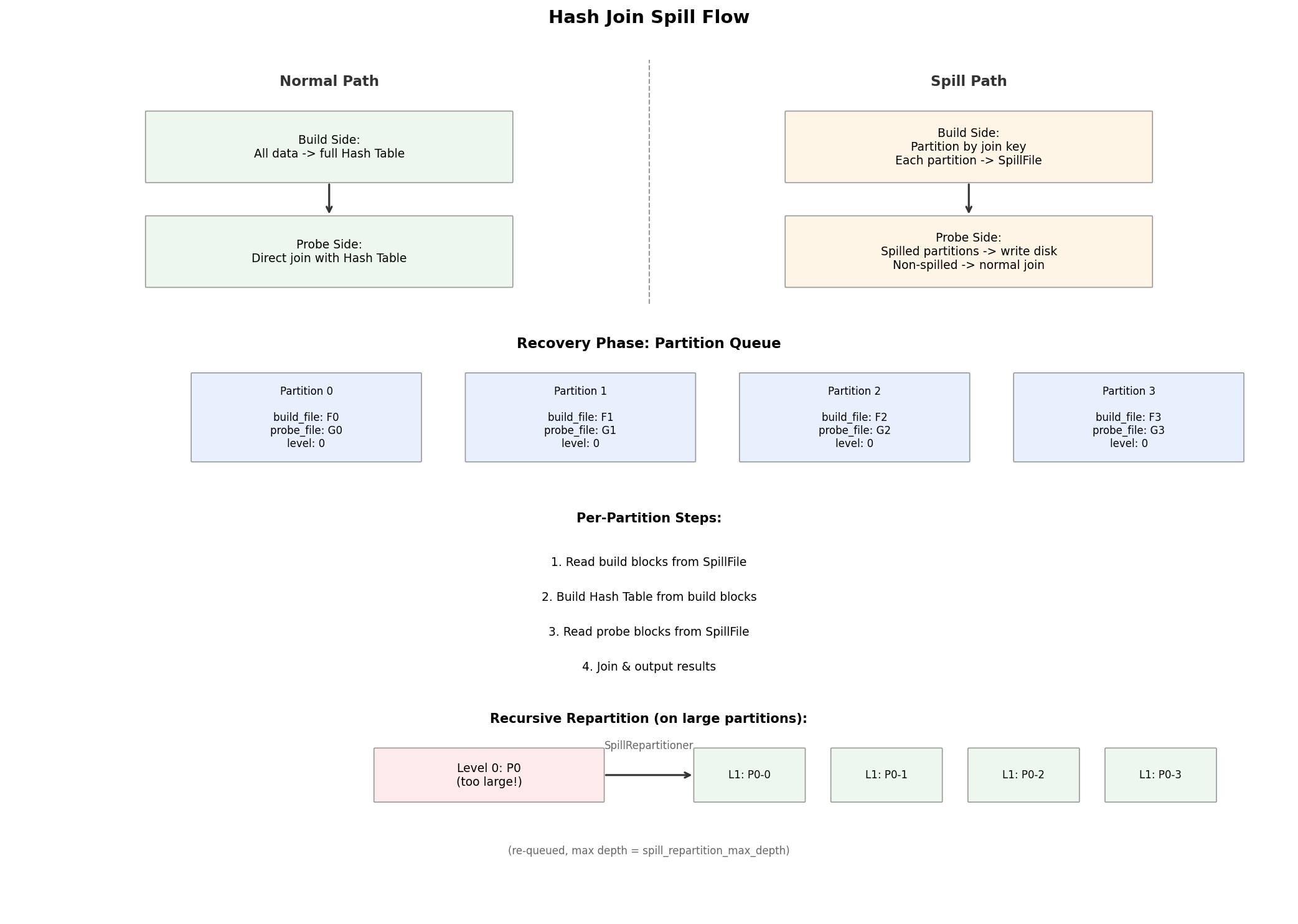
First Spill: Build Side Switches from Full Hash Table to Partitioned Writes
- First spill (
is_spilled == false): Extract build data from the internal hash table → partition by join key → write each partition to its ownSpillFile→ disable Runtime Filter (the build side is no longer fully resident in memory) - Subsequent spills (
is_spilled == true): Continue flushing the current in-memory partition blocks to their corresponding spill files
Why the Probe Side Also Spills
Once a build-side partition has been written to disk, the probe side cannot use the current hash table for that partition, because the table no longer contains the complete build data. The probe operator partitions using the same join key, writes probe rows for spilled partitions to disk, and continues joining non-spilled partitions against the in-memory hash table.
Recovery Phase: Processing Partitions One at a Time
When input is exhausted, the probe side assembles, builds, and probe spill files into a unified Partition Queue (_spill_partition_queue). Each element is a JoinSpillPartitionInfo containing both a build_file and a probe_file. Each partition is processed in four steps:
- Recover build blocks from the build spill file into memory
- Build the internal hash table from those build blocks
- Recover probe blocks from the probe spill file
- Complete the join for that partition and output results
Recursive Repartitioning: Handling Data Skew
If a recovered partition's build data is still too large for available memory, SpillRepartitioner splits the current build/probe partition into next-level sub-partitions (level + 1), which are placed back into _spill_partition_queue. This repeats up to spill_repartition_max_depth levels.
This means Apache Doris' Hash Join spill is not a simple write to disk, read back operation, it's partitioned execution with recursive partitioned recovery as needed.
Aggregation:
This section covers the Partitioned Aggregation spill. Streaming Aggregation does not support spill; related parameters only limit its memory usage.
Sink Side: Serialize Group State and Partition to Disk
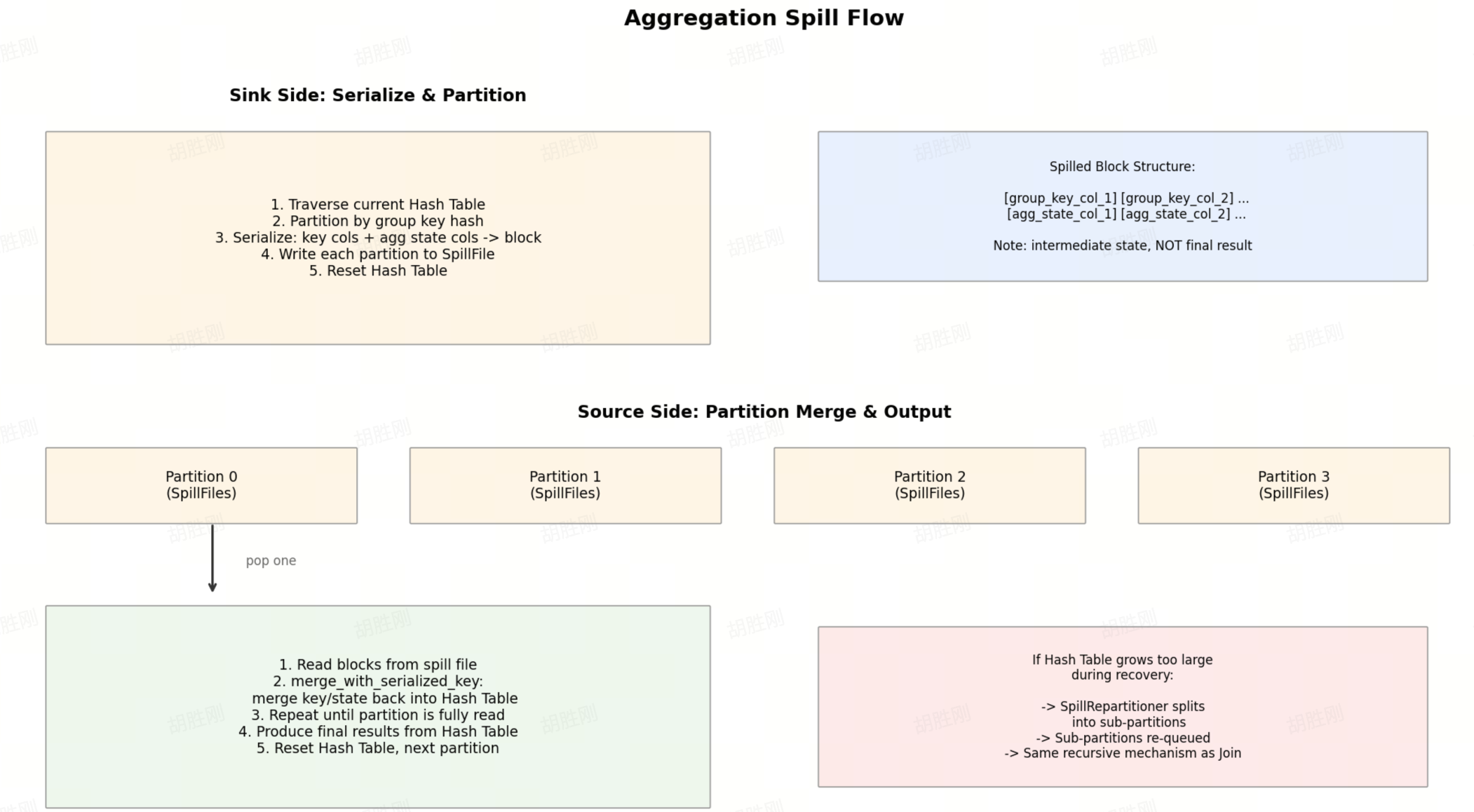
When revoke_memory() triggers: iterate the current hash table → partition by group key hash → serialize key columns and aggregate state into blocks → write each partition to a SpillFile → reset the hash table.
Key point: Aggregation spill writes intermediate aggregation state, not final results. The same group may be spilled multiple times, and recovery requires re-merging.
Source Side: Recover by Partition, Merge, Output
- Read a batch of blocks from the spill file
merge_with_serialized_key: merge the serialized key/state back into the in-memory hash table- Repeat until the current partition is fully read
- Produce final results from the hash table
- Reset the hash table and continue to the next partition
If the hash table grows large again during recovery, SpillRepartitioner creates sub-partitions, which are placed back into _partition_queue.
Aggregation recovery doesn't pipe spill file data directly to downstream operators. It first reconstructs the hash table, then produces output normally from that table.
Order By/Sort:
Spill for Sort is different from Join or Aggregation. It follows a classic External Merge Sort model, where the core unit is a sorted run rather than a partition.
Basic Approach
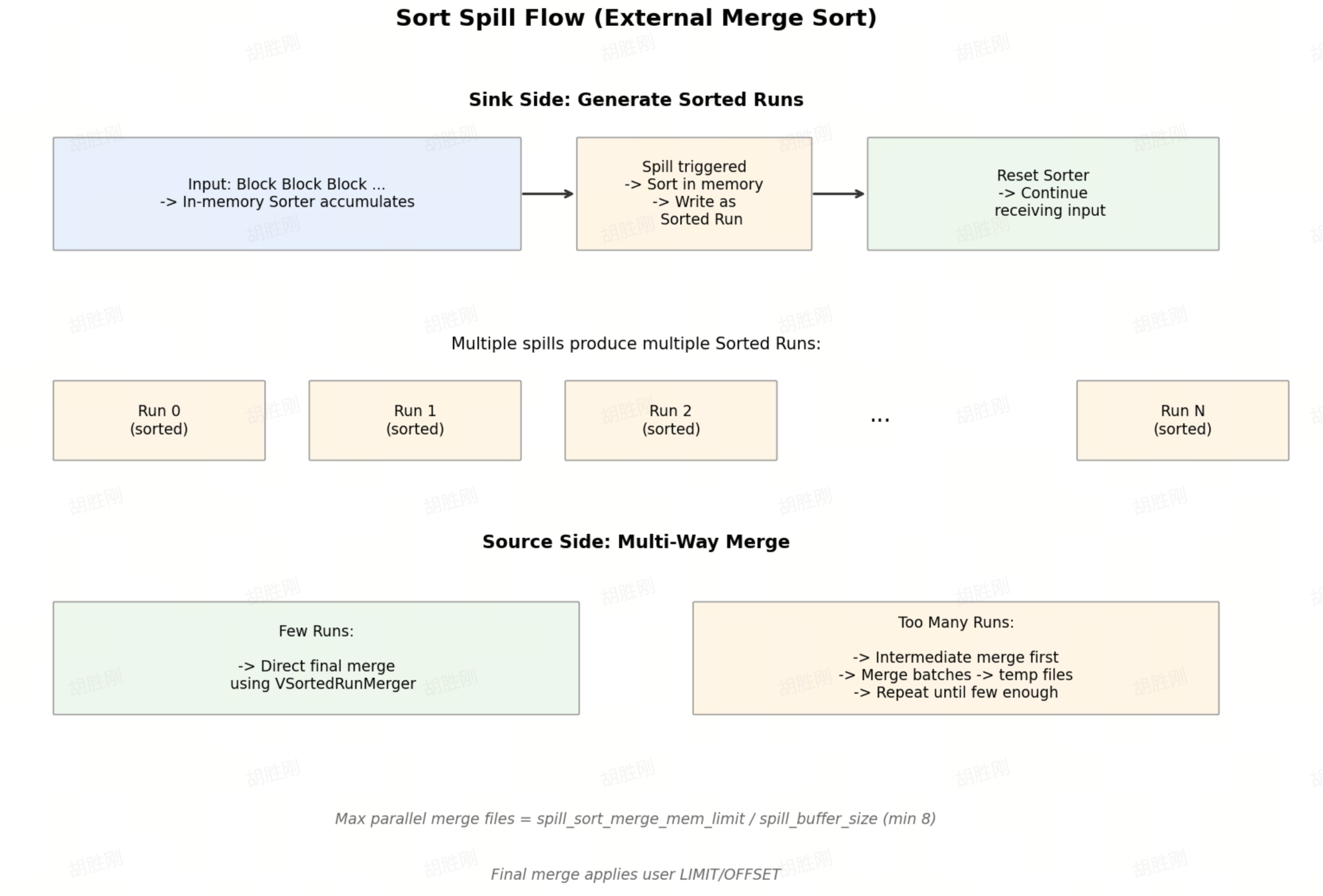
External Merge Sort flow
Sink Side
Each revoke_memory() trigger:
- Mark shared state as spilled, record limit/offset
- Create a new
SpillFile - Call the internal Sorter's
prepare_for_spill()to complete sort preparation - Loop reading sorted blocks and write them as one sorted run to disk
- Reset the sorter and continue receiving new input
Source Side: Multi-Way Merge
- Fewer runs: Use
VSortedRunMergerdirectly for the final merge. - Too many runs: Select a batch of runs for an intermediate merge to generate a temporary spill file, then repeat until the run count is small enough.
The number of files that can be merged in parallel = spill_sort_merge_mem_limit_bytes ÷ spill_buffer_size_bytes (minimum 8). The user query's limit/offset is applied only in the final merge round.
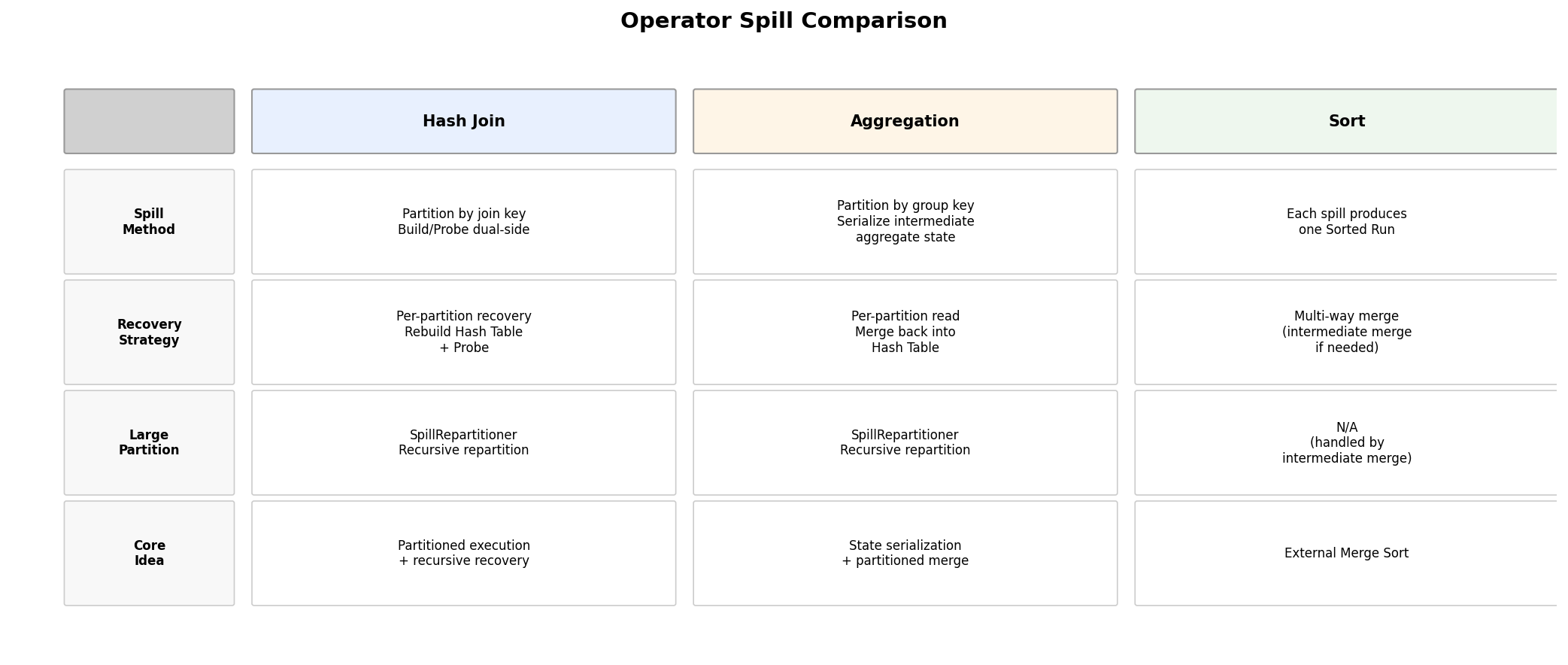
Operator Comparison Summary
6. Key Configuration Parameters
The most important parameters in the current implementation:
| Parameter | Default | Description |
|---|---|---|
enable_spill | false | Enable spill to disk |
enable_force_spill | false | Force the spill path regardless of reserve and WG watermark checks. Testing only. |
enable_reserve_memory | true | Enable the "reserve first, then execute" mechanism |
spill_min_revocable_mem | 4MB | Minimum revocable memory considered worth spilling |
spill_buffer_size_bytes | 8MB | Spill block size; also affects the sort merge read buffer |
spill_hash_join_partition_count | 4 | Initial partition count for joins |
spill_aggregation_partition_count | 4 | Initial partition count for aggregations |
spill_repartition_max_depth | 8 | Maximum recursive repartitioning depth for joins and aggregations |
spill_join_build_sink_mem_limit_bytes | 64MB | Memory threshold above which the join build sink proactively flushes after entering spilled state |
spill_aggregation_sink_mem_limit_bytes | 64GB | Proactive flush threshold for the aggregation sink |
spill_sort_sink_mem_limit_bytes | 64MB | Proactive flush threshold for the sort sink |
spill_sort_merge_mem_limit_bytes | 64MB | Total memory budget for the sort merge phase |
Key Workload Group watermark parameters:
memory_low_watermarkmemory_high_watermarkslot_memory_policy
Note: low_watermark and high_watermark don't directly mean "start spilling." They signal high memory pressure to the system, which then influences how paused queries are handled.
7. Observability
When a spill occurs, these tools are available for monitoring and debugging:
- Query Profile: Spilled operators show
"Spilled": "true"in their profile, along with timers likeSpillWriteSerializeBlockTimeandSpillMergeSortTime. These help identify where disk write latency is concentrated. - Logs: Key spill events are logged at INFO level (e.g.,
"all spill tasks done, resume it"). More detailed partition-level information is available by enablingVLOG_DEBUG. - Force spill testing (
enable_force_spill): Setting this totruebypasses reserve and Workload Group watermark checks and forces all spill-capable operators through the disk path. Useful for verifying spill correctness in testing without needing to reproduce real memory pressure.
8. Benchmark: TPC-DS 10TB on a Single Node
Test Environment and Configuration
Test environment:
- 1 FE (8C16G) + 1 BE (8C16G, 500GB SSD)
- Labeled as 1BE 10T TPC-DS test
Session variables used:
set global enable_profile = true;
set global spill_hash_join_partition_count = 8;
set global broadcast_row_count_limit = 3000000.0;
set global query_timeout = 28800;
set global profile_level = 2;
set global enable_spill = true;
set global spill_join_build_sink_mem_limit_bytes = 1073741824;
set global spill_aggregation_partition_count = 8;
set global spill_aggregation_sink_mem_limit_bytes = 1073741824;
set global exec_mem_limit = 8589934592;
set global max_file_scanners_concurrency = 8;
Workload Group configuration:
alter workload group normal properties(
    'slot_memory_policy' = 'dynamic'
);
BE configuration:
disable_storage_page_cache = true
spill_storage_limit = 95%
spill_storage_root_path = /mnt/disk1/storage
mem_limit = 14G
max_sys_mem_available_low_water_mark_bytes = 268435456
soft_mem_limit_frac = 0.95
disable_segment_cache = true
max_external_file_meta_cache_num = 64
Schema Setup
Data was prepared using an external catalog:
CREATE CATALOG `dlf` PROPERTIES (
    "type" = "hms",
    "ipc.client.fallback-to-simple-auth-allowed" = "true",
    "hive.metastore.type" = "dlf",
    "dlf.uid" = "217316283625971977",
    "dlf.secret_key" = "xxxx",
    "dlf.region" = "cn-beijing",
    "dlf.proxy.mode" = "DLF_ONLY",
    "dlf.endpoint" = "dlf-vpc.cn-beijing.aliyuncs.com",
    "dlf.catalog.id" = "emr_dev",
    "dlf.access_key" = "xxxxx"
);
Query Results
| Query | Timestamp | Time_ms | PeakMemoryBytes | ScanBytes | SpillWriteBytesToLocalStorage | SpillReadBytesFromLocalStorage | ScanBytesFromRemoteStorage |
|---|---|---|---|---|---|---|---|
| Query1 | 2026-03-11 10:09:04.678 | 249511 | 6.09 GB | 25.43 GB | 11.81 GB | 11.81 GB | 25.43 GB |
| Query2 | 2026-03-11 10:13:14.208 | 288281 | 2.01 GB | 84.17 GB | 0 | 0 | 84.17 GB |
| Query3 | 2026-03-11 10:18:02.509 | 309598 | 560.97 MB | 194.32 GB | 0 | 0 | 194.32 GB |
| Query4 | 2026-03-11 10:23:12.145 | 5096701 | 8.10 GB | 747.52 GB | 263.04 GB | 277.70 GB | 747.52 GB |
| Query5 | 2026-03-11 11:48:08.881 | 560352 | 4.67 GB | 518.04 GB | 0 | 0 | 518.04 GB |
| Query6 | 2026-03-11 11:57:29.252 | 296185 | 3.61 GB | 168.82 GB | 0 | 0 | 168.82 GB |
| Query7 | 2026-03-11 12:02:25.451 | 623932 | 1.28 GB | 367.66 GB | 0 | 0 | 367.66 GB |
| Query8 | 2026-03-11 12:12:49.410 | 214793 | 1.21 GB | 126.25 GB | 0 | 0 | 126.25 GB |
| Query9 | 2026-03-11 12:16:24.225 | 1904681 | 6.45 GB | 1094.79 GB | 0 | 0 | 1094.79 GB |
| Query10 | 2026-03-11 12:48:08.925 | 262662 | 5.59 GB | 66.55 GB | 472.18 MB | 470.99 MB | 66.55 GB |
| Query11 | 2026-03-11 12:52:31.604 | 3030705 | 8.00 GB | 249.68 GB | 96.46 GB | 100.90 GB | 249.68 GB |
| Query12 | 2026-03-11 13:43:02.327 | 89220 | 887.83 MB | 62.61 GB | 0 | 0 | 62.61 GB |
| Query13 | 2026-03-11 13:44:31.562 | 701969 | 1.98 GB | 462.63 GB | 0 | 0 | 462.63 GB |
| Query14 | 2026-03-11 13:56:13.560 | 2362297 | 7.34 GB | 777.25 GB | 1.36 GB | 1.36 GB | 777.25 GB |
| Query14_1 | 2026-03-11 14:35:35.881 | 2029864 | 6.96 GB | 834.18 GB | 0 | 0 | 834.18 GB |
| Query15 | 2026-03-11 15:09:25.761 | 108941 | 5.16 GB | 44.86 GB | 0 | 0 | 44.86 GB |
| Query16 | 2026-03-11 15:11:14.717 | 2709611 | 6.53 GB | 194.81 GB | 52.38 GB | 52.37 GB | 194.81 GB |
| Query17 | 2026-03-11 15:56:24.345 | 1436164 | 5.90 GB | 357.26 GB | 52.10 GB | 52.10 GB | 357.26 GB |
| Query18 | 2026-03-11 16:20:20.525 | 663571 | 8.24 GB | 249.82 GB | 1.94 GB | 1.94 GB | 249.82 GB |
| Query19 | 2026-03-11 16:31:24.111 | 443592 | 5.05 GB | 277.74 GB | 0 | 0 | 277.74 GB |
| Query20 | 2026-03-11 16:38:47.718 | 175846 | 914.79 MB | 121.82 GB | 0 | 0 | 121.82 GB |
| Query21 | 2026-03-11 16:41:43.579 | 12984 | 1.12 GB | 6.44 GB | 0 | 0 | 6.44 GB |
| Query22 | 2026-03-11 16:41:56.576 | 37106 | 2.07 GB | 6.46 GB | 0 | 0 | 6.46 GB |
| Query23 | 2026-03-11 16:42:33.704 | 8484933 | 8.17 GB | 506.22 GB | 434.40 GB | 434.39 GB | 506.22 GB |
| Query23_1 | 2026-03-11 19:03:58.655 | 9580074 | 8.10 GB | 507.09 GB | 495.48 GB | 495.46 GB | 507.09 GB |
| Query24 | 2026-03-11 21:43:38.748 | 1402735 | 5.33 GB | 259.23 GB | 35.90 GB | 35.90 GB | 259.23 GB |
| Query24_1 | 2026-03-11 22:07:01.500 | 1373745 | 5.32 GB | 259.20 GB | 35.92 GB | 35.91 GB | 259.20 GB |
| Query25 | 2026-03-11 22:29:55.260 | 1420038 | 5.58 GB | 492.23 GB | 36.24 GB | 36.24 GB | 492.23 GB |
| Query26 | 2026-03-11 22:53:35.313 | 306443 | 1.37 GB | 189.45 GB | 0 | 0 | 189.45 GB |
| Query27 | 2026-03-11 22:58:41.771 | 569707 | 2.69 GB | 339.86 GB | 0 | 0 | 339.86 GB |
| Query28 | 2026-03-11 23:08:11.494 | 1978179 | 3.50 GB | 968.46 GB | 0 | 0 | 968.46 GB |
| Query29 | 2026-03-11 23:41:09.688 | 3629652 | 5.52 GB | 361.30 GB | 202.97 GB | 202.96 GB | 361.30 GB |
| Query30 | 2026-03-12 00:41:39.356 | 74567 | 7.46 GB | 13.95 GB | 2.55 GB | 2.55 GB | 13.95 GB |
| Query31 | 2026-03-12 00:42:53.938 | 338011 | 5.58 GB | 169.21 GB | 0 | 0 | 169.21 GB |
| Query32 | 2026-03-12 00:48:31.965 | 192334 | 432.80 MB | 121.80 GB | 0 | 0 | 121.80 GB |
| Query33 | 2026-03-12 00:51:44.318 | 588839 | 3.47 GB | 475.30 GB | 0 | 0 | 475.30 GB |
| Query34 | 2026-03-12 01:01:33.174 | 439078 | 5.05 GB | 74.20 GB | 947.62 MB | 947.52 MB | 74.20 GB |
| Query35 | 2026-03-12 01:08:52.411 | 421239 | 6.61 GB | 66.72 GB | 5.38 GB | 5.38 GB | 66.72 GB |
| Query36 | 2026-03-12 01:15:53.671 | 560406 | 2.19 GB | 357.64 GB | 0 | 0 | 357.64 GB |
| Query37 | 2026-03-12 01:25:14.091 | 125019 | 717.86 MB | 68.33 GB | 0 | 0 | 68.33 GB |
| Query38 | 2026-03-12 01:27:19.123 | 963870 | 8.03 GB | 67.00 GB | 25.08 GB | 25.08 GB | 67.00 GB |
| Query39 | 2026-03-12 01:43:23.012 | 10118 | 3.90 GB | 6.17 GB | 0 | 0 | 6.17 GB |
| Query39_1 | 2026-03-12 01:43:33.156 | 7378 | 4.14 GB | 6.17 GB | 0 | 0 | 6.17 GB |
| Query40 | 2026-03-12 01:43:40.548 | 772176 | 4.99 GB | 132.54 GB | 22.24 GB | 22.24 GB | 132.54 GB |
| Query41 | 2026-03-12 01:56:32.740 | 381 | 219.99 MB | 0 | 0 | 0 | 0 |
| Query42 | 2026-03-12 01:56:33.135 | 355028 | 705.32 MB | 242.20 GB | 0 | 0 | 242.20 GB |
| Query43 | 2026-03-12 02:02:28.179 | 233200 | 1.40 GB | 71.82 GB | 0 | 0 | 71.82 GB |
| Query44 | 2026-03-12 02:06:21.393 | 1641881 | 1.27 GB | 0 | 0 | 0 | 0 |
| Query45 | 2026-03-12 02:33:43.290 | 102558 | 5.62 GB | 55.25 GB | 0 | 0 | 55.25 GB |
| Query46 | 2026-03-12 02:35:25.862 | 845444 | 6.90 GB | 242.34 GB | 1.26 GB | 1.26 GB | 242.34 GB |
| Query47 | 2026-03-12 02:49:31.326 | 659900 | 1.83 GB | 204.06 GB | 0 | 0 | 204.06 GB |
| Query48 | 2026-03-12 03:00:31.241 | 468186 | 1.22 GB | 249.58 GB | 0 | 0 | 249.58 GB |
| Query49 | 2026-03-12 03:08:19.445 | 1103747 | 4.54 GB | 759.59 GB | 0 | 0 | 759.59 GB |
| Query50 | 2026-03-12 03:26:43.210 | 579398 | 4.50 GB | 233.52 GB | 0 | 0 | 233.52 GB |
| Query51 | 2026-03-12 03:36:22.630 | 2519960 | 7.57 GB | 243.48 GB | 29.05 GB | 29.05 GB | 243.48 GB |
| Query52 | 2026-03-12 04:18:22.605 | 350151 | 718.79 MB | 242.20 GB | 0 | 0 | 242.20 GB |
| Query53 | 2026-03-12 04:24:12.772 | 339872 | 618.42 MB | 204.05 GB | 0 | 0 | 204.05 GB |
| Query54 | 2026-03-12 04:29:52.662 | 425603 | 4.80 GB | 265.87 GB | 0 | 0 | 265.87 GB |
| Query55 | 2026-03-12 04:36:58.280 | 347111 | 752.24 MB | 242.20 GB | 0 | 0 | 242.20 GB |
| Query56 | 2026-03-12 04:42:45.407 | 626281 | 2.79 GB | 476.64 GB | 0 | 0 | 476.64 GB |
| Query57 | 2026-03-12 04:53:11.704 | 309493 | 2.10 GB | 99.12 GB | 0 | 0 | 99.12 GB |
| Query58 | 2026-03-12 04:58:21.216 | 475025 | 2.30 GB | 402.98 GB | 0 | 0 | 402.98 GB |
| Query59 | 2026-03-12 05:06:16.257 | 566388 | 1.61 GB | 71.82 GB | 0 | 0 | 71.82 GB |
| Query60 | 2026-03-12 05:15:42.660 | 590653 | 3.19 GB | 476.60 GB | 0 | 0 | 476.60 GB |
| Query61 | 2026-03-12 05:25:33.328 | 882132 | 4.36 GB | 592.47 GB | 0 | 0 | 592.47 GB |
| Query62 | 2026-03-12 05:40:15.477 | 85728 | 1.77 GB | 26.01 GB | 0 | 0 | 26.01 GB |
| Query63 | 2026-03-12 05:41:41.221 | 336360 | 720.48 MB | 204.06 GB | 0 | 0 | 204.06 GB |
| Query64 | 2026-03-12 05:47:17.598 | 1559295 | 8.00 GB | 617.30 GB | 2.15 GB | 2.15 GB | 617.30 GB |
| Query65 | 2026-03-12 06:13:17.169 | 2315970 | 7.42 GB | 408.10 GB | 60.44 GB | 60.44 GB | 408.10 GB |
| Query66 | 2026-03-12 06:51:53.162 | 298893 | 3.04 GB | 221.15 GB | 0 | 0 | 221.15 GB |
| Query67 | 2026-03-12 06:56:52.069 | 9408439 | 6.81 GB | 228.59 GB | 373.37 GB | 373.36 GB | 228.59 GB |
| Query68 | 2026-03-12 09:33:40.523 | 1177568 | 5.38 GB | 366.06 GB | 534.01 MB | 533.98 MB | 366.06 GB |
| Query69 | 2026-03-12 09:53:18.106 | 124151 | 1.13 GB | 925.67 MB | 0 | 0 | 925.67 MB |
| Query70 | 2026-03-12 09:55:22.272 | 545681 | 1.31 GB | 146.79 GB | 0 | 0 | 146.79 GB |
| Query71 | 2026-03-12 10:04:27.968 | 613861 | 2.00 GB | 453.86 GB | 0 | 0 | 453.86 GB |
| Query72 | 2026-03-12 10:14:42.009 | 8243155 | 7.93 GB | 182.69 GB | 131.67 GB | 131.65 GB | 182.69 GB |
| Query73 | 2026-03-12 12:32:05.186 | 435543 | 5.01 GB | 74.11 GB | 944.57 MB | 944.48 MB | 74.11 GB |
| Query74 | 2026-03-12 12:39:20.752 | 1726486 | 7.75 GB | 173.95 GB | 65.54 GB | 70.36 GB | 173.95 GB |
| Query75 | 2026-03-12 13:08:07.261 | 3557968 | 8.00 GB | 565.43 GB | 196.27 GB | 196.26 GB | 565.43 GB |
| Query76 | 2026-03-12 14:07:25.249 | 579602 | 2.47 GB | 465.38 GB | 0 | 0 | 465.38 GB |
| Query77 | 2026-03-12 14:17:04.874 | 455135 | 4.22 GB | 450.39 GB | 0 | 0 | 450.39 GB |
| Query78 | 2026-03-12 14:24:40.031 | 17452931 | 7.98 GB | 591.57 GB | 1035.60 GB | 1035.53 GB | 591.57 GB |
| Query79 | 2026-03-12 19:15:32.983 | 800549 | 8.00 GB | 241.61 GB | 1.15 GB | 1.15 GB | 241.61 GB |
| Query80 | 2026-03-12 19:28:53.555 | 2741950 | 7.85 GB | 830.76 GB | 121.44 GB | 121.44 GB | 830.76 GB |
| Query81 | 2026-03-12 20:14:35.526 | 90319 | 6.61 GB | 24.75 GB | 2.19 GB | 2.19 GB | 24.75 GB |
| Query82 | 2026-03-12 20:16:05.864 | 220234 | 919.21 MB | 133.12 GB | 0 | 0 | 133.12 GB |
| Query83 | 2026-03-12 20:19:46.119 | 54538 | 1.61 GB | 34.45 GB | 0 | 0 | 34.45 GB |
| Query84 | 2026-03-12 20:20:40.676 | 29747 | 1.01 GB | 14.12 GB | 0 | 0 | 14.12 GB |
| Query85 | 2026-03-12 20:21:10.443 | 195031 | 6.93 GB | 117.46 GB | 0 | 0 | 117.46 GB |
| Query86 | 2026-03-12 20:24:25.492 | 135832 | 1.48 GB | 63.11 GB | 0 | 0 | 63.11 GB |
| Query87 | 2026-03-12 20:26:41.342 | 903848 | 8.00 GB | 67.03 GB | 19.99 GB | 19.99 GB | 67.03 GB |
| Query88 | 2026-03-12 20:41:45.212 | 1366476 | 3.91 GB | 274.00 GB | 0 | 0 | 274.00 GB |
| Query89 | 2026-03-12 21:04:31.711 | 375284 | 1.22 GB | 204.05 GB | 0 | 0 | 204.05 GB |
| Query90 | 2026-03-12 21:10:47.015 | 65010 | 947.87 MB | 31.68 GB | 0 | 0 | 31.68 GB |
| Query91 | 2026-03-12 21:11:52.045 | 26913 | 817.90 MB | 0 | 0 | 0 | 0 |
| Query92 | 2026-03-12 21:12:18.977 | 97142 | 481.83 MB | 62.60 GB | 0 | 0 | 62.60 GB |
| Query93 | 2026-03-12 21:13:56.138 | 559349 | 4.51 GB | 277.95 GB | 0 | 0 | 277.95 GB |
| Query94 | 2026-03-12 21:23:15.507 | 1096824 | 6.34 GB | 89.60 GB | 22.16 GB | 22.15 GB | 89.60 GB |
| Query95 | 2026-03-12 21:41:32.353 | 13163692 | 6.99 GB | 94.48 GB | 81.08 GB | 80.97 GB | 94.48 GB |
| Query96 | 2026-03-13 01:20:56.065 | 161809 | 562.34 MB | 34.28 GB | 0 | 0 | 34.28 GB |
| Query97 | 2026-03-13 01:23:37.893 | 4394223 | 8.24 GB | 256.93 GB | 246.50 GB | 246.45 GB | 256.93 GB |
| Query98 | 2026-03-13 02:36:52.136 | 367533 | 1.13 GB | 242.21 GB | 0 | 0 | 242.21 GB |
| Query99 | 2026-03-13 02:42:59.752 | 179826 | 1.65 GB | 42.15 GB | 0 | 0 | 42.15 GB |
Important limitation: The Intersect/Except operator does not yet support spill. SQL involving that logic was rewritten using equivalent Join syntax for this test.
This reflects the current coverage boundary: spill mainly covers Join, Agg, and Sort. Set operators are not yet fully supported.
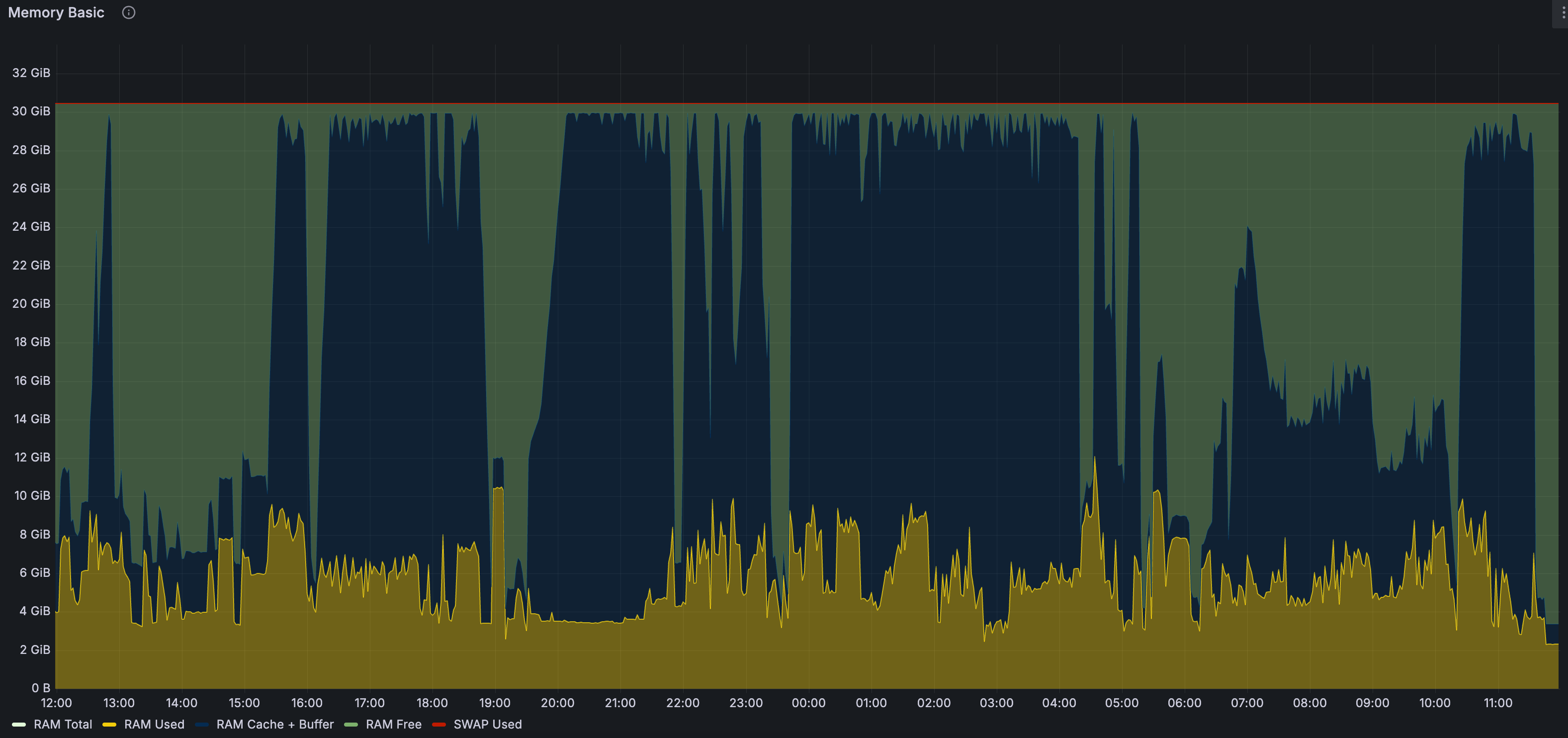
System Resource Usage
Memory usage:
CPU usage:
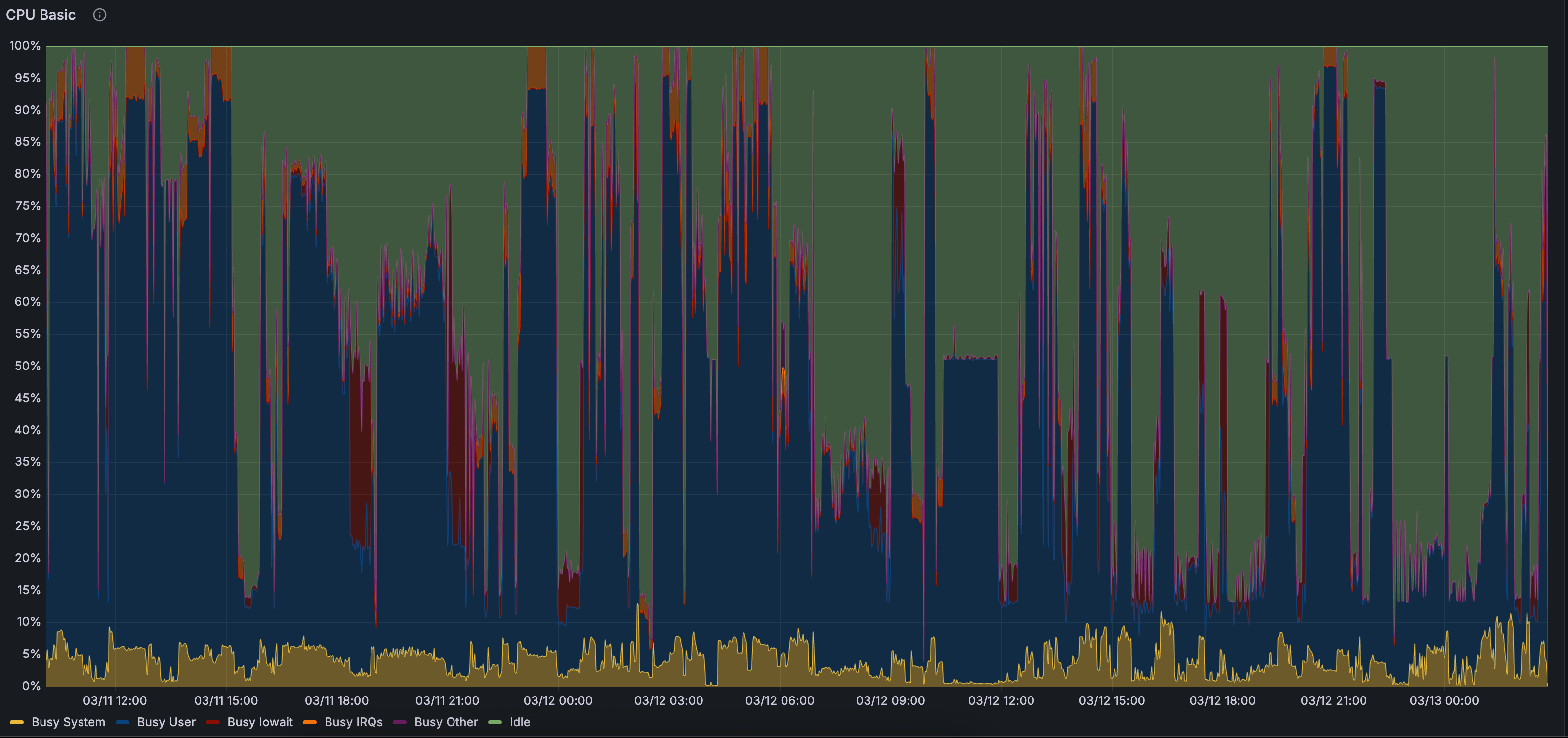
Representative Test Cases
Three representative SQL types cover the most important spill scenarios:
- q14 / q14_1: Centered on
cross_itemsandavg_salesCTEs, combining multi-table joins,Union All, aggregation,Having,Rollup,Order By, andLimitin a complex execution path. - q38: Joins three customer sets from
store_sales,catalog_sales, andweb_sales, validating execution under complex join combinations. - q87: Uses
Left Join + IS NULLto express semantics that would normally requireIntersect/Except, a workaround for the current Set spill limitation.
These cases validate that Apache Doris can stably combine and execute multiple operator spill mechanisms in real TPC-DS-style SQL.
Summary
To summarize the Apache Doris Spill to Disk mechanism in one sentence: Use Reserve Memory to detect risk early; WorkloadManager pauses the query; specific operators convert their revocable state into SpillFiles; and during recovery, that state is read back in smaller-granularity batches.
The overall flow:
PipelineTask::execute()
  ├── get_reserve_mem_size()  ──→  estimate memory needs for this round
  ├── _should_trigger_revoking()  ──→  check for high memory pressure
  │     ├── reserve × parallelism > query_limit / 5 ?
  │     ├── query_used ≥ 90% or WG touches watermark?
  │     └── revocable × parallelism ≥ query_limit × 20%?
  ├── [high pressure] add_paused_query(QUERY_MEMORY_EXCEEDED)
  │     └── WorkloadGroupMgr::handle_paused_queries()
  │           ├── already recovered → resume
  │           ├── has revocable → QueryTaskController::revoke_memory()
  │           │     ├── sort tasks by revocable size
  │           │     ├── target recovery = consumption × 20%
  │           │     └── PipelineTask::do_revoke_memory()
  │           │           └── per-operator revoke_memory()
  │           └── no revocable → disable reserve, may cancel
  └── [normal] try_reserve() → continue execution
The three core operators differ in approach:
- Join: Partition by join key, coordinate spill across both build and probe sides, recursively repartition on recovery as needed.
- Aggregation: Serialize intermediate aggregation state and partition by key. During recovery, merge back into the hash table before producing output.
- Sort: Each spill produces one sorted run. Final output uses multi-way merge.
In addition, SpillIcebergTableSinkOperatorX (be/src/exec/operator/spill_iceberg_table_sink_operator.cpp) also implements revoke_memory(), supporting spill for Iceberg table write scenarios.
Operators that currently do not support spill include Window Functions / Analytic Functions and Set operators (Union/Intersect/Except). When these operators run out of memory, queries still terminate with an error.
The most important thing to understand about Apache Doris's Spill to Disk design: it's deeply embedded in Doris' execution engine, tightly coupled with PipelineTask, MemTracker, WorkloadGroup, and Operator State, making it a core scheduling mechanism in the execution engine itself.
Join the Apache Doris community on Slack and connect with Doris experts and users. If you're looking for a fully managed Apache Doris cloud service, contact the VeloDB team.