





Modern data platforms process massive datasets across distributed systems. To make this scalable computing accessible to Python developers, Apache Spark provides a Python interface known as PySpark.
PySpark is widely used in data engineering, machine learning pipelines, ETL workflows, and large-scale analytics systems. By combining Python with Spark’s distributed computing engine, PySpark allows teams to analyze huge datasets efficiently across clusters.
What Is PySpark?
PySpark is the Python API for Apache Spark that allows developers to perform distributed data processing using Python.
It provides a Python interface for interacting with the Spark engine, enabling developers to write big data applications using familiar Python syntax while leveraging Spark’s distributed computing capabilities.
Because PySpark runs on top of Apache Spark, it inherits Spark’s core strengths:
- Distributed computing across clusters
- In-memory parallel processing
- Fault-tolerant data pipelines
- Integration with the broader Spark ecosystem
PySpark is commonly used in big data analytics, machine learning workflows, and large-scale data processing systems.
Key capabilities of PySpark include:
- Distributed data processing across large clusters
- SQL queries through Spark SQL
- Machine learning using MLlib
- Real-time data processing with Structured Streaming
These capabilities make PySpark one of the most popular tools for modern data engineering and large-scale data analytics.
How PySpark Works
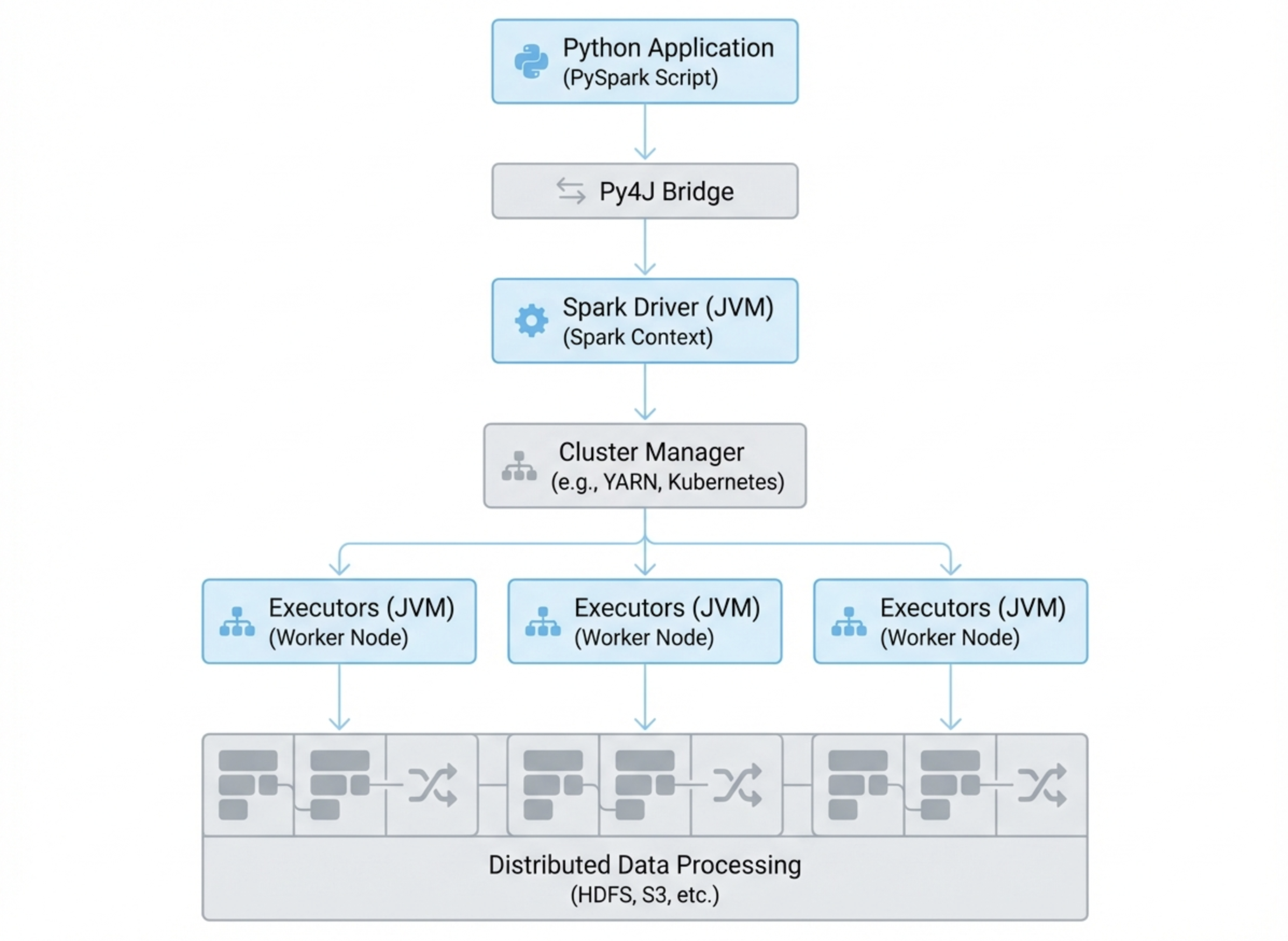 PySpark applications run on top of the Apache Spark engine, which processes data using distributed computing across multiple machines.
Instead of running computations on a single machine, Spark distributes tasks across a cluster of worker nodes. PySpark provides the Python interface used to define these computations.
PySpark Architecture
A typical PySpark application runs within the Spark distributed architecture, which includes the following components.
Driver
The driver program is the main process where the PySpark application runs. It creates the SparkSession, defines transformations, and coordinates tasks across the cluster.
Executors
Executors run on worker nodes and perform the actual data processing tasks. They execute transformations on distributed data and return results to the driver.
Cluster Manager
The cluster manager allocates resources across machines in the cluster. Common cluster managers include:
- Apache YARN
- Kubernetes
- Apache Mesos
- Standalone Spark clusters
Together, these components allow Spark to process very large datasets efficiently across many nodes.
How Python Communicates with Spark (Py4J)
Since Apache Spark is written in Scala and runs on the JVM (Java Virtual Machine), PySpark must bridge Python and Java.
This communication is handled through Py4J, a library that enables Python programs to interact with Java objects.
The execution process typically follows this flow:
Python code → Py4J → JVM → Spark engine → distributed cluster
When developers write PySpark code, the instructions are translated and executed by the Spark engine across the cluster.
Core Components of PySpark
PySpark exposes several core components of the Apache Spark ecosystem, each designed for different types of data workloads.
DataFrames
DataFrames are the most commonly used data abstraction in PySpark.
A DataFrame represents a distributed dataset organized into named columns, similar to a relational database table.
Key features include:
- Distributed storage across cluster nodes
- Lazy evaluation of transformations
- Automatic query optimization through the Catalyst optimizer
Because of these optimizations, DataFrames are typically preferred over lower-level abstractions such as RDDs.
Spark SQL
Spark SQL enables users to run SQL queries directly on structured datasets stored in DataFrames.
This allows analysts and data engineers to perform large-scale analytics using familiar SQL syntax.
Spark SQL supports:
- Standard SQL queries
- Integration with Hive tables
- Query optimization through the Catalyst engine
This capability makes Spark suitable for both engineering pipelines and analytical workloads.
MLlib
MLlib is the machine learning library included in Apache Spark.
It provides scalable algorithms for training models on distributed datasets.
Common MLlib features include:
- Classification algorithms
- Regression models
- Clustering methods such as K-Means
- Recommendation systems
MLlib enables data scientists to train models on large datasets without needing to move data to separate machine learning platforms.
Structured Streaming
Structured Streaming is Spark’s framework for real-time data processing.
It allows developers to process continuous data streams while using the same DataFrame and SQL APIs used in batch workloads.
Typical streaming sources include:
- Apache Kafka
- File systems
- Message queues
Structured Streaming is commonly used for real-time analytics pipelines and event processing systems.
What Is PySpark Used For?
PySpark is widely used across modern data platforms for processing and analyzing large datasets. Because it runs on the distributed Apache Spark engine, PySpark can scale from small data workflows to massive datasets processed across clusters.
Organizations use PySpark in a variety of data-intensive workloads, including data engineering pipelines, machine learning systems, and large-scale analytics platforms.
Large-Scale Data Processing
One of the most common uses of PySpark is large-scale data processing. Organizations often need to process massive datasets that exceed the capacity of a single machine. PySpark distributes computation across many nodes, enabling teams to efficiently process terabytes or even petabytes of data.
Common data processing tasks include:
- Data aggregation across billions of records
- Feature engineering for machine learning models
- Cleaning and transforming raw data
- Large-scale data joins and filtering operations
Because PySpark executes tasks in parallel across a cluster, it significantly reduces the time required to process very large datasets compared to traditional single-node systems.
Typical industries using PySpark for large-scale processing include finance, e-commerce, telecommunications, and advertising platforms.
Machine Learning on Big Data
PySpark is also widely used for training machine learning models on large datasets. The Spark ecosystem includes MLlib, a distributed machine learning library that allows data scientists to train models across clusters.
Instead of sampling smaller subsets of data, PySpark enables models to be trained on complete datasets stored in distributed environments such as data lakes.
Common machine learning workflows using PySpark include:
- Customer churn prediction
- Recommendation systems
- Fraud detection models
- Large-scale classification and regression tasks
Because PySpark distributes both data and computation, it allows machine learning pipelines to scale far beyond what traditional single-machine tools can support.
ETL and Data Pipelines
Many modern data platforms use PySpark as a core engine for building ETL (Extract, Transform, Load) pipelines. Data engineers use PySpark to ingest raw data, transform it into structured formats, and load it into analytical storage systems.
Typical ETL workflows include:
- Ingesting data from databases, APIs, or streaming platforms
- Cleaning and normalizing raw datasets
- Transforming data into analytical schemas
- Loading processed data into data lakes or data warehouses
Because PySpark supports distributed execution and integrates well with cloud storage systems such as Amazon S3, Google Cloud Storage, and HDFS, it is commonly used in modern data lake architectures.
Real-Time Streaming Analytics
With Structured Streaming, PySpark can also process streaming data in near real time. This enables organizations to analyze event streams as they are generated rather than waiting for batch processing jobs.
Typical streaming analytics use cases include:
- Fraud detection systems that analyze transactions in real time
- Operational monitoring dashboards that track system metrics
- IoT data pipelines that process sensor data continuously
- User behavior analytics for web and mobile applications
Streaming pipelines built with PySpark often integrate with systems such as Apache Kafka, message queues, and real-time analytical databases to provide low-latency insights from continuously generated data.
In many modern data architectures, PySpark handles large-scale data processing and transformation, while real-time analytical engines such as VeloDB power interactive queries, dashboards, and customer-facing analytics on the processed data.
Why Use PySpark?
Several factors have contributed to PySpark’s popularity in modern data platforms. By combining the scalability of Apache Spark with the flexibility of Python, PySpark enables organizations to build large-scale data processing and analytics systems using a familiar programming language.
Below are some of the main reasons why many data engineers and data scientists choose PySpark.
Scalability
One of the biggest advantages of PySpark is its ability to scale horizontally across clusters.
Instead of running computations on a single machine, PySpark distributes workloads across multiple worker nodes. Each node processes a portion of the dataset in parallel, allowing the system to handle extremely large datasets efficiently.
This distributed architecture makes PySpark suitable for workloads involving:
- Terabytes or petabytes of data
- Large-scale ETL pipelines
- Enterprise data lake processing
- High-volume analytics workloads
As datasets grow, organizations can scale their PySpark infrastructure simply by adding more nodes to the cluster.
Performance
PySpark benefits from Apache Spark’s in-memory distributed computing model, which significantly improves processing speed compared to traditional disk-based systems such as Hadoop MapReduce.
Spark stores intermediate results in memory whenever possible, reducing the need for repeated disk reads and writes. This allows many workloads to run 10–100× faster than traditional batch-processing systems.
In addition, Spark’s Catalyst query optimizer and Tungsten execution engine help optimize query execution and resource usage, further improving performance for large-scale analytics jobs.
Python Ecosystem
Another major reason for PySpark’s popularity is its integration with the Python ecosystem.
Because PySpark applications are written in Python, developers can easily combine distributed Spark processing with widely used Python data libraries such as:
- Pandas
- NumPy
- Matplotlib
- Scikit-learn
This makes PySpark particularly attractive to data scientists, who can build scalable machine learning pipelines while still using familiar Python tools.
In many workflows, PySpark is used for large-scale data processing, while libraries like Pandas or Scikit-learn are used for downstream analysis and model development.
Integration with Hadoop and Data Lakes
PySpark integrates naturally with the broader Hadoop ecosystem and modern data lake architectures.
It can read and write data from distributed storage systems such as:
- HDFS
- Amazon S3
- Google Cloud Storage
- Azure Data Lake Storage
This makes PySpark a common choice for organizations building data lake pipelines or large-scale data processing workflows in the cloud.
Because Spark supports multiple storage formats—including Parquet, ORC, and Avro—PySpark can efficiently process structured and semi-structured data across modern analytics infrastructures.
Unified Analytics Platform
Another advantage of PySpark is that it provides a unified platform for multiple data workloads.
Instead of using separate systems for batch processing, streaming analytics, and machine learning, organizations can run all of these workloads on the same Spark platform.
For example, a single PySpark-based system can support:
- Batch data processing jobs
- Machine learning model training
- Real-time streaming analytics
- Interactive SQL queries
This unified architecture simplifies data infrastructure and reduces operational complexity for many data teams.
How to Install PySpark
Installing PySpark is straightforward and can be done using Python’s package manager. Developers can install PySpark locally for development and testing, or connect their environment to a distributed Spark cluster when working with large-scale data processing workloads.
PySpark can run on a single machine in local mode, which is useful for learning, experimentation, and building data processing pipelines before deploying them to a cluster.
Prerequisites
Before installing PySpark, ensure the following software is available:
- Python
- Java (JDK 8 or JDK 11)
- pip package manager
Java is required because Apache Spark runs on the JVM.
Install with pip
The easiest way to install PySpark is through pip.
pip install pyspark
Once installed, developers can create a SparkSession and start running PySpark applications locally or on a cluster.
PySpark vs Apache Spark
Apache Spark is the core distributed computing engine, while PySpark is the Python interface used to interact with it.
| Feature | Apache Spark | PySpark |
|---|---|---|
| Language | Scala / Java | Python |
| Execution engine | Native Spark engine | Uses Spark via Py4J |
| Performance | Slightly faster | Slight overhead |
| Use cases | Core Spark development | Data engineering and analytics |
Most data engineers use PySpark rather than writing Spark applications directly in Scala.
PySpark DataFrame vs RDD
RDDs (Resilient Distributed Datasets) were the original data abstraction in Apache Spark.
However, modern PySpark applications typically use DataFrames instead.
| Feature | RDD | DataFrame |
|---|---|---|
| Abstraction level | Low | High |
| Optimization | Manual | Automatic (Catalyst optimizer) |
| Ease of use | More complex | Easier |
| Performance | Slower for SQL workloads | Faster |
Because DataFrames benefit from automatic optimization, they are recommended for most modern workloads.
PySpark Best Practices
To build efficient PySpark applications, developers often follow several best practices. These practices help improve query performance, reduce cluster resource usage, and make large-scale data pipelines more stable and scalable.
1.Use DataFrames instead of RDDs
In most cases, DataFrames provide better performance than RDDs because they benefit from Spark’s Catalyst optimizer and Tungsten execution engine. These components automatically optimize query plans and memory usage, which significantly improves execution efficiency for large datasets.
2.Cache datasets when they are reused multiple times
If a dataset is used in multiple transformations or actions, caching it in memory can prevent repeated computation. Using caching mechanisms such as cache() or persist() helps reduce recomputation and speeds up iterative workloads.
3.Use Spark SQL for complex transformations
Spark SQL allows developers to express complex transformations using SQL syntax. The query optimizer can automatically generate efficient execution plans, making SQL-based transformations often faster and easier to maintain than manually implemented operations.
4.Avoid excessive data shuffling across nodes
Operations such as joins, groupBy, and repartition may trigger data shuffling, which moves large amounts of data between nodes in the cluster. Excessive shuffling can significantly slow down jobs and increase network overhead. Designing pipelines carefully and minimizing unnecessary shuffles helps improve performance.
5.Partition data effectively
Proper data partitioning allows Spark to distribute work evenly across executors. Using techniques such as repartition() or coalesce() can help balance workloads and prevent performance bottlenecks caused by uneven data distribution.
Following these best practices helps improve performance, reduce execution time, and make PySpark applications more efficient in large-scale data processing environments.
PySpark FAQ
Is PySpark the same as Apache Spark?
No. Apache Spark is the distributed computing engine used for large-scale data processing, while PySpark is the Python API that allows developers to interact with Spark using Python code.
Is PySpark faster than Pandas?
For small datasets that fit entirely in memory, Pandas may be faster because it runs on a single machine with low overhead. However, PySpark is designed for distributed computing and can process much larger datasets across clusters, making it more suitable for big data workloads.
What language is PySpark written in?
PySpark applications are written in Python. However, the underlying Apache Spark engine is implemented in Scala and runs on the Java Virtual Machine (JVM).
Do you need Java to run PySpark?
Yes. PySpark requires a Java runtime environment because Apache Spark runs on the JVM. Python code communicates with the Spark engine through a bridge library called Py4J.
When should you use PySpark instead of Pandas?
PySpark is typically used when datasets are too large to fit into a single machine’s memory. It is well suited for distributed data processing tasks such as large-scale ETL pipelines, machine learning workflows, and data lake processing.
Is PySpark suitable for real-time data processing?
Yes. PySpark supports real-time data processing through Structured Streaming, which allows developers to process streaming data sources such as Kafka and message queues using the same APIs used for batch pro
