Most explanations of OLTP vs OLAP get stuck in definitions. They'll tell you OLTP handles transactions and OLAP handles analytics—technically accurate, practically useless.
The real question isn't "what's the difference?" It's "why does this distinction matter for your business, and when should you care?"
Here's the uncomfortable truth: OLTP vs OLAP isn't primarily a technical choice—it's a business maturity decision. The right architecture changes as your company grows. A startup with 100GB of data needs a different setup than a scale-up with 10TB. Companies fail in both directions: some over-engineer too early, paying an operational tax for complexity they don't need; others under-engineer too late, paying an infrastructure tax as their single database buckles under analytical load.
Understanding these trade-offs—not just memorizing definitions—is what separates database decisions that scale from those that collapse under load. This guide covers the technical foundations, but remember: the goal isn't choosing the "best" database. It's matching your architecture complexity to your current business stage.
What Is OLTP?
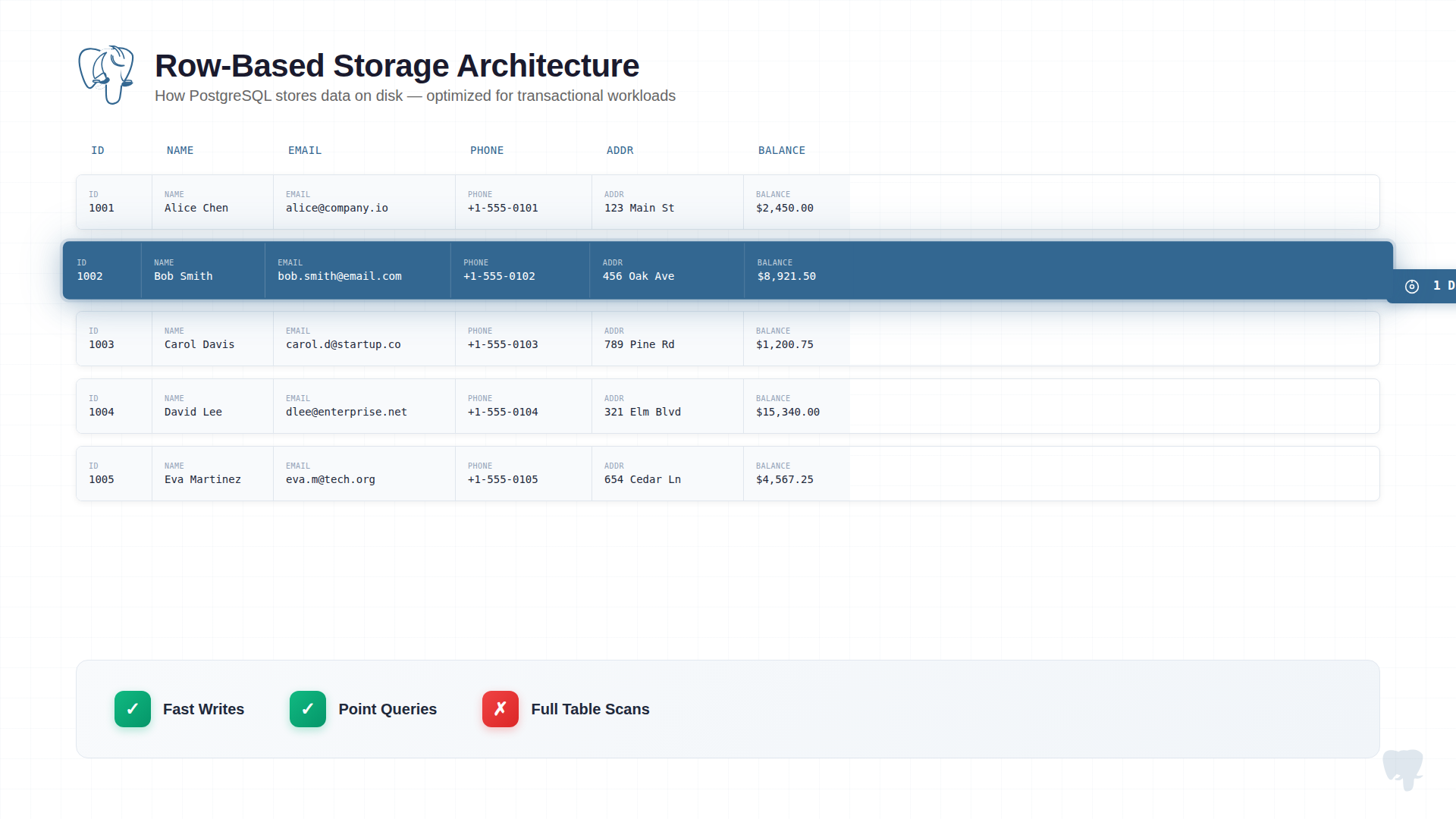 OLTP systems are the workhorses of operational data. They process the transactions that keep businesses running—orders, payments, inventory updates, user actions.
The architecture is optimized for one thing: getting small pieces of data in and out as fast as possible, with absolute consistency guarantees.
What makes OLTP systems tick:
-
Row-based storage. Data is stored record by record. When you fetch a customer, you get all their fields in one disk read. This is fast for operations that touch complete records.
-
ACID transactions. Every operation either completes fully or doesn't happen at all. A bank transfer that crashes halfway doesn't leave money in limbo. This consistency isn't free—it requires locking, logging, and coordination that limit throughput.
-
Normalized schemas. Data lives in one place. Customer address stored once, referenced everywhere. This prevents update anomalies but means queries often need joins.
-
Write-optimized. The system expects thousands of concurrent writes. Indexes are tuned for insert speed. Buffer pools cache hot rows.
What OLTP queries look like:
-- Insert a new order (touches one table, one row)
INSERT INTO orders (customer_id, product_id, quantity, total)
VALUES (1234, 5678, 2, 99.98);

-- Update inventory (touches one row)
UPDATE products SET stock = stock - 2 WHERE product_id = 5678;

-- Fetch account balance (returns one row)
SELECT balance FROM accounts WHERE account_id = 9012;
These queries are simple by design. They touch a handful of rows, execute in milliseconds, and maintain strict consistency. That's what OLTP is built for.
What Is OLAP?
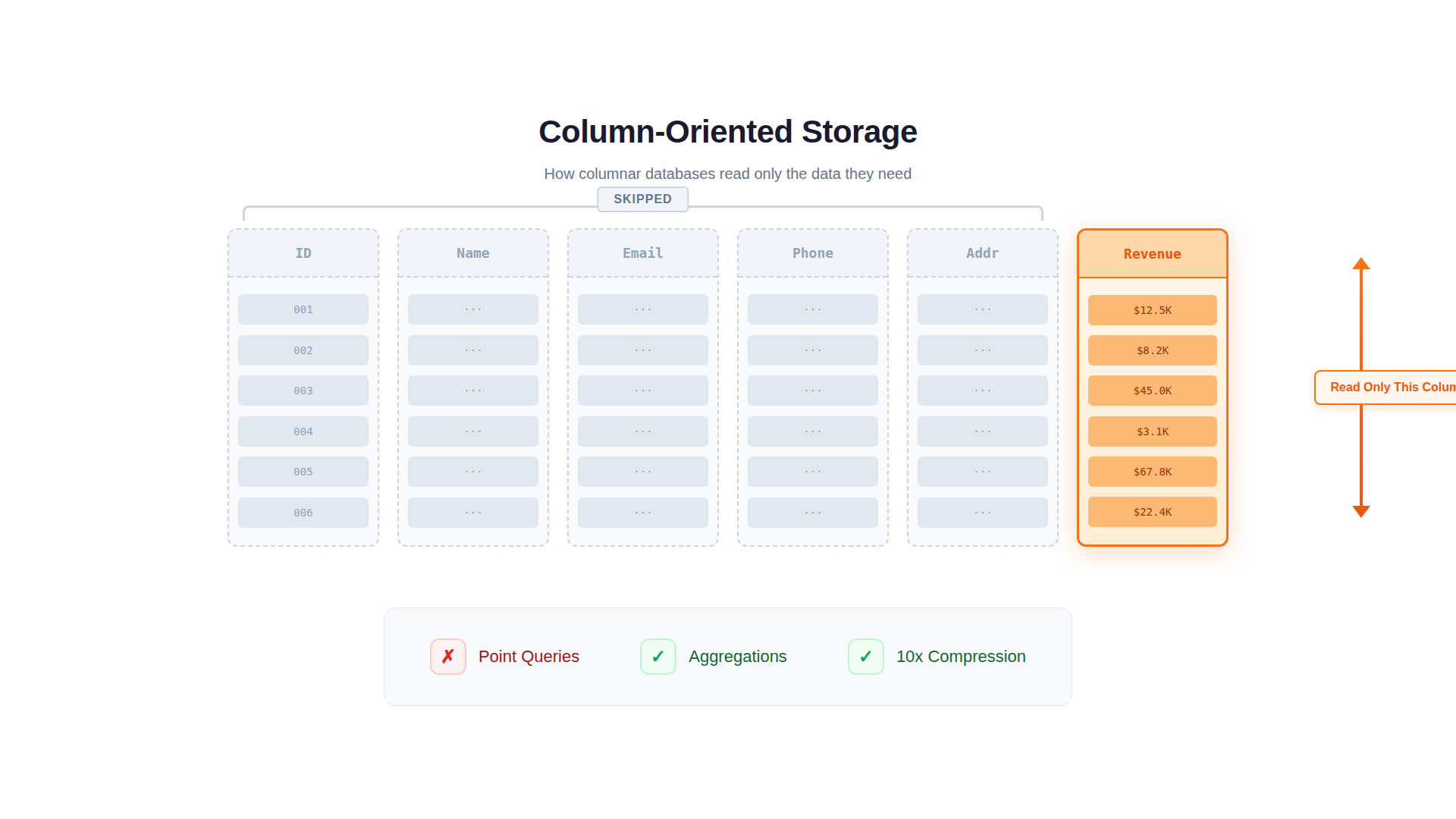 OLAP systems exist because OLTP databases break under analytical workloads. Not "slow down"—break.
Ask an OLTP database to sum revenue across 100 million orders grouped by region and month, and you'll learn why analytical databases exist. The query will scan every row, read every column (even ones you don't need), and likely timeout or crash your application's response times in the process.
OLAP architecture makes different trade-offs to solve this problem.
What makes OLAP systems fast:
-
Columnar storage. Data is stored column by column, not row by row. A query asking for SUM(revenue) reads only the revenue column—not customer names, addresses, or order notes. This alone can reduce I/O by 10-50x.
-
Vectorized execution. Instead of processing one row at a time, OLAP engines process batches of values through CPU pipelines. Modern CPUs can apply the same operation to thousands of values simultaneously. This is 10-100x faster for aggregations.
-
Compression. Columnar storage enables extreme compression. Similar values stored together compress well. A 100GB OLTP table might compress to 10GB in OLAP. Less data to read means faster queries.
-
MPP architecture. Queries distribute across multiple machines. A 60-second query on one node becomes 6 seconds on ten nodes working in parallel. OLTP databases can't do this effectively—their query planners weren't designed for distributed execution.
What OLAP queries look like:
-- Monthly revenue by region (scans millions of rows)
SELECT
    region,
    DATE_TRUNC('month', order_date) AS month,
    SUM(revenue) AS total_revenue,
    COUNT(DISTINCT customer_id) AS unique_customers
FROM orders
WHERE order_date >= '2024-01-01'
GROUP BY region, DATE_TRUNC('month', order_date)
ORDER BY month, total_revenue DESC;

-- Year-over-year comparison (aggregates across years)
SELECT
    product_category,
    SUM(CASE WHEN YEAR(order_date) = 2024 THEN revenue END) AS revenue_2024,
    SUM(CASE WHEN YEAR(order_date) = 2023 THEN revenue END) AS revenue_2023
FROM orders
GROUP BY product_category;
These queries scan massive datasets, perform complex aggregations, and return summarized results. They'd cripple an OLTP database but execute in seconds on OLAP systems.
Key Differences Between OLTP, OLAP, and Real-time OLAP
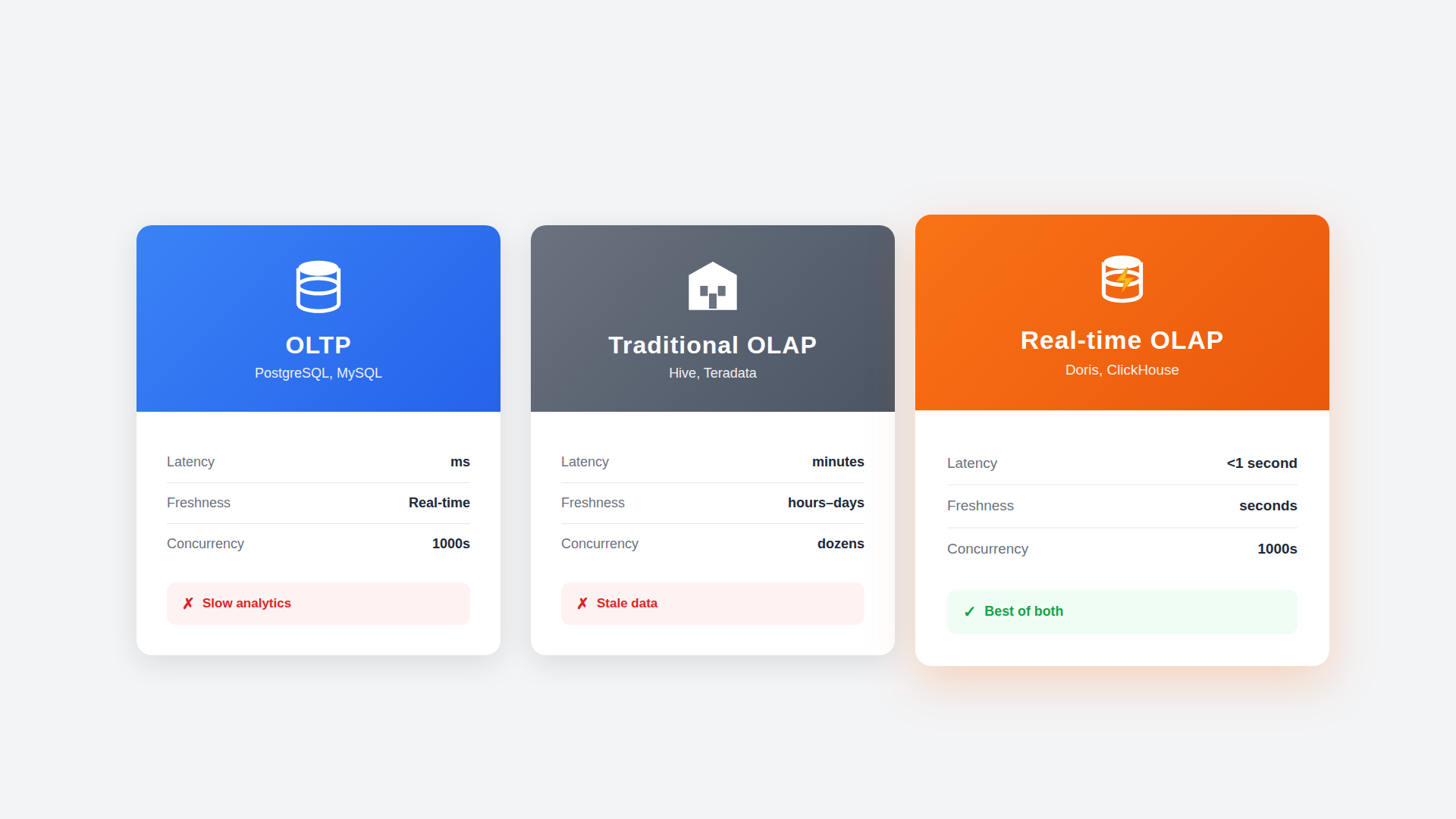
The differences aren't arbitrary—they're the result of optimizing for fundamentally different access patterns. Traditional OLAP systems were designed for batch analytics. Modern real-time OLAP systems like Apache Doris bridge the gap—combining analytical power with transactional flexibility.
Purpose:
- OLTP: Process transactions
- Traditional OLAP: Analyze historical data
- Real-time OLAP: Analyze fresh data in real-time
Processing type:
- OLTP: Many small transactions
- Traditional OLAP: Few complex batch queries
- Real-time OLAP: Many complex real-time queries
Query complexity:
- OLTP: Simple, 1-100 rows
- Traditional OLAP: Complex, millions of rows
- Real-time OLAP: Complex, millions of rows
Data volume:
- OLTP: GB to low TB
- Traditional OLAP: TB to PB
- Real-time OLAP: TB to PB
Latency:
- OLTP: Milliseconds
- Traditional OLAP: Seconds to minutes
- Real-time OLAP: Tens of milliseconds to seconds
Concurrency:
- OLTP: Thousands of transactions
- Traditional OLAP: Dozens of queries
- Real-time OLAP: Thousands of queries
Schema design:
- OLTP: Normalized (3NF)
- Traditional OLAP: Denormalized/star schema
- Real-time OLAP: Flexible (supports both)
Storage format:
- OLTP: Row-based
- Traditional OLAP: Columnar
- Real-time OLAP: Columnar
Data freshness:
- OLTP: Real-time
- Traditional OLAP: Hours to days (batch ETL)
- Real-time OLAP: Seconds (streaming ingestion)
Update support:
- OLTP: Full CRUD
- Traditional OLAP: Append-only or slow updates
- Real-time OLAP: Real-time upserts
Transaction support:
- OLTP: Full ACID
- Traditional OLAP: Limited or none
- Real-time OLAP: Full ACID
Intended users:
- OLTP: Applications
- Traditional OLAP: Analysts (offline)
- Real-time OLAP: Applications + Analysts
Typical use case:
- OLTP: Order processing
- Traditional OLAP: Monthly reports
- Real-time OLAP: Live dashboards, user-facing analytics
Example systems:
- OLTP: PostgreSQL, MySQL
- Traditional OLAP: Hive, traditional warehouses
- Real-time OLAP: Apache Doris, ClickHouse
The fundamental trade-offs:
OLTP optimizes for write speed and consistency at the cost of analytical performance. Every write must be durable. Every read must reflect committed state. This requires mechanisms (locking, MVCC, WAL) that slow down large scans.
Traditional OLAP optimizes for read speed on large datasets at the cost of write flexibility. Columnar storage is efficient for scans but terrible for updating individual rows. Data freshness is sacrificed for query performance—batch ETL means analytics are always hours or days behind.
Real-time OLAP bridges the gap. Systems like Apache Doris combine columnar storage with streaming ingestion, ACID transactions, and real-time upserts. You get analytical performance without sacrificing data freshness or update flexibility. This is why real-time OLAP has become the modern standard for user-facing analytics and live dashboards.
But here's what the technical comparison doesn't tell you: The question isn't "which is better?" It's "which do I need now, and when will that change?" A startup forcing itself into a complex OLTP+OLAP architecture wastes engineering time on infrastructure instead of product. A scale-up clinging to PostgreSQL for analytics past the breaking point wastes money and team morale fighting architecture. Match the complexity to your stage.
OLTP vs OLAP: When to Use Each
 The technical capabilities matter, but timing matters more. Most companies start with OLTP alone—and that's correct. The question is recognizing when your business stage demands adding OLAP.
When to Use OLTP
OLTP is the foundation of every data architecture. It handles the writes that power your application—every user action, every state change, every business transaction that requires immediate consistency.
Use OLTP when your application needs to process transactions reliably. For most companies, this is where you start—and where you stay until data volume and analytical demands force evolution.
The patterns that demand OLTP:
-
User-facing applications. Every click, form submission, and action that changes state. E-commerce checkouts. Banking transfers. Social media posts. These require immediate consistency and low latency.
-
Inventory and booking systems. Where double-booking or overselling is unacceptable. Hotel reservations. Flight seats. Event tickets. The ACID guarantees of OLTP prevent race conditions that cause business disasters.
-
Financial record-keeping. Where regulatory requirements demand transaction integrity. Audit trails. Account balances. Payment processing. Partial failures aren't acceptable.
-
Session and state management. User authentication. Shopping carts. Application configuration. Small, frequent reads and writes that power interactive experiences.
The reality: If users are directly interacting with the data through your application, you need OLTP. There's no shortcut here.
When to Use OLAP
OLAP exists because analytical workloads have fundamentally different access patterns—scanning millions of rows, aggregating across dimensions, and generating insights that OLTP systems were never designed to handle efficiently.
Use OLAP when you need to analyze data, not just store it—and when your OLTP database can no longer handle the analytical load without affecting application performance.
The business stage signal: If your dashboards are slow, your analysts are frustrated, and your DBAs spend more time optimizing queries than building features, you've likely outgrown single-database architecture.
The patterns that demand OLAP:
-
Business intelligence dashboards. Revenue trends. Customer cohorts. Conversion funnels. Any visualization that aggregates data across time periods or dimensions.
-
Ad-hoc analysis. When analysts need to explore data without predefined queries. Slicing by different dimensions. Drilling into anomalies. Data that OLTP systems would take hours to query.
-
Operational reporting. Daily/weekly/monthly reports that summarize business performance. These queries touch large percentages of your data—exactly what OLTP can't handle efficiently.
-
Machine learning pipelines. Feature engineering. Training data preparation. Model evaluation. ML workloads scan massive datasets repeatedly.
-
Log and event analytics. Application logs. User behavior events. IoT sensor data. High-volume append-only data that needs to be queried in aggregate.
The reality: If you're asking questions about your data rather than processing transactions, you need OLAP. Forcing these workloads onto OLTP is a common and expensive mistake.
When to Use Real-time OLAP
Real-time OLAP represents the next evolution—combining analytical power with the freshness and concurrency that modern applications demand. These systems ingest data continuously and make it queryable within seconds, supporting thousands of concurrent users with sub-second response times.
Use real-time OLAP when traditional OLAP is too slow, too stale, or can't handle the concurrency your use case demands.
The patterns that demand real-time OLAP:
-
User-facing analytics. When your customers—not just internal analysts—query their data. SaaS dashboards. E-commerce seller portals. Financial account summaries. These require sub-second response times at thousands of concurrent users. Traditional OLAP can't deliver this.
-
Operational dashboards with live data. When decisions depend on what's happening now, not what happened yesterday. Real-time inventory. Live sales tracking. Current system health. Batch ETL latency isn't acceptable.
-
Observability and monitoring. Logs, metrics, and traces that must be queryable within seconds of generation. Incident response can't wait for hourly batch loads. You need data freshness measured in seconds, not hours.
-
LLM and AI observability. Token usage, prompt analytics, model performance, cost attribution—all need real-time visibility as AI workloads scale and costs compound.
-
Time-series analytics at scale. IoT sensor data, financial ticks, operational metrics. High-cardinality, high-volume data that needs both real-time ingestion and fast analytical queries.
-
Search + analytics combined. When you need full-text search, vector similarity search, AND analytical aggregations in one system. Log exploration. Document search with faceting. RAG applications with analytics.
-
Feature stores for ML. Serving precomputed features for online inference with low-latency point lookups, while also supporting batch feature computation for training. Real-time OLAP handles both patterns—fast key-value access AND analytical aggregations—in one system.
-
Replacing multiple specialized systems. When you're running Elasticsearch for logs, ClickHouse for metrics, a vector DB for embeddings, and a warehouse for joins—and the operational complexity is killing you.
The reality: If your users expect fresh data and fast responses, if your concurrency is in thousands not dozens, if you're stitching together multiple systems to cover different analytical needs—real-time OLAP is the answer.
Common Use Cases and Examples
To make these differences concrete, it helps to see how OLTP, traditional OLAP, and real-time OLAP are applied in real-world systems and the types of workloads each is designed to support.
OLTP in Practice
OLTP systems power the operational backbone of business applications, handling the constant stream of transactions that keep businesses running in real-time.
E-commerce platform:
- Processing checkout: validating inventory, charging payment, creating order record
- Updating stock levels in real-time as purchases occur
- Managing customer accounts, addresses, preferences
- Handling returns and refunds with proper accounting
Banking system:
- Processing deposits, withdrawals, transfers between accounts
- Maintaining accurate balances that never go negative (without authorization)
- Recording every transaction for regulatory compliance
- Handling concurrent access to the same account safely
SaaS application:
- User authentication and session management
- Subscription creation, upgrades, cancellations
- Usage tracking for billing
- Multi-tenant data isolation
Traditional OLAP in Practice
Traditional OLAP systems excel at batch-oriented analytical workloads where data freshness of hours or days is acceptable and queries are run by internal analysts exploring historical patterns.
Marketing analytics:
- Campaign performance: impressions, clicks, conversions by channel, creative, audience
- Attribution modeling: which touchpoints drive purchases
- Customer segmentation: behavioral clustering across millions of users
- ROI analysis: spend vs. revenue by campaign over time
Product analytics:
- Feature adoption: what percentage of users engage with each feature
- Funnel analysis: where users drop off in key flows
- Retention cohorts: how engagement changes over user lifetime
- A/B test analysis: statistical comparison across experiment variants
Business intelligence:
- Executive dashboards: KPIs refreshed daily or weekly
- Financial reporting: quarterly revenue, margins, forecasts
- Regulatory compliance: audit reports, data lineage documentation
Traditional OLAP excels when data freshness of hours or days is acceptable and queries are run by internal analysts.
Real-time OLAP in Practice
Real-time OLAP handles workloads that traditional OLAP can't: user-facing queries, sub-second latency requirements, and data that must be fresh to be useful. These systems combine the analytical power of columnar storage with the operational characteristics of transactional systems.
User-facing analytics:
- Customer dashboards: letting users explore their own data in real-time
- SaaS analytics: usage metrics, billing summaries, performance reports per tenant
- E-commerce insights: sellers viewing sales trends, inventory analytics, buyer behavior
- Financial portals: account holders analyzing spending patterns, transaction history
- Gaming leaderboards: real-time rankings, player statistics across millions of users
Observability & monitoring:
- Application performance monitoring (APM): latency percentiles, error rates, throughput in real-time
- Infrastructure monitoring: CPU, memory, disk, network metrics across thousands of servers
- Distributed tracing: request flows across microservices with sub-second query response
- Security analytics: real-time threat detection, anomaly identification in access patterns
LLM observability:
- Token usage tracking: monitoring costs across models, users, and applications in real-time
- Prompt/response analytics: latency distribution, error rates, token consumption patterns
- Model performance: comparing response quality, hallucination rates across model versions
- Cost attribution: breaking down AI spend by team, feature, or customer
- Guardrail monitoring: tracking safety filter triggers, content policy violations
Time-series analytics:
- IoT sensor data: millions of devices reporting metrics, queried in real-time
- Financial tick data: market prices, trading volumes with millisecond granularity
- Operational metrics: system health indicators with real-time alerting
- Energy monitoring: power consumption, grid analytics, demand forecasting
Log analytics:
- Centralized logging: aggregating logs across services, queryable in seconds
- Error tracking: real-time exception aggregation and trending
- Audit trails: compliance queries across billions of events
- Debugging: interactive log exploration during incidents
Real-time OLAP shines when you need: thousands of concurrent users, sub-second response times, data freshness in seconds, and the ability to handle both analytical queries and high-concurrency point lookups.
Can OLTP and OLAP Work Together?
They don't just "can" work together—in most mature architectures, they must. The question isn't whether to combine them, but when and how.
The business stage perspective: Early-stage companies run everything on PostgreSQL. That's correct—operational simplicity beats architectural purity when you're still finding product-market fit. Growth-stage companies hit the wall: analytics slow down, ETL jobs extend, optimization becomes a full-time job. Scale-stage companies split the architecture: OLTP for transactions, OLAP for analytics, connected by real-time data sync.
The transition isn't failure—it's maturity. The approach to connecting these systems has evolved significantly over the past decade.
The Traditional Approach: Batch ETL
For years, batch ETL was the standard pattern for moving data from operational systems to analytical warehouses. Nightly jobs extract, transform, and load data—a process that worked when "real-time" meant yesterday's data by morning.
The classic pattern: OLTP handles operations during the day, ETL jobs run overnight to load data into a warehouse.
OLTP Database → Nightly ETL → Data Warehouse (OLAP)
This worked when "real-time" meant "yesterday's data by 9 AM." It doesn't work when your CEO expects dashboards to reflect what happened an hour ago.
The problems with batch ETL:
- Data is always stale (hours to a day behind)
- ETL pipelines are complex and fragile
- Failed jobs create data gaps
- Growing data volumes extend processing windows
The Modern Approach: Real-Time CDC
The modern approach replaces batch jobs with continuous streaming. Change Data Capture (CDC) streams changes from OLTP to OLAP as they happen—inserts, updates, and deletes flow continuously, not in batches.
OLTP Database → CDC Stream → OLAP Database
     ↓                            ↓
Application                   Dashboards
(real-time)                   (near real-time)
What this requires from your OLAP system:
- Efficient handling of streaming inserts
- Support for updates and deletes (not all OLAP systems handle this well)
- Low-latency data visibility after ingestion
Apache Doris: Built for OLTP-OLAP Integration
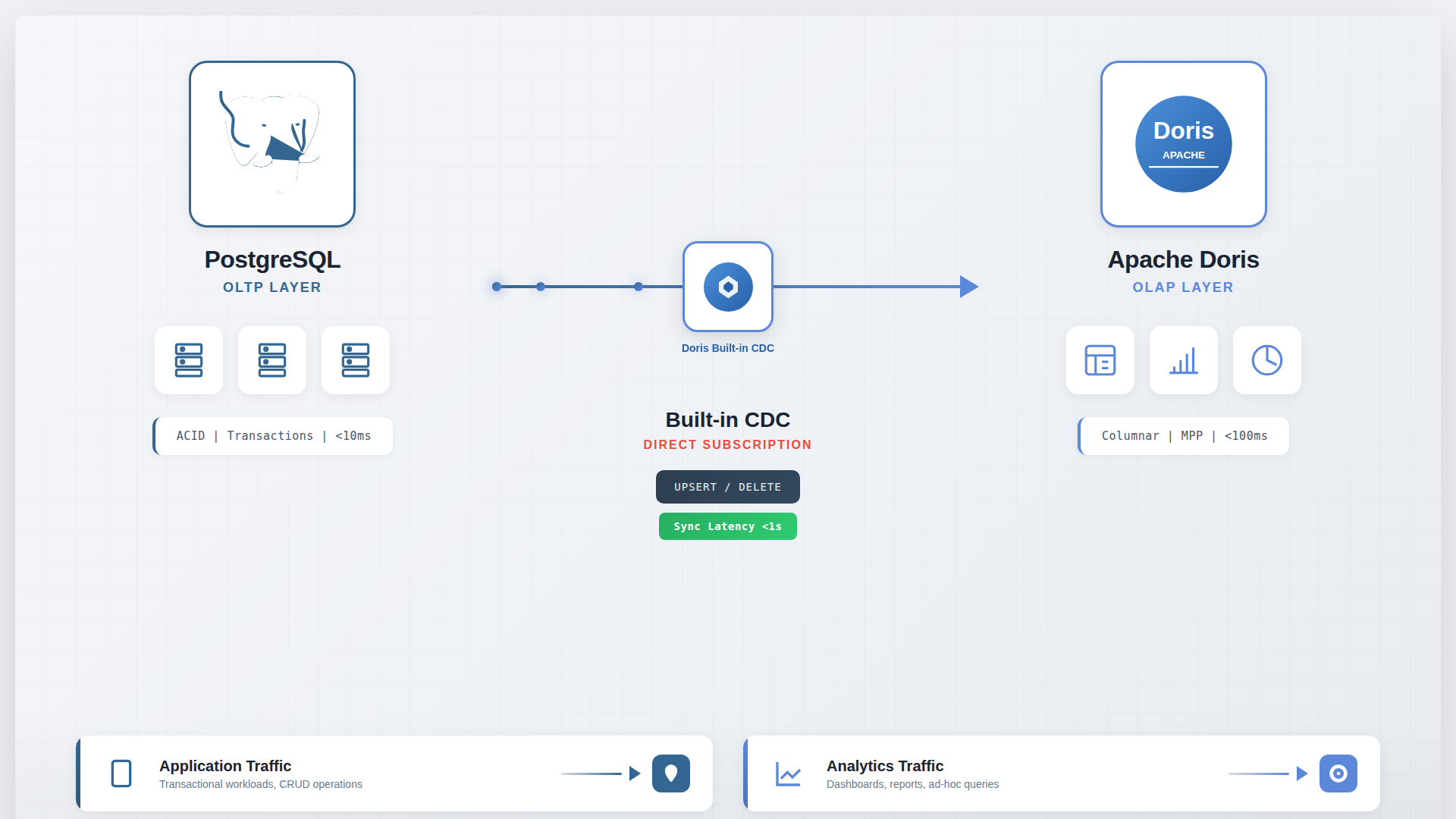 Most OLAP systems were designed for batch loading. They struggle with real-time updates. Apache Doris was designed differently—it handles the streaming, updating workloads that CDC creates.
Why Doris works well alongside OLTP:
-
ACID transactions. Unlike most OLAP systems, Doris provides full transactional guarantees. Your analytical data stays consistent even with concurrent updates.
-
Real-time upserts. The Unique Key model handles UPDATE and DELETE operations as they stream from CDC—not as expensive background merges, but as first-class operations. Your dashboards show current state, not stale snapshots.
-
Sub-second data visibility. Data ingested from Kafka or Flink becomes queryable immediately. The gap between "it happened" and "it's in the dashboard" shrinks to seconds.
-
Strong join performance. Doris's MPP engine distributes joins across nodes efficiently. Complex analytical queries that join multiple tables perform well—unlike systems optimized only for single-table aggregations.
-
Built-in search. Inverted indexes for full-text search. Vector indexes for similarity search. You don't need a separate Elasticsearch or vector database for log analytics or semantic search.
-
MySQL protocol compatibility. Your team already knows SQL. Doris speaks the same language. The learning curve is minimal.
The architecture:
┌─────────────────┐         CDC         ┌─────────────────┐
│   PostgreSQL    │ ─────────────────▶  │  Apache Doris   │
│     (OLTP)      │   Debezium/Flink    │     (OLAP)      │
└─────────────────┘                     └─────────────────┘
        │                                       │
        ▼                                       ▼
   Application                           Dashboards
  Transactions                           Analytics
  (milliseconds)                         (seconds)
PostgreSQL stays the source of truth. Doris receives synchronized data for analytics. Each system does what it was designed for.
VeloDB: Managed Apache Doris
For teams that want Doris capabilities without cluster operations, VeloDB provides a fully managed cloud service. Same engine, zero infrastructure management. Deploy in minutes, not weeks.
OLTP vs OLAP: Which Is Right for You?
This is the wrong question. It frames OLTP and OLAP as competing choices when they're actually stages in an evolution.
The right question: "What stage is my business, and what architecture matches it?"
Every growing company passes through predictable stages, and the optimal architecture changes at each transition. Recognizing where you are—and when to evolve—is more important than debating which database is "best."
Stage 1: Start with OLTP alone when:
- Data volume is under 1TB
- Analytical queries are simple aggregations
- Query response times under 10 seconds are acceptable
- You don't have dedicated data engineering capacity
- Operational simplicity outweighs analytical performance
PostgreSQL handles both OLTP and light OLAP at smaller scales. Don't add complexity until the symptoms demand it. Over-engineering at this stage means paying an operational tax for infrastructure you don't need.
Stage 2: Add OLAP when you see these symptoms
Stage 2 is where most companies get stuck. The single database starts showing strain, optimization becomes a recurring task, and the team debates whether to keep tuning or split the architecture. Watch for these signals:
- Dashboard queries exceeding 30 seconds
- Analytical queries slowing down transactional performance
- ETL jobs running past their maintenance windows
- Team spending significant time on query optimization
- Storage costs growing faster than data volume (MVCC bloat)
- Users complaining about stale or slow reports
These symptoms indicate you've outgrown single-database architecture. Continuing to optimize PostgreSQL at this point is treating symptoms, not solving the architecture problem. Under-engineering at this stage means paying an infrastructure tax that compounds monthly.
Stage 3: Choose your OLAP system
Once you've decided to add OLAP, the next question is which system. The landscape has shifted dramatically in recent years, with specialized systems converging toward unified platforms.
The convergence trend: Time-series databases, observability platforms, user-facing analytics, and search systems are converging toward real-time OLAP. What once required four or five specialized systems—ClickHouse for logs, Druid for streaming, Elasticsearch for search, a warehouse for joins, a vector DB for embeddings—can increasingly be handled by a single real-time OLAP system.
This convergence simplifies the technical stack dramatically. Instead of maintaining multiple systems with different query languages, operational patterns, and data synchronization challenges, teams can consolidate on one platform.
The decision framework:
-
What's your data volume? Under 1TB, optimize OLTP. Over 10TB, dedicated OLAP becomes essential.
-
What's your freshness requirement? Daily batches vs. real-time analytics require different architectures.
-
What's your update pattern? Frequent updates narrow your options to systems like Doris that handle upserts efficiently.
-
What's your operational capacity? Managed services trade cost for simplicity. Self-hosted trades effort for control.
Conclusion
OLTP and OLAP aren't competing technologies—they're complementary architectures that serve different business stages. The industry's mistake is treating this as a static technical choice. The reframe: it's a dynamic business maturity decision.
The real risk isn't choosing the wrong database—it's mismatching architecture to business stage. Over-engineer too early, and you pay an operational tax. Under-engineer too late, and you pay an infrastructure tax.
Three truths:
- One database IS right—for startups. Operational simplicity beats architectural purity.
- Optimization buys time—it doesn't solve architecture. Diminishing returns signal a stage transition.
- The split is maturity—not failure. It means your business has grown.
Stop asking "OLTP or OLAP?" Ask: "What stage is my business?" Then match your architecture to your reality.