An inverted index maps terms to document locations, enabling sub-second full-text search across millions of records. Instead of scanning documents one by one, databases use inverted indexes to instantly locate which documents contain specific keywords.
In practice, inverted indexes perform best when queries are keyword-driven and data is append-heavy—such as log analytics, document search, or RAG retrieval where users look for specific terms, error codes, or phrases. However, they are less effective for leading wildcard queries (e.g., LIKE '%abc%'), frequent in-place updates, or scenarios where semantic similarity outweighs exact keyword matching. For aggregation-only workloads, columnar indexes remain more efficient. The best results often come from combining inverted indexes with vector search—using keyword precision alongside semantic understanding.
This guide explains how inverted indexes work in analytical databases, covers their construction process, and shows how VeloDB applies them for AI search and observability workloads.
What Is an Inverted Index
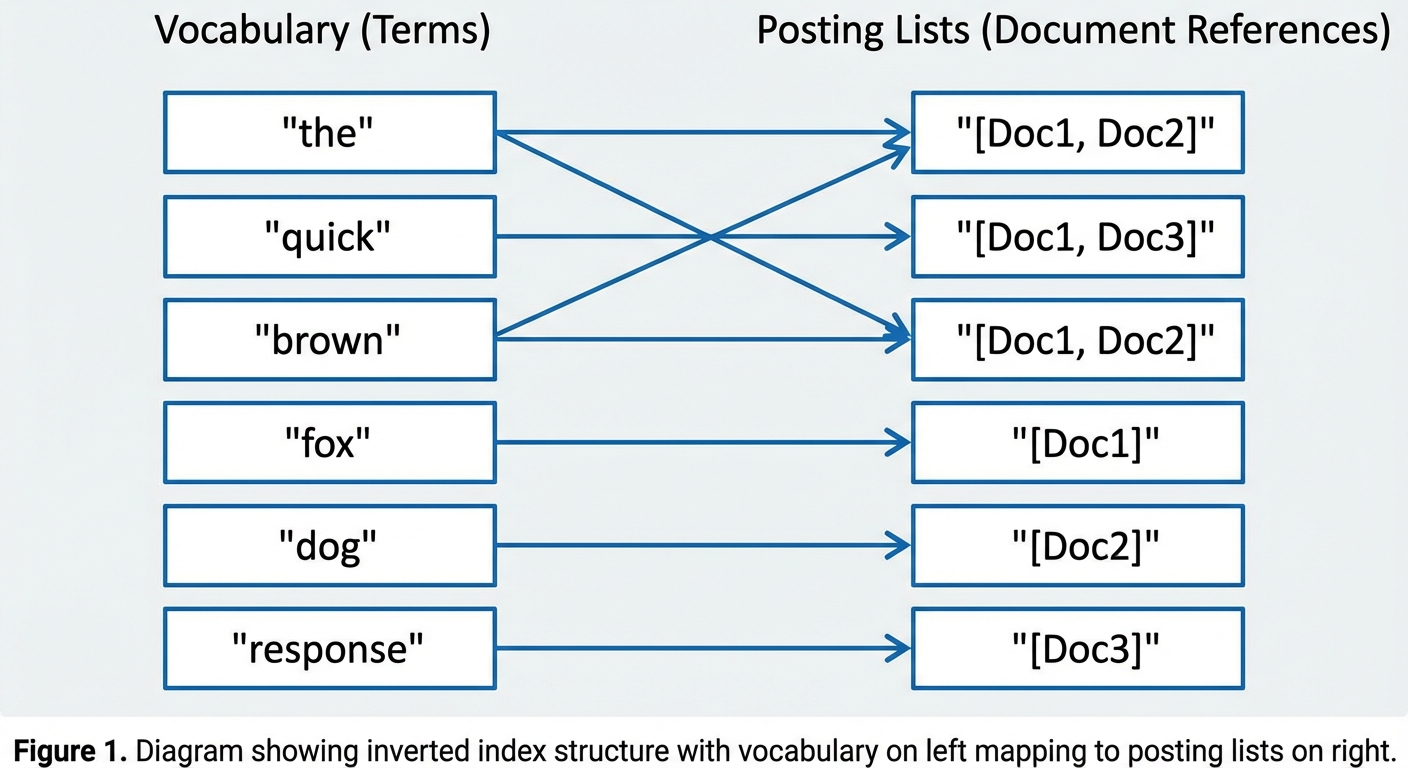 An inverted index reverses the traditional document-to-content mapping. In a forward index, each document points to its terms. In an inverted index, each term points to the documents containing it.
Example:
Three documents:
- Doc1: "The quick brown fox"
- Doc2: "The brown dog"
- Doc3: "A quick response"
The inverted index:
| Term | Posting List |
|---|---|
| "the" | [Doc1, Doc2] |
| "quick" | [Doc1, Doc3] |
| "brown" | [Doc1, Doc2] |
| "fox" | [Doc1] |
| "dog" | [Doc2] |
| "response" | [Doc3] |
To answer "which documents contain 'quick'?", the database performs a dictionary lookup instead of scanning every document. This becomes critical when building AI search applications or querying millions of log entries.
Why Inverted Index Exists
To understand why inverted indexes matter, we ran a test on a real dataset: 135 million Amazon customer reviews (37GB of Snappy-compressed Parquet files). Each review contains fields like customer_id, product_id, star_rating, and a lengthy review_body text field.
We tried a simple query: find the top 5 products whose reviews mention "is super awesome", sorted by review count. Here's what happened.
Without any index: 7.6 seconds
The database scanned all 135 million rows, checking each review_body field for the phrase. For a quick exploratory query, 7.6 seconds might be tolerable. But imagine running this in a production log analytics system where engineers need to search error messages during an incident—or in a RAG pipeline where the LLM is waiting for context. That latency kills the user experience.
SELECT product_id, any(product_title), AVG(star_rating) AS rating, COUNT() AS count
FROM amazon_reviews
WHERE review_body LIKE '%is super awesome%'
GROUP BY product_id
ORDER BY count DESC
LIMIT 5;
-- 7.60 sec
With inverted index: 0.19 seconds
After adding an inverted index on the review_body column with English tokenization, the same query dropped to 190 milliseconds—a 40x speedup.
ALTER TABLE amazon_reviews ADD INDEX review_body_idx(`review_body`)
    USING INVERTED PROPERTIES("parser" = "english", "support_phrase" = "true");

SELECT product_id, any(product_title), AVG(star_rating) AS rating, COUNT() AS count
FROM amazon_reviews
WHERE review_body MATCH_PHRASE 'is super awesome'
GROUP BY product_id
ORDER BY count DESC
LIMIT 5;
-- 0.19 sec
The difference is stark: without an index, users wait; with an index, they get instant results.
Non-primary key column queries tell a similar story. We tested a point lookup: find the review from Customer 13916588 about Product B002DMK1R0. Without an index, the query took 1.81 seconds scanning 16.6 million rows. After adding inverted indexes on customer_id and product_id, the same query finished in 0.06 seconds—a 30x improvement.
Looking at the query profile, we found that the inverted index filtered out 16,907,403 rows in just 11.58 milliseconds and read only 1 row (the target). Without the index, the system had to load all 16.6 million rows first, then filter—spending 3.14 seconds just on data loading.
These aren't synthetic benchmarks. They reflect what happens in production when teams search logs, debug incidents, or build AI-powered search features. The inverted index exists because the alternative—full scans on large text datasets—simply doesn't scale.
How Inverted Index Works
The 40x speedup we observed doesn't come from magic—it comes from a carefully designed data structure and query execution strategy. An inverted index transforms the search problem from "scan everything and check each row" to "look up the term and jump directly to matching rows."
To understand how this works, we need to examine three aspects: the underlying data structure that makes fast lookups possible, the search process that uses this structure to answer queries, and the build process that creates and maintains the index as data flows in.
Data Structure
 At its core, an inverted index consists of two components that work together: a vocabulary (or dictionary) that stores all unique terms, and posting lists that map each term to its locations in the data.
Vocabulary (Dictionary)
The vocabulary stores every unique term extracted from the document collection. Each entry includes:
At its core, an inverted index consists of two components that work together: a vocabulary (or dictionary) that stores all unique terms, and posting lists that map each term to its locations in the data.
Vocabulary (Dictionary)
The vocabulary stores every unique term extracted from the document collection. Each entry includes:
- Normalized term string
- Document frequency (DF): how many documents contain this term
- Pointer to the posting list
Implementation options vary by use case: hash tables provide O(1) lookup for exact term matching, B-trees support range queries, and FST (Finite State Transducer) offers memory efficiency for large vocabularies.
Posting Lists
For each term in the vocabulary, a posting list stores:
- Document IDs: sorted list of documents (or row numbers) containing the term
- Term frequency (TF): occurrence count per document, used for relevance scoring
- Positions: word offsets within documents, required for phrase query support
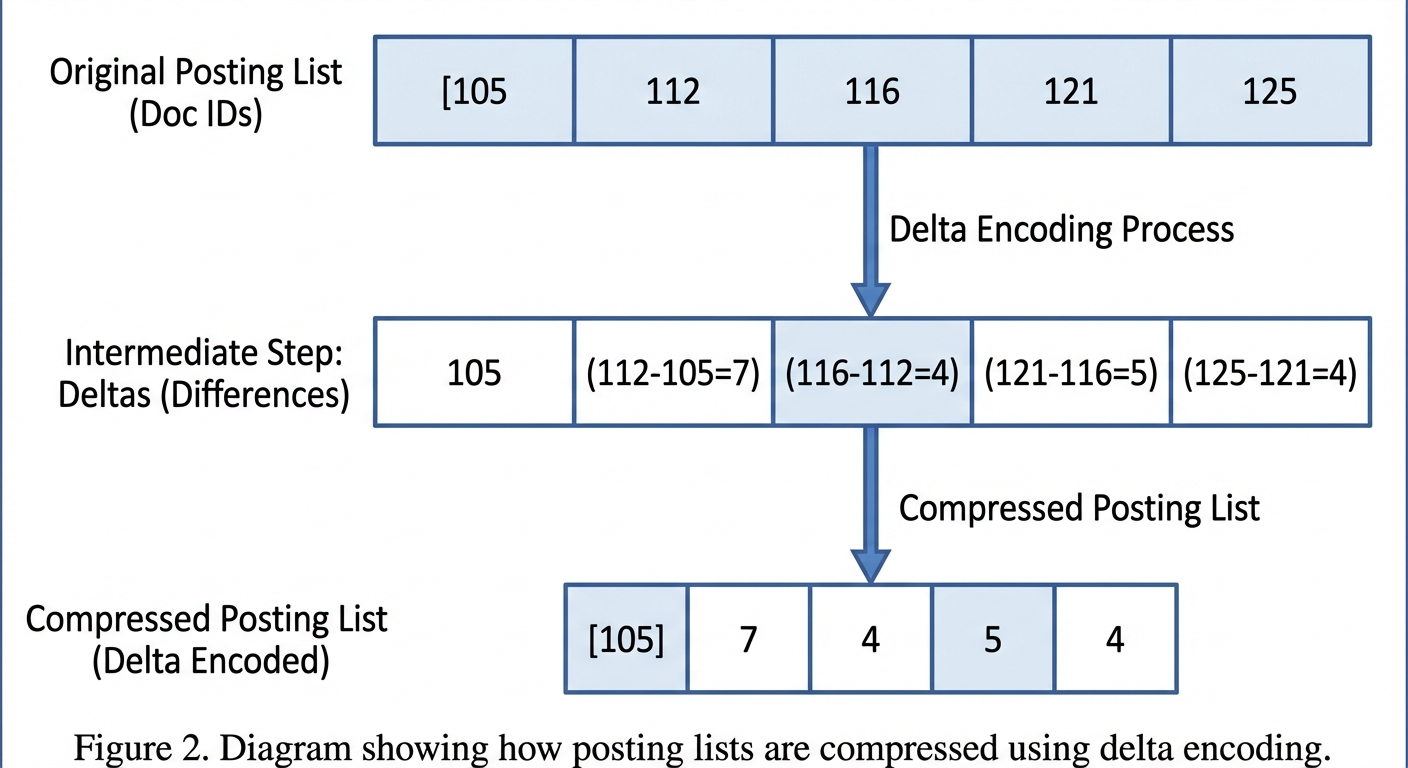
To keep storage manageable, posting lists use compression techniques like Frame-of-Reference encoding, delta encoding, and Roaring bitmaps. These methods typically reduce storage by 5–10x while maintaining fast decompression during queries.
With this structure in place, the database can quickly locate any term and retrieve its posting list. But how does a query actually get executed? Let's walk through the search process step by step.
Search Process
When a query arrives, the database doesn't scan rows—it looks up terms in the vocabulary and operates on posting lists. Here's how a phrase search like "is super awesome" gets processed:
Step 1: Parse the query The query string is tokenized using the same analyzer that was used during indexing. For English text, this typically involves lowercasing, removing stop words, and stemming.
SELECT TOKENIZE('I can honestly give this product 100%, super awesome buy!',
    '"parser" = "english", "support_phrase" = "true"');
-- ["i", "can", "honestly", "give", "this", "product", "100", "super", "awesome", "buy"]
Step 2: Look up each term
Each token is located in the vocabulary, and the corresponding posting lists are retrieved:
- "is" → Posting list A: [row 5, row 12, row 89, ...]
- "super" → Posting list B: [row 12, row 45, row 89, ...]
- "awesome" → Posting list C: [row 12, row 89, row 102, ...]
Step 3: Combine posting lists
For phrase queries (MATCH_PHRASE), the system intersects posting lists and checks that the words appear in the correct order using position data. Row 12 and row 89 contain all three terms in sequence, so they match. For boolean queries, simpler set operations apply: AND = intersection, OR = union.
Step 4: Return row numbers
The final result is a list of row numbers—[12, 89] in this example. The database then fetches only those rows from storage, skipping millions of irrelevant pages entirely.
This is the key insight: inverted index reduces computational complexity from O(n) full-scan to O(log n) dictionary lookup plus O(k) result retrieval, where k is the number of matching rows. When k is small (which is typical for specific search queries), the speedup is dramatic.
Understanding the search process explains why queries are fast, but how does the index get built in the first place? Let's look at the construction pipeline.
Build Process
In VeloDB, inverted index is logically defined at the column level but physically built alongside data files. The indexing happens through a pipeline that processes text into searchable structures.
Step 1: Data ingestion
When data is written to a data file, it is also synchronously written to the inverted index file. Row numbers are matched between the two files, ensuring the index can accurately point back to source data.
Step 2: Tokenization
Text passes through an analyzer pipeline:
- Tokenizer: splits text into individual terms (words, subwords, or n-grams depending on configuration)
- Filters: applies transformations like lowercasing, stemming, and stop-word removal
- Normalizers: handles Unicode normalization and accent folding
For English text with the english parser, the phrase "Running quickly" becomes tokens ["run", "quick"] after stemming.
Step 3: Sorting and indexing
Tokenized words are sorted alphabetically, and a skip list index is created over the vocabulary. This sorted structure enables binary search for term lookup, achieving O(log n) complexity.
Step 4: Compression
Posting lists are compressed using Frame-of-Reference encoding (storing deltas from a base value) and variable-byte encoding (using fewer bytes for smaller integers). This keeps the index compact without sacrificing query speed.
For existing tables, you can build indexes on historical data asynchronously:
ALTER TABLE amazon_reviews ADD INDEX review_body_idx(`review_body`)
    USING INVERTED PROPERTIES("parser" = "english");
BUILD INDEX review_body_idx ON amazon_reviews;
The BUILD INDEX command runs in the background, processing existing data without blocking queries. Once complete, new queries automatically use the index.
Key Concepts and Terminology
Before diving into performance characteristics, here's a quick reference for the key terms used throughout this guide:
| Term | Definition |
|---|---|
| Posting List | List of document IDs (row numbers) associated with a vocabulary term |
| Document Frequency (DF) | Number of documents containing a term |
| Term Frequency (TF) | Occurrences of a term in a specific document |
| BM25 | Ranking function that scores document relevance based on TF and DF |
| Analyzer | Pipeline combining tokenizer and filters for text processing |
| MATCH_PHRASE | Query operator that matches exact phrases with word order preserved |
| MATCH_ANY / MATCH_ALL | Query operators for OR / AND boolean matching |
Performance Characteristics and Trade-offs
The benchmarks we ran earlier provide concrete numbers, but it's useful to understand the broader performance profile of inverted indexes.
Benchmark Summary (135M Amazon Reviews)
| Query Type | Without Index | With Inverted Index | Speedup |
|---|---|---|---|
| Full-text search (LIKE) | 7.6s | 0.19s | 40x |
| Point lookup (customer_id + product_id) | 1.81s | 0.06s | 30x |
| Low-cardinality filter (product_category) | 1.80s | 1.54s | 1.15x |
Time Complexity
| Operation | Complexity |
|---|---|
| Term lookup | O(1) to O(log n) |
| Posting list retrieval | O(k), k = matching docs |
| AND intersection | O(min( |
| Phrase query | O(k × p), p = positions per doc |
Space Overhead
- Without positions: 15–40% of raw text
- With positions (for phrase queries): 40–80% of raw text
- Compressed repetitive text: as low as 5–10%
Strengths and Limitations
Every index involves trade-offs. Here's an honest assessment of where inverted indexes excel and where they fall short.
Strengths
- Fast at scale: Millisecond search across hundreds of millions of documents
- Flexible queries: Boolean (AND, OR, NOT), phrase, and fuzzy matching
- Low-cardinality friendly: Unlike some indexes, inverted index doesn't hurt low-cardinality columns—it still provides modest speedup (15% in our tests on a column with 43 distinct values)
- Hybrid-ready: Complements vector search for better RAG accuracy
- Incremental updates: New data indexed without full rebuild
Limitations
- Storage overhead: 15–80% on top of raw data depending on configuration
- Update cost: Deletions require segment merging
- Leading wildcards: LIKE '%abc%' cannot use inverted index efficiently—consider NGram BloomFilter for this pattern
- Not for aggregations: Columnar indexes are better for SUM, COUNT, AVG without text filtering
How VeloDB Applies Inverted Index in Practice
In production environments, teams often struggle with operating separate systems for search and analytics. A typical architecture might use Elasticsearch for log search and ClickHouse or VeloDB for metrics aggregation—but maintaining data synchronization between them, handling schema evolution across systems, and debugging cross-system latency quickly become operational bottlenecks. When an incident occurs, engineers find themselves jumping between tools, piecing together information that should live in one place.
VeloDB's inverted index implementation emerged from these constraints. Rather than treating search as a separate concern, the design integrates inverted indexes directly into the analytical storage engine. This means the same data file supports both fast keyword filtering and SQL aggregations—no ETL pipelines, no synchronization lag, no schema drift between systems.
The trade-off is intentional: VeloDB's inverted index isn't trying to replace a dedicated search engine for complex relevance ranking or faceted navigation. Instead, it focuses on the 80% use case—filtering logs by error message, looking up records by ID, combining text predicates with analytical queries—where the overhead of a separate system isn't justified.
Create Table with Inverted Index
CREATE TABLE user_logs (
    log_id BIGINT AUTO_INCREMENT,
    user_id BIGINT,
    message TEXT,
    error_code VARCHAR(50),
    event_time DATETIME,
    INDEX idx_message(message) USING INVERTED PROPERTIES("parser" = "english"),
    INDEX idx_error(error_code) USING INVERTED
)
DUPLICATE KEY(log_id, user_id)
DISTRIBUTED BY HASH(user_id) BUCKETS 32;
Full-Text Search Query
-- Find logs containing "connection timeout"
SELECT user_id, message, event_time
FROM user_logs
WHERE message MATCH_PHRASE 'connection timeout'
  AND event_time > '2024-01-01'
ORDER BY event_time DESC
LIMIT 100;
Combining Structured Filters with Text Search
-- Find reviews from a specific customer about a specific product
SELECT product_title, review_headline, review_body, star_rating
FROM amazon_reviews
WHERE product_id = 'B002DMK1R0'
  AND customer_id = 13916588;
-- With inverted indexes on both columns: 0.06s (vs 1.81s without)
Analyzer Selection
Different text content requires different tokenization strategies. Choose the parser based on your data:
| Parser | Use Case |
|---|---|
| english | English text with stemming |
| chinese | Chinese text (Jieba tokenization) |
| unicode | Multilingual content, URLs, user agents |
| standard | General-purpose tokenization |